
Rebecca Bond discusses a few of the options available in IBM DB2’s new CLPPLUS command line processor that you can use to connect to databases and to define, edit, and run statements, scripts, and commands.
Even when it doesn’t involve security, I enjoy playing games and solving puzzles, especially if they involve DB2. Today’s game? What can we learn about DB2’s new CLPPLUS command line processor in two hours or less?
This is a switch. I’m going to begin at the end of this contest and then walk you through the game play to show you the winning approach. If you’re one of those people who likes to read the last chapter first, this article is for you.
The Win at the Finish:
The CLPPLUS command processor, which is a newer, more intense DB2 CLP command line processor, behaves like I do when I have exceeded my 18 cup a day coffee quota. If this thing was running against me in a half marathon, I’d have to have an hour head start to beat it to the finish line. If you use the command line at all, there is much to this game that will assure a winning outcome.
The Game Begins:
To begin the game, I have installed DB2 9.7 Enterprise Server Edition and upgraded to Fixpack 1 to take advantage of some newer features. I don’t like to play solitaire without a full deck, and I don’t like to learn software that isn’t the most current.
IBM’s site says that the Command Line Processor Plus (CLPPlus) provides a command-line user interface that you can use to connect to databases and to define, edit, and run statements, scripts, and commands. Sounds good so far, but where is the winning exploit (because all games have some strategy element, right?). Wait, I don’t want to cheat. Don’t tell me if you know this one.
I’ll start by … well…“starting”. Since I’m working on a Windows platform today, I can just use the menu option:
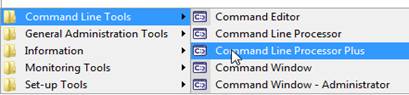
Or, I can open a Windows DOS command and type clpplus at the prompt. If you have any trouble starting your CLPPLUS sessions, refer to the troubleshooting tips here: IBM DB2 Database for Linux, UNIX, and Windows Information Center. Search on the topic “Troubleshooting CLPPlus Issues”.
Now I’ll connect to my sample database. There is more than one way to do this, but I’ll just take the simple approach by typing CONNECT and following the prompts for now:
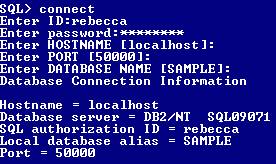
Notice something? This is a good game exploit. There was no catalog database statement and since I was using the sample database and the default port, I only had to enter my id and password and I was automatically connected to the database. When I’m ready to disconnect from the database, all it takes is a DISCONNECT keyword.
If I want to run an OS command, all I have to do is precede it with the keyword HOST. Maybe I want to see what files are in my directory so I would type:
SQL> HOST dir
To do the same thing on UNIX, I’d type
SQL> host ls
Now I need to know more about the options, so I’ll ask for help.
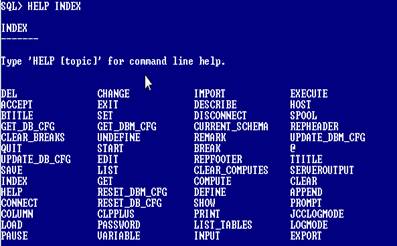
Notice that if I want, I can just ask for Help on a specific topic, or I can type HELP INDEX and get the full list. That’s a nice feature until I get more comfortable with the commands. I wish I had that option when I was first learning chess.
Being a DBA, I’m curious about what DB2 information I can gather from CLPPLUS. The list is:
- SQL> GET DATABASE CONFIGURATION
- SQL> GET DATABASE MANAGER CONFIGURATION
- SQL> UPDATE DATABASE CONFIGURATION
- SQL> UPDATE DATABASE MANAGER CONFIGURATION
- SQL> RESET DATABASE CONFIGURATION
- SQL> RESET DATABASE MANAGER CONFIGURATION
When I use these commands, I discover that the ones that have “DEFERRED VALUES” such as DBM CFG and DB CFG display those as well. The shortcuts that I am so used to (DBM CFG for Database Manager Configuration) also work and the commands aren’t case sensitive so “get dbm cfg” works too.
From what I read in the documentation, there are some great logging and tracing features. I wanted to log my client session so I tried:
SQL> Set logmode clpplus
When I finished logging and wanted to disable it, I entered:
SQL> Set logmode none
The clpplus.log file was in my current directory and contained some very detailed information about my activity when the logmode was set. I can see this being an extremely useful feature for debugging purposes. However, what I really wanted was to log my CLPPLUS session from an input/output viewpoint. That feature is available as SPOOL. To turn on logging of my CLPPLUS session, I’ll type:
SQL> SPOOL mycmds
With this on and a named file parameter provided, CLPPLUS will log my current session commands to a file in my current directory called “mycmds”. That is exactly what I wanted.
Thinking about setting the logmode made me think about “SET”, so I did a HELP SET and pulled back a long list of options for SET, along with relevant descriptions. The SET CLPPLUS command works only at the session level, so once I “SET”, the value only lasts temporarily while I’m in that particular session.
One of the advertised benefits of using CLPPLUS makes it sound like a good strategic maneuver that DBAs can use to easily format screen output. I’m not a fan of having to use CHAR or SUBSTR to parse my output. To try the formatting features out, I’m going to create a table for testing purposes. To enhance the game play, I’m going to put a typo in my syntax so that I can test out what happens when I use the CLPPLUS EDIT option.
SQL> create table locksmith.text (col1 char(80), col2 char(80))"
  2  /
ERROR near line 1: (this didn’t parse correctly, that double quote has to go)
SQL0010N  The string constant beginning with """ does not have an ending string delimiter.
[The slash symbol (/) provides the completion indicator to the editor]
But this is easy enough to fix.
SQL> edit
At this point, my default editor, NOTEPAD, pops up with the syntax so that I can edit it and remove the offending double quote and save the file.

I’ve fixed my typo and saved my file. Now, all I have to is type RUN to create the table.
SQL > run
I’ll load some data for testing purposes, but before I do, I’ll set AUTOCOMMIT on for this session (the default is off, except for DDL statements which are automatically committed.).
SQL> set autocommit on
(While you were in the kitchen getting popcorn, I went ahead and took my turn. I inserted two rows into our locksmith.text table.)
Now, I want to play with the formatting options.
First, I’ll look at WRAP. Setting WRAP off seems to allow truncation of a line in my output:

With WRAP on, I get
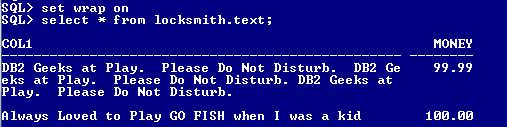
Better, but I don’t like the headings, so I’m going to add some more formatting.
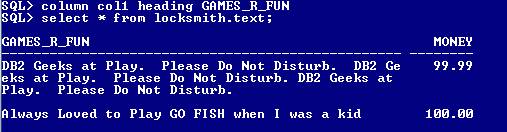
This looks good, but there are so many more options available. Unfortunately, all games at some point have to end and we must now declare the match a win, lose or draw and move on. I call a tie.
But before we put all the game pieces away to play another day, let’s look at the rule book to discover some game play options we didn’t get to cover. You can look forward to exploring these the next time you want to play the new game I’ve now dubbed “CLPPLUS SMART DBA CHALLENGE”
Some other notable CLPPLUS Game Goodies are:
- A buffer can be used to store scripts, script fragments, SQL statements, SQL PL statements, or PL/SQL statements for editing and then execution. Text in the buffer can be listed, printed, edited, or run as a batch script.
- A comprehensive set of processor commands can be used to define variables and strings that can be stored in the buffer.
- Ability to store buffers or buffer output to a file.
- Support for executing system-defined routines.
Since the game is almost finished and it’s time to go home, I will be kind to my database and issue the DISCONNECT command which closes my database connection, but keeps me resident in the CLPPLUS session. When I’m through with all my CLPPLUS games and fun and before I head out to solve some urgent security puzzler, I’ll issue the QUIT command to close out my CLPPLUS session until the next game.
Oh, and before our next match, for more information on how to assure a winning game, you might want to check out the CLPPLUS video at YouTube .
[And, a big Shout Out to my friend, Serge Rielau, IBM SQL Architect extraordinaire, for taking time from his very busy schedule to review this article. Read his excellent article on running Oracle applications on DB2].