


This example shows how you can use a single DTS package to import multiple files from a given directory.
For this, it is assumed that all files have the same format, and that all files are imported into the same table.
Feel free to expand on this to fit your own solution.
(This example uses the Microsoft FileSystemObject)
The package has four tasks and two connections –

1: Create Table [master].[dbo].[ImportTest] Task (Execute SQL Task)
This task will drop an existing version of Import Test and recreate it.
2: Get First File (Active Script Task)
This reads the first file name from the directory and updates the DataSource
property of the text file connection (Connection 1).
'**********************************************************************
'  Visual Basic ActiveX Script
'************************************************************************
Option Explicit

Function Main()

    ' Declare FSO Related Variables
    Dim sFolder
    Dim fso
    Dim fsoFolder
    Dim fsoFile
    Dim sFileName


    ' Import Folder
    sFolder = DTSGlobalVariables("ImportFolder")

    Set fso = CreateObject("Scripting.FileSystemObject")
    Set fsoFolder = fso.GetFolder(sFolder)
    Set fso = CreateObject("Scripting.FileSystemObject")
    Set fsoFolder = fso.GetFolder(sFolder)

    For Each fsoFile in fsoFolder.Files
        ' Get first filenme
        sFileName = sFolder & fsoFile.Name
        Exit For
    Next

    'Declare Variables
    Dim oPKG
    Dim oConnection

    ' Get Package Object
    Set oPKG = DTSGlobalVariables.Parent
    ' Get Source Connection Object
    Set oConnection = oPKG.Connections("Connection 1")

    ' Set new Filename
    oConnection.DataSource = sFileName

    Main = DTSTaskExecResult_Success
End Function
|
3: Connection 1 (Text File Source Connection)
Obviously the source connection.
4: Copy Data from ImportTest to [master].[dbo].[ImportTest] Task (Data Transformation Task)
This uses simple Copy Column transformations to import the data. One important point property is set under the tasks Workflow Properties, Options tab:
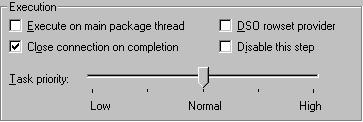
The “Close connection on completion” option must be checked. If not then each loop of
the package imports the same file, as the connection will not automatically refresh
itself after setting the new filename.
5: Connection 2 (SQL Server OLE DB Connection)
A simple connection to the local server, using trusted authentication
6: Get Next File Loop (Active Script Task)
This is the task where we get the name of the next file to import,
and change the step ExecutionStatus property of the import Transformation
Task back to waiting. This causes a loop in the package workflow, and imports the next file.
To reference the correct step in the steps collection you can either supply the ordinal position or the step name as below. To easily find the name of your step, right click the task and look at the Options sheet for Workflow Properties. The name is shown there.
'**********************************************************************
'  Visual Basic ActiveX Script
'************************************************************************
Option Explicit

Function Main()
    ' Declare FSO Related Variables
    Dim sFolder
    Dim fso
    Dim fsoFolder
    Dim fsoFilesCollection
    Dim fsoFile
    Dim sFileName
    'Declare PKG Variables
    Dim oPKG
    Dim oConnection

    ' Get Package Object
    Set oPKG = DTSGlobalVariables.Parent
    ' Get Source Connection Object
    Set oConnection = oPKG.Connections("Connection 1")

    ' Import Folder read from global variable
    sFolder = DTSGlobalVariables("ImportFolder")

    Set fso = CreateObject("Scripting.FileSystemObject")
    Set fsoFolder = fso.GetFolder(sFolder)

    Dim bFound ' Used to exclude files previously exported
    bFound = False

    For Each fsoFile in fsoFolder.Files
        sFileName = sFolder & fsoFile.Name
        If oConnection.DataSource = sFileName Then
            bFound = True
        ElseIf bFound = True Then ' New file found
            oConnection.DataSource = sFileName
            ' Set Pump Step to waiting
            oPKG.Steps("Copy Data from ImportTest to [master].[dbo].[ImportTest] Step") _
				.ExecutionStatus = DTSStepExecStat_Waiting
            Exit For
        End If
    Next

    Main = DTSTaskExecResult_Success
End Function
|
For some more information about changing filenames and other connection properties see How to dynamically change…Connections.
The sample package can be downloaded below. To use –
- Extract archive
- Load package
- Check the server name of Connection 2, currently set to local. If you change it reject the option to reset the transformations.
- Create directory “C:\DemoImport\” and place in it “ImportTest.txt”. Remember that DTS paths are local to the machine they are executed from, not the server.
- Make multiple copies of “ImportTest.txt”, all in “C:\DemoImport\”
- Execute [DTSDirDemo-Step] package
A table called [ImportTest] will be created in master DB.
There are ten records in “ImportTest.txt”, so the record count of [ImportTest] will be 10 X Number of “ImportTest.txt”
copies in “C:\DemoImport\”.
Files contained in DTSDirDemoStep.zip –
Download DTSDirDemoStep sample.