


Thank you to those people who pointed out some bugs in the first release and sorry to anyone who encountered problems.
This DTS custom task allow you to use package global variables in Execute SQL Tasks.
It works by reading the global variables and converting them into T-SQL. It then examines
all tasks in the package to find any Execute SQL Tasks. If found the global variable SQL
is added to the front of the existing SQL.
Example
The following Global Variables will be used –
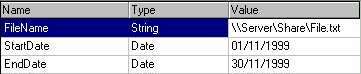
The first section of SQL is added by the custom task, the second is a simple query that utilises the new variables – |
/*GlobalVariableToSQL*/  DECLARE @FileName varchar(23)
/*GlobalVariableToSQL*/  SET @FileName = '\\Server\Share\File.txt'
/*GlobalVariableToSQL*/  DECLARE @StartDate datetime
/*GlobalVariableToSQL*/  SET @StartDate = '01/11/1999'
/*GlobalVariableToSQL*/  DECLARE @EndDate datetime
/*GlobalVariableToSQL*/  SET @EndDate = '30/11/1999'
|
/* This section is not altered in anyway by the task */
DELETE FROM tbRecords
WHERE RecordDate BETWEEN @StartDate AND @EndDate
|
Installation
- Download and extract the archive to a suitable location (SQL 6.X or SQL 7.X version).
- From within the DTS Designer select Register Custom Task from the Tasks menu
- Supply a suitable description such as GlobalVariableToSQL Task
- Supply the Task location (Find GVCustomTask.dll in the extraction directory)
- Supply the Icon location (Find GVCustomTask.ico in the extraction directory)
- Click OK and you are ready to go.
A more complete step by step guide is available here
Usage Notes
When designing the package, ensure that GVCustomTask is executed prior to any Execute SQL Tasks, using suitable workflow constraints.
The SQL variables will be declared with the same name as the global variable, and will not change.
Do not alter any lines prefixed with /*GlobalVariableToSQL*/ . Each time the package is run,
the SQL is examined for the presence of this string, and if found the line is removed.
The new global variable SQL is then added, preventing duplicate declarations in the SQL.
Only the following global variable types are supported at present –
String, Int, Integer, Integer (Small), Currency, Date, Boolean, Decimal.
All other types will be placed in the SQL but commented out with a warning.
MS SQL Server 7 Service Pack 1 is required for this Custom Task. Without SP1 you will encounter automation errors when executing packages from the DTS designer. (See SQL Links).
There are now two versions of the CustomTask (GVCustomTask6.zip: v1.1.0 and GVCustomTask7.zip: v1.0.2). The new version will use SET instead of SELECT when defining the variables in SQL to enable compatibility with SQL 6.X servers.
Please note that this program is provided without any warranty or assurances of any kind.
Use it at your own risk. Commercial distribution or distribution for profit in any form is strictly forbidden without prior permission from the author.
Any comments would be greatly appreciated.
Download GVCustomTask7 (~10K) or GVCustomTask6 (~10K).
Version 1.1.0 (28/12/1999) – Changed SQL parsing to use SET instead of SELECT for SQL 6.x compatibility. No other changes from v1.0.2.
Version 1.0.2 (06/11/1999) – Fixed SQL parsing which caused loss of first line. Fixed task properties which caused MMC to crash when task deleted.
Version 0.6.3 (31/10/1999) – First Public Release Version