


SQL Mail (MAPI) is not cluster
aware. However, Email/Pager messages are very important for Technology Administrators,
especially when a job fails or an alert is triggered. In a Non-Cluster environment,
it would be a straightforward process to set up SQLMail. To set mail up on an SQL
Server Cluster Server, we need a work-a-round.
Process:
You will need SMTPSEND.EXE. If you don’t have it, check with
your network admin, check the Windows
NT Resource Kit, or search the internet. Then, in any node of your clustered
server, copy this file to the Storage array usually E: or F: (depending on the
setup), by creating a folder \SMTP.
Get the SMTP relay IP address for sending SMTP email, from
your Network Administrator.
Create the Email Table for sending email to groups and
individuals. Open Query Analyser, and run the following command to create the
table and rows.
Table
use master
go
create table EmailGroups
(Groupname varchar(100),EmailID varchar(100))
insert into EmailGroups
(Groupname ,EmailId) values (“DBA
Group”,”mak_999@yahoo.com”)
insert into EmailGroups
(Groupname ,EmailId) values
(“mak_999@yahoo.com”,”mak_999@yahoo.com”)
insert into EmailGroups
(Groupname ,EmailId) values (“DBA
Group”,”you@yahoo.com”)
go
Remember to create one row for groups and another row with
same email Id for individual emails. On occasion, you may need to send email to
entire groups and other times to individual users.
Now, create the following procedure by changing the path (eg:
E:\SMTP) and by changing the SMTP relay IP address (eg: 171.21.81.51)
Procedure
use master
go
CREATE PROCEDURE USP_SENDMAIL @SENDER VARCHAR(100),
@RECEIVER VARCHAR(100),@SUBJECT VARCHAR(300),
@filename varchar(100) = ”
AS
–CREATED BY :MAK
–CREATED DATE :JUNE 25,2002
–OBJECTIVE :CLUSTER SERVER SQL MAIL SETUP ISSUE.
–ALTERNATIVE NOTIFICATION PROCEDURE
–NOTES :CREATED A FOLDER E:\SMTP AND COPIED SMTPSEND.EXE UNDER.
SET QUOTED_IDENTIFIER OFF
DECLARE @QUERY VARCHAR(1000)
DECLARE @EMAILID VARCHAR(100)
DECLARE EMAIL CURSOR FORWARD_ONLY FOR SELECT EMAILID
FROM EMAILGROUPS WHERE replace(GROUPNAME,” “,””) = replace(@RECEIVER,” “,””)
OPEN EMAIL
–print @receiver
–SELECT EMAILID FROM EMAILGROUPS WHERE
–replace(GROUPNAME,” “,””) = replace(@RECEIVER,” “,””)
FETCH NEXT FROM EMAIL INTO @EMAILID
WHILE (@@FETCH_STATUS =0)
BEGIN
–print @emailid
if @filename = ”
begin
SET @QUERY = ‘EXEC MASTER..XP_CMDSHELL “E:\SMTP\SMTPSEND.EXE -t’
+LTRIM(RTRIM(@EMAILID))+’ -f’+@sender+’ -h171.21.81.51’+’ -s’
+@SUBJECT++’ AT ‘+CONVERT(VARCHAR,GETDATE())+”+'”‘
PRINT @QUERY
EXEC (@QUERY)
end
else
begin
SET @QUERY = ‘EXEC MASTER..XP_CMDSHELL “E:\SMTP\SMTPSEND.EXE -t’
+LTRIM(RTRIM(@EMAILID))+’ -f’+@sender+’ -a’ + @filename + ‘ -h171.21.81.51′
+’ -s’+@SUBJECT++’ AT ‘+CONVERT(VARCHAR,GETDATE())+”+'”‘
PRINT @QUERY
EXEC (@QUERY)
end
FETCH NEXT FROM EMAIL INTO @EMAILID
END
CLOSE EMAIL
DEALLOCATE EMAIL
TEST Email
Execute the following
commands to test the SMTP email that we have set up.
New statement
Backup database master to
disk = ‘g:\mssql2000\backup\master.bak’ with
init
If @@error = 0
Begin
exec master.dbo.USP_SENDMAIL @@servername,
“DBA Group”,”Backup: Master
database Succesful”,”c:\mytext,txt”
End
Else
Begin
exec master.dbo.USP_SENDMAIL @@servername,
“DBA Group”,”Backup: Master
database Failed”,”c:\mytext,txt”
End
Update jobs with
this email procedure
If you like all the SQL
Jobs to be updated with SMTP email notification , the following are examples on
‘How to update the Jobs and Alerts.’
Old statement
Backup database master to disk = ‘g:\mssql2000\backup\master.bak’ with init
New statement
Backup database master to disk = ‘g:\mssql2000\backup\master.bak’ with init
If @@error = 0
Begin
exec master.dbo.USP_SENDMAIL @@servername,”DBA Group”,
	“Backup: Master database Succesful”,”c:\mytext,txt”
End
Else
Begin
exec master.dbo.USP_SENDMAIL @@servername,”DBA Group”,
	“Backup: Master database Failed”,”c:\mytext,txt”
End
Note: @@Servername
returns the current servername. You can replace it with some logical text.
Alerts
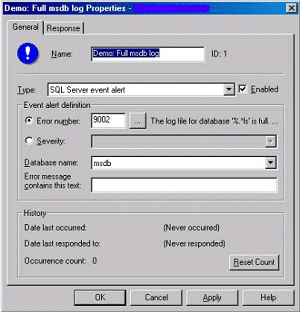
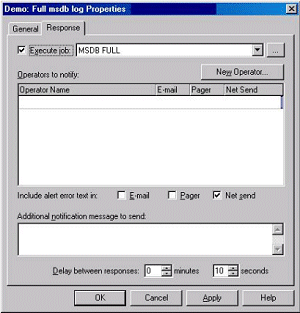
For alerts, create a
job for every alert type. In the alert response tab [Double click on a particular
alert], check “Execute job,” and select the corresponding job that you have
created.
Eg: This will create a
job for the Alert MSDB FULL.
BEGIN TRANSACTION
  DECLARE @JobID BINARY(16)
  DECLARE @ReturnCode INT
  SELECT @ReturnCode = 0
IF (SELECT COUNT(*) FROM msdb.dbo.syscategories
WHERE name = N’[Uncategorized (Local)]’) < 1
  EXECUTE msdb.dbo.sp_add_category @name = N’[Uncategorized (Local)]’
  — Delete the job with the same name (if it exists)
  SELECT @JobID = job_id
  FROM   msdb.dbo.sysjobs
  WHERE (name = N’MSDB FULL’)
  IF (@JobID IS NOT NULL)
  BEGIN
  — Check if the job is a multi-server job
  IF (EXISTS (SELECT  *
              FROM    msdb.dbo.sysjobservers
              WHERE   (job_id = @JobID) AND (server_id <> 0)))
  BEGIN
    — There is, so abort the script
    RAISERROR (N’Unable to import job ”MSDB FULL” since there is
already a multi-server job with this name.’, 16, 1)
    GOTO QuitWithRollback
  END
  ELSE
    — Delete the [local] job
    EXECUTE msdb.dbo.sp_delete_job @job_name = N’MSDB FULL’
    SELECT @JobID = NULL
  END
BEGIN
  — Add the job
  EXECUTE @ReturnCode = msdb.dbo.sp_add_job @job_id = @JobID OUTPUT ,
@job_name = N’MSDB FULL’, @owner_login_name = N’amuthusamy’,
@description = N’No description available.’,
@category_name = N’[Uncategorized (Local)]’,
@enabled = 1, @notify_level_email = 0,
@notify_level_page = 0, @notify_level_netsend = 0,
@notify_level_eventlog = 2, @delete_level= 0
  IF (@@ERROR <> 0 OR @ReturnCode <> 0) GOTO QuitWithRollback
  — Add the job steps
  EXECUTE @ReturnCode = msdb.dbo.sp_add_jobstep @job_id = @JobID,
 @step_id = 1, @step_name = N’MSDB FULL’,
 @command = N’exec master.dbo.USP_SENDMAIL @@servername,
“DBA Group”,”Alert: MSDB FULL”,”c:\mytext,txt”‘,
@database_name = N’master’, @server = N”, @database_user_name = N”,
@subsystem = N’TSQL’, @cmdexec_success_code = 0, @flags = 0,
@retry_attempts = 0, @retry_interval = 1, @output_file_name = N”,
@on_success_step_id = 0, @on_success_action = 1, @on_fail_step_id = 0,
@on_fail_action = 2
  IF (@@ERROR <> 0 OR @ReturnCode <> 0) GOTO QuitWithRollback
  EXECUTE @ReturnCode = msdb.dbo.sp_update_job @job_id = @JobID,
@start_step_id = 1
  IF (@@ERROR <> 0 OR @ReturnCode <> 0) GOTO QuitWithRollback
  — Add the Target Servers
  EXECUTE @ReturnCode = msdb.dbo.sp_add_jobserver
@job_id = @JobID, @server_name = N'(local)’
  IF (@@ERROR <> 0 OR @ReturnCode <> 0) GOTO QuitWithRollback
END
COMMIT TRANSACTION
GOTO   EndSave
QuitWithRollback:
  IF (@@TRANCOUNT > 0) ROLLBACK TRANSACTION
EndSave:
Conclusion:
Until Microsoft makes
MAPI cluster aware, the only choice we have is to use SMTP emails.