


CRUD:
A coating or an incrustation of filth or refuse.
That’s the American Heritage dictionary definition but not the database definition. When you are working with databases, CRUD is an acronym for the four essential database operations: Create, Read, Update, and Delete.
This article is the first of two articles about how to create stored procedures to implement the CRUD operations in SQL Server. This article concentrates on the rational behind using stored procedures and discusses many of the technical issues that are particular to SQL Server. Next month, in Part 2, I’ll show you the stored procedures themselves and discuss ways of generating them automatically, rather than hand coding each one.
The application designer has many choices for accomplishing the CRUD operations but the most efficient choice in terms of SQL Server performance is to create a set of stored procedures to perform the operations. Stored procedures have several advantages, which are discussed, in the next section. Before getting to that, let’s take a look at the design of a typical n-tier application. Figure 1 shows the layers of the application from the client (Web or Windows), to the Business Objects, to the Data Services Layer, and finally to the Data Storage Layer. SQL Server and the stored procedures, tables, views, user-defined functions, and triggers constitute the Data Storage Layer.
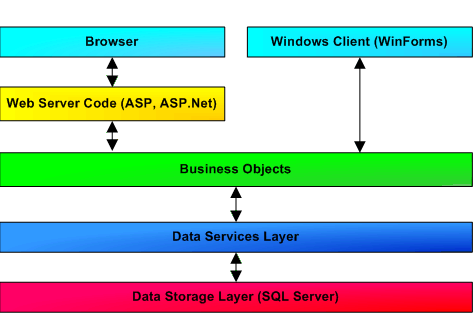
Figure 1 n-Tier Application Design
The Data Services Layer, written in a language such as C#, VB, VB.Net, Java, or PHP, communicates with the Data Storage Layer to perform the CRUD operations. The communication could be in the form of ad hoc SQL statements such as INSERT, SELECT, UPDATE, and DELETE. When using RecordSet objects in ADO or datacommands in ADO.Net, the ADO layer will usually write the SQL statement for the programmer. In the stored procedures approach, we will forgo these SQL statements in favor of using only the EXECUTE statement on stored procedures. Of course, the SQL statements are still needed to accomplish the data manipulation. They are in the stored procedures.
Why Used Stored Procedures for CRUD
The reasons for using Stored Procedures to implement the Data Storage Layer instead of allowing ad hoc SQL statements are:
- The best possible performance
- Removes the SQL code from the other layers of the application
- Prevents SQL injection attacks
- Prevents casual table browsing and modifications
I examine each of these reasons in the sections that follow. Overall, I think the case is pretty strong for using stored procedures. By the end of this section I hope you will also.
Performance
After the first use of each stored procedure, the plan for executing the procedure is cached in SQL Server’s procedure cache, kept in master..syscacheobjects. For subsequent invocations of the stored procedure, the plan is reused. This avoids the parsing and optimization steps with their overhead.
Plans take time to create because SQL Server uses several techniques to optimize the plan that include examining statistics for each of the indexes. The procedures for our CRUD operations will be pretty simple, usually with only one INSERT, SELECT, UPDATE, or DELETE statement that accesses the database. The existence of a clustered index on the primary key makes creating the plan even easier because SQL Server will not have many choices to make.
Of course, even when cached, plans sometimes have to be recompiled and this can be a problem. If you suspect that this is an issue on your system, take a look at two articles that I wrote on the topic this past spring. They will help you identify the problem and minimize the recompiles necessary:
- Identifying Stored Procedure Recompilation Problems in SQL Server 2000 at https://www.databasejournal.com/features/mssql/article.php/2203601
- Minimizing SQL Server Stored Procedure Recompiles at https://www.databasejournal.com/features/mssql/article.php/2218451
The plans for ad hoc SQL statements are also cached. However, any variation can cause a new plan to be created and using ad hoc statements does not result in as much caching as using stored procedures.
Code Management
By removing the SQL statements from the application code, all the SQL can be kept in the database. Unfortunately, keeping the SQL out of the client application and in the database means that someone can control. Control often becomes a political issue. Often the DBA is the person in control. If you are the DBA, this might sound great to you. If you are the application developer, you might not like this situation so much.
I have found that this only really works when the application developers have access to the database and can create the procedures that they need. However, for CRUD, I have already mentioned that the writing of these procedures should be automated, so control is really vested in the person managing the procedure generation process.
The management issues surrounding control are just that: management issues. Looking at it technically, it is cleaner to have all the SQL in the database and nothing but stored procedure invocations in the client application. The benefit is in the cost of debugging and the cost of long-term maintenance.
Preventing SQL Injection Attacks
Anytime a client application uses string concatenation to create SQL statements, there is a possibility of a SQL injection attack. In short, these attacks involve clever entry of SQL in the data entry fields of an application in such a way that the SQL statements executed are different from the ones intended by the programmer. They require that the application developer is careless about not cleaning any user input to prevent the attack. It happens much more frequently that you might suspect.
Using stored procedures for all SQL Statements prevents SQL injection attacks because everything placed into a parameter gets quoted in the process. The programmer does not get the opportunity to be careless with their SQL.
Remember, SQL injection attacks are not limited to web applications. Seventy percent of attacks come from within the organization and a Windows application is just as good an entry point to attack as a web application.
Preventing Casual Browsing and Modifications
If an application uses ad hoc SQL statements, the users of the application must have the required permissions on the database tables. Once they are given permission on the tables, they can work with them in any application that can read and manipulate the data such as Excel, Word and various report writers. Casual examination of the data and even updates that bypass the application’s business rules become possible.
The situation can be prevented through the use of an application role. Application roles are a SQL Server technique that allows the code to switch identity, without informing the user. Only the application role has direct access to the tables and stored procedures in the database. Using integrated security for database access and an Application Role for table permissions closes this loophole.
Application roles are added to the database using the sp_addapprole stored procedure. Once it is added, assign permissions to the application role just as you would to any other role. This script creates an application role named MyApplication and gives it a password:
	sp_addapprole 'MyApplication', 'Secret!Password!123#'
	go
	(Results)
	New application role added.
After every connection is made, the application switches into the application role with the sp_setapprole stored procedure. For example, as in this script:
	sp_setapprole 'MyApplication', 'Secret!Password!123#'
	go
	(Results)
	The application role 'MyApplication' is now active.
The password is generally coded into the application and might be difficult to change, it is best to keep this as secret as possible. For reasons explained in the next paragraph, I use an application role, even when using stored procedures.
Stored procedures have long been used to prevent casual browsing and updates. This is implemented by granting permission to execute the CRUD stored procedures to the users and revoking permission to access the tables directly. A user could still use the stored procedures to manipulate the database. To do this they have to be determined enough to know how stored procedures work and how to use a tool that can invoke them. A while ago, these obstacles might have been sufficient to provide a measure of protection but these days it is a smaller hurdle that you might think. After all Crystal Reports and Access both let the user invoke stored procedures in a SQL Server database and they do almost all the work for the user. For this reason, to prevent casual browsing and modifications, it is best to use the combination of integrated security for database access and an application role for permissions on all tables, stored procedures, views and user-defined functions.
Are you convinced that using stored procedure for the CRUD operations is a good idea? I hope so. Let’s move on to some of the technical issues that must be faced before they can be created.