


Collaboration Data Objects, also called CDO,
is designed to simplify writing programs that create or manipulate Internet
messages. CDO for Windows 2000 is an integral part of the Windows 2000 and
higher series of operating systems. It is easy to send SMTP email from SQL
Server using CDOsys. It is an alternate method to SQLMail. This article
illustrates how to use CDOSys to send formatted emails from Query Analyzer and
SQL Server Alerts.
Pre-requisite
a.
Your email
client should be capable of handling and showing HTML messages
b.
Operating
System of the SQL Server box should be windows 2000 or later.
c.
SQL Server box
can connect to the internet.
d.
Usp_Send_cdosysmail
(Refer below)
Note
a.
Please change
the email Id used in this article to your email ID.
b.
Please change
the SMTP server used to your SMTP server.
Create the stored procedure “usp_send_cdosysmail” as shown below.
use master
go
if exists (select * from dbo.sysobjects
  where id = object_id(n’[dbo].[usp_send_cdosysmail]’) and
  objectproperty(id, n’isprocedure’) = 1)
drop procedure [dbo].[usp_send_cdosysmail]
go
create procedure usp_send_cdosysmail
@from varchar(500) ,
@to varchar(500) ,
@subject varchar(500),
@body varchar(4000) ,
@smtpserver varchar(25),
@bodytype varchar(10)
as
declare @imsg int
declare @hr int
declare @source varchar(255)
declare @description varchar(500)
declare @output varchar(1000)
exec @hr = sp_oacreate ‘cdo.message’, @imsg out
exec @hr = sp_oasetproperty @imsg,
‘configuration.fields(“http://schemas.microsoft.com/cdo/configuration/sendusing”).value’,’2′
exec @hr = sp_oasetproperty @imsg,
  ‘configuration.fields(“http://schemas.microsoft.com/cdo/configuration/smtpserver”).value’,
  @smtpserver
exec @hr = sp_oamethod @imsg, ‘configuration.fields.update’, null
exec @hr = sp_oasetproperty @imsg, ‘to’, @to
exec @hr = sp_oasetproperty @imsg, ‘from’, @from
exec @hr = sp_oasetproperty @imsg, ‘subject’, @subject
— if you are using html e-mail, use ‘htmlbody’ instead of ‘textbody’.
exec @hr = sp_oasetproperty @imsg, @bodytype, @body
exec @hr = sp_oamethod @imsg, ‘send’, null
— sample error handling.
if @hr <>0
select @hr
begin
exec @hr = sp_oageterrorinfo null, @source out, @description out
if @hr = 0
begin
select @output = ‘ source: ‘ + @source
print @output
select @output = ‘ description: ‘ + @description
print @output
end
else
begin
print ‘ sp_oageterrorinfo failed.’
return
end
end
exec @hr = sp_oadestroy @imsg
go
set quoted_identifier off
go
set ansi_nulls on
go
Download the stored procedure from here.
Send simple formatted emails from Query Analyzer
Execute
the code below, as shown in Fig 1.0, in order get email as shown in Fig 1.1
exec master..usp_send_cdosysmail
@from=’mak_999@yahoo.com’,
@to =’mak_999@yahoo.com’,
@subject =’Formatted email from MAK’,
@body ='<B>Test Email From MAK</B><BR> Please Ignore this <Font Color=red>email.’,
@smtpserver =’optonline.net’,
@bodytype =’HTMLBody’
Parameters Explained
@From = ‘Sender of the Email’
@To= ‘Receiver of the Email’
@Subject = ‘Subject of this Email’
@Body = ‘Body of this Email. The body of the message
accepts HTML tags’
@SMTPServer = ‘SMTP server’
@BodyType = ‘Type of body: It can be HTMLBody or TEXTBody’

[Fig 1.0]
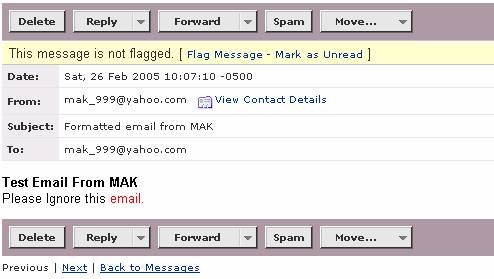
[Fig 1.1]
Send query results as formatted emails from Query Analyzer
Create and execute the code below, as shown in Fig 1.2,
in order to receive email as shown in Fig 1.3
declare @body1 varchar(1000)
set @body1='<table border=”2″ cellspacing=”2″ cellpadding=”2″>
  <TR><td colspan=2
  style=”color: #A0522D; font-family: Verdana; font-size: 10;” align=left>’
set @body1=@body1+’Tables </TD></TR>’
select @body1=@body1 +'<TR><TD>’+ name +'</TD></TR>’ from sysobjects
print @body1
exec master..usp_send_cdosysmail
@from=’mak_999@yahoo.com’,
@to =’mak_999@yahoo.com’,
@subject =’Formatted email from MAK’,
@body =@body1,
@smtpserver =’optonline.net’,
@bodytype =’HTMLBody’
Download Query.txt
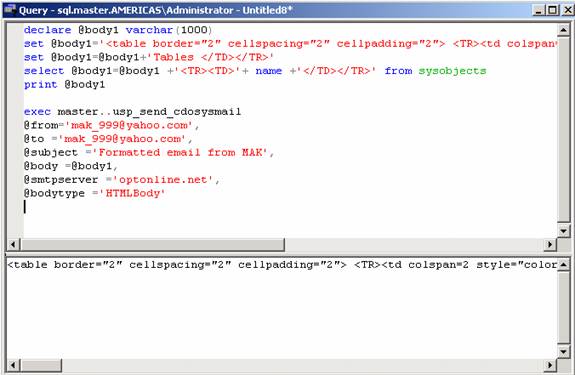
[Fig 1.2]
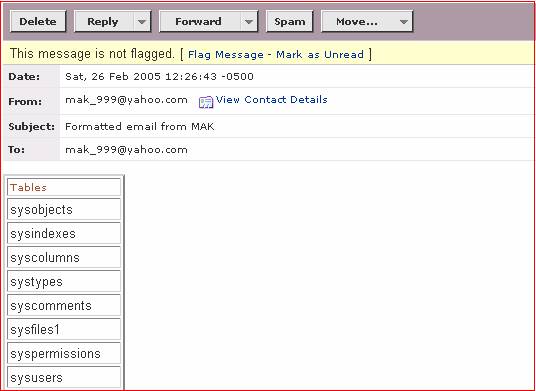
[Fig 1.3]