


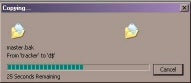
SQL Server Database administrators often copy(refer Fig 1.0) huge files, such as Full backup files and transaction log backup files from production to QA or from production to development environment and so on. Sometimes they need to copy source data files for importing. If they want to restore those Full backups or transaction log backup files or import those huge source files, they have to wait until the copy is complete.
In SQL Server there are three way to check the status of the file. They are:
Exec master.. Xp_getfiledetails ( refer Fig 1.1 )
Exec master.. XP_Cmdshell ( refer Fig 1.2 )
Exec master.. XP_FILEEXIST ( refer Fig 1.3 )
Xp_getfiledetails reports that the file exists and shows more details about the file.

Xp_cmdshell command executes the MS-DOS command and shows that file Exists and it has been created.
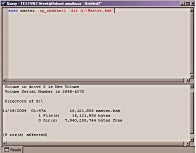
The output of XP_cmdshell with DIR command is shown below
 Volume in drive D is New Volume
 Volume Serial Number is 284B-A370

 Directory of d:\

11/19/2004  01:47a          16,121,856 master.bak
               1 File(s)     16,121,856 bytes
               0 Dir(s)   7,940,255,744 bytes free


(9 row(s) affected)
xp_fileexist ‘D:\PERFMON.CSV’ also reports that the file exists.
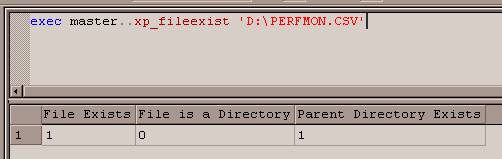
[Fig 1.3 ]
However, when a file is being copied (refer Fig 1.0), the above three statements report that the file exists and is ready to be used, which is false. Therefore, in order to discover the real status of the file we have to create a user defined function as shown below. This Function takes advantage of SP_Oamethod and the File system object to get the real status of the File.
SET QUOTED_IDENTIFIER OFF
GO
SET ANSI_NULLS ON
GO

Create function udf_CheckFileStatus (@filename varchar(1000))
returns bit
as

BEGIN
DECLARE @FS int
DECLARE  @OLEResult int
DECLARE  @FileID int
--set @filename = 'D:\sqldumps\etst.bak'
--declare  @filename varchar(1000)
DECLARE @source NVARCHAR(255)
DECLARE @description NVARCHAR(255)
DECLARE @flag bit
set @source ='Exist'
set @description='Exist'
--set @filename = 'D:\sqldumps\msdb_20040916_23_00_40.BAK'
EXECUTE @OLEResult = sp_OACreate 'Scripting.FileSystemObject', @FS OUT
IF @OLEResult <> 0
begin
EXEC sp_OAGetErrorInfo NULL, @source OUTPUT, @description OUTPUT
goto displayerror
end
--Open a file
execute @OLEResult = sp_OAMethod @FS, 'OpenTextFile', @FileID OUT,@filename , 1
IF @OLEResult <> 0
begin
EXEC sp_OAGetErrorInfo NULL, @source OUTPUT, @description OUTPUT
goto displayerror
end
EXECUTE @OLEResult = sp_OADestroy @FileID
EXECUTE @OLEResult = sp_OADestroy @FS
DisplayError:
if @source is NULL and @description is NULL
begin
--print @filename + '  in Use'
set @flag = 1
end
else
begin
--print @filename + '  is ready'
set @flag = 0
end
return @flag
END


GO
SET QUOTED_IDENTIFIER OFF
GO
SET ANSI_NULLS ON
GO
Download udf_CheckFileStatus.sql.