


SQL Server Database administrators often have requirements such as importing multiple files to a table on a database. This article discusses how to upload multiple files, especially XML files, to the SQL Server database XML data type column.
Pre-requisite
a. Make sure xp_cmdshell is enabled. If it is not enabled, execute the following command as shown below.
use master
go
sp_configure ‘show advanced options’,1
go
reconfigure with override
go
sp_configure ‘xp_cmdshell’,1
go
reconfigure with override
go
b. Create a database and table dedicated for this import as shown below. You could also use an existing database.
USE [master]
GO
/****** Object:  Database [XMLTest]
 Script Date: 04/17/2007 01:49:43 ******/
IF  EXISTS (SELECT name FROM sys.databases WHERE name = N’XMLTest’)
DROP DATABASE [XMLTest]
go
create database XMLTest
go
use XMLTest
go
c. Be sure to create a table with an XML data type. Also, make sure at least one column in the table can hold the value of the filename as shown below.
use [XMLTest]
/****** object:  table [dbo].[myimage]
 script date: 09/10/2006 21:55:46 ******/
if  exists (select * from sys.objects
   where object_id = object_id(N’[MYXML]’) and type in (N’u’))
drop table [MYXML]
go
create table [MYXML] (
[id] int identity(1,1),
[XML File Name] varchar(100),
[Data] XML)
Go
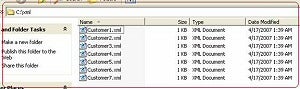
d. Let us assume that we want to upload all of the .bmp files from the C:\XML [refer Fig 1.0 and 1.1] folder to the “MYXML” table in the “dbo” schema on the “XMLTest” database.
Example content of Customer5.xml
<?xml version=”1.0″ standalone=”yes”?>
<Customer>
  <CustomerLogInfo>
    <Date>2007-03-31T06:40:38.0000000-05:00</Date>
    <user>Rainbow.River</user>
    <Userid>1AE</Userid>
    <ls>A-Accessible</ls>
    <eqtid>761</eqtid>
    <es>Stopped</es>
    <tp>30</tp>
  </CustomerLogInfo>
  <CustomerLogInfo>
    <Date>2007-03-31T06:40:38.0000000-05:00</Date>
    <user>Rainbow.River</user>
    <Userid>1AE</Userid>
    <ls>Not-Accessible</ls>
    <eqtid>870</eqtid>
    <es>Stopped</es>
    <tp>30</tp>
  </CustomerLogInfo>
  <CustomerLogInfo>
    <Date>2007-03-31T06:40:38.0000000-05:00</Date>
    <user>Rainbow.River</user>
    <Userid>1AE</Userid>
    <ls>A-Accessible</ls>
    <eqtid>97F</eqtid>
    <es>Started</es>
    <tp>30</tp>
  </CustomerLogInfo>
</Customer>
e. Let us create a procedure, usp_uploadXMLFiles [using copy and paste or download the usp_uploadXMLfiles.sql file]. This creates a stored procedure, usp_uploadXMLfiles, on the master database so that it can be executed and called for any database.
USE [master]
GO
/****** Object:  StoredProcedure [dbo].[usp_uploadXMLfiles]    Script Date: 09/10/2006 23:33:34 ******/
IF  EXISTS (SELECT * FROM sys.objects WHERE object_id = OBJECT_ID(N’[dbo].[usp_uploadXMLfiles]’) AND type in (N’P’, N’PC’))
DROP PROCEDURE [dbo].[usp_uploadXMLfiles]
go
set quoted_identifier off
go
create procedure usp_uploadXMLfiles
@databasename varchar(128),
@schemaname varchar(128),
@tablename varchar(128),
@FileNameColumn varchar(128),
@xmlcolumn varchar(128),
@path varchar(500),
@filetype varchar(10),
@printorexec varchar(5) = ‘print’
as
set nocount on
declare @dircommand varchar(1500)
declare @insertquery varchar(2000)
declare @updatequery varchar(2000)
declare @count int
declare @maxcount int
declare @filename varchar(500)
set @count=1
set @dircommand = ‘dir /b ‘+@path+@filetype
create table #dir (name varchar(1500))
insert #dir(name) exec master..xp_cmdshell @dircommand
delete from #dir where name is NULL
create table #dir2 (id int identity(1,1),name varchar(1500))
insert into #dir2 select name from #dir
–select * from #dir2
set @maxcount = ident_current(‘#dir2’)
print ‘set quoted_identifier off’
print ‘go’
while @count <=@maxcount
begin
set @filename =(select name from #dir2 where id = @count)
set @insertquery = ‘Insert into [’+@databasename+’].[’+@schemaname+’].[’+@tablename+’]
 ([’ +@filenamecolumn +’]) values (“‘+@filename+'”)’
set @updatequery = ‘update [’+@databasename+’].[’+@schemaname+’].[’+@tablename+’]
 set [’+@xmlcolumn+’] = (SELECT *    FROM OPENROWSET(BULK “‘+@path+@filename+'”, SINGLE_BLOB)AS x )
 WHERE [’+@filenamecolumn +’]=”‘+@filename+'”‘
if @printorexec =’print’
begin
print @insertquery
print @updatequery
end
if @printorexec =’exec’
begin
set @insertquery=’set quoted_identifier off’ + char(10)+char(13)+@insertquery
set @updatequery=’set quoted_identifier off’ + char(10)+char(13)+@updatequery
exec (@insertquery)
exec (@updatequery)
end
set @count = @count +1
end
go
This procedure accepts the following parameters:
@databasename = Name of the database where the schema and table exist.
@schemaname = Schema of the database where the table exists
@tablename = Name of the table where files are going to be uploaded
@FileNameColumn = Name of the column in the table where the file name is going to be stored
@XMLcolumn = The actual XML Datatype column where the file is going to be stored as XML
@path = Path of all the files that are suppose to be uploaded. Example “C:\Windows\”
@filetype = Type of file you want to upload. Example “*.XML”
@printorexec = if “Print” is passed as a parameter it will generate and display the commands. If “Exec” is passed as a parameter, it will execute the command directly meaning upload all the files.
f. Let us execute the procedure with the parameter printorexec=’print’ as shown below.
Exec master..[usp_uploadXMLfiles]
@databasename =’XMLTest’,
@schemaname =’dbo’,
@tablename =’MYXML’,
@FileNameColumn =’XML File Name’,
@XMLcolumn = ‘Data’,
@path = ‘c:\XML\’,
@filetype =’*.xml’,
@printorexec =’print’
This will generate all of the commands needed for creating a row for each file and updating the row with the proper file as shown below.
set quoted_identifier off
go
Insert into [XMLTest].[dbo].[MYXML] ([XML File Name]) values (“Customer1.xml”)
update [XMLTest].[dbo].[MYXML] set [Data] = (SELECT *
 FROM OPENROWSET(BULK “c:\XML\Customer1.xml”, SINGLE_BLOB)AS x )
 WHERE [XML File Name]=”Customer1.xml”
Insert into [XMLTest].[dbo].[MYXML] ([XML File Name]) values (“Customer2.xml”)
update [XMLTest].[dbo].[MYXML] set [Data] = (SELECT *
 FROM OPENROWSET(BULK “c:\XML\Customer2.xml”, SINGLE_BLOB)AS x )
 WHERE [XML File Name]=”Customer2.xml”
Insert into [XMLTest].[dbo].[MYXML] ([XML File Name]) values (“Customer3.xml”)
update [XMLTest].[dbo].[MYXML] set [Data] = (SELECT *
 FROM OPENROWSET(BULK “c:\XML\Customer3.xml”, SINGLE_BLOB)AS x )
 WHERE [XML File Name]=”Customer3.xml”
Insert into [XMLTest].[dbo].[MYXML] ([XML File Name]) values (“Customer4.xml”)
update [XMLTest].[dbo].[MYXML] set [Data] = (SELECT *
 FROM OPENROWSET(BULK “c:\XML\Customer4.xml”, SINGLE_BLOB)AS x )
 WHERE [XML File Name]=”Customer4.xml”
Insert into [XMLTest].[dbo].[MYXML] ([XML File Name]) values (“Customer5.xml”)
update [XMLTest].[dbo].[MYXML] set [Data] = (SELECT *
 FROM OPENROWSET(BULK “c:\XML\Customer5.xml”, SINGLE_BLOB)AS x )
 WHERE [XML File Name]=”Customer5.xml”
Insert into [XMLTest].[dbo].[MYXML] ([XML File Name]) values (“Customer6.xml”)
update [XMLTest].[dbo].[MYXML] set [Data] = (SELECT *
 FROM OPENROWSET(BULK “c:\XML\Customer6.xml”, SINGLE_BLOB)AS x )
 WHERE [XML File Name]=”Customer6.xml”
Insert into [XMLTest].[dbo].[MYXML] ([XML File Name]) values (“Customer7.xml”)
update [XMLTest].[dbo].[MYXML] set [Data] = (SELECT *
 FROM OPENROWSET(BULK “c:\XML\Customer7.xml”, SINGLE_BLOB)AS x )
 WHERE [XML File Name]=”Customer7.xml”
g. Now let us execute the procedure with the parameter printorexec=’exec’ as shown below.
Exec master..[usp_uploadXMLfiles]
@databasename =’XMLTest’,
@schemaname =’dbo’,
@tablename =’MYXML’,
@FileNameColumn =’XML File Name’,
@XMLcolumn = ‘Data’,
@path = ‘c:\XML\’,
@filetype =’*.xml’,
@printorexec =’exec’
This will upload all of the xml files.
h. Now let us query the table using the transact SQL statement below.
use XMLTest
go
select * from myxml
go
This produces the following results. [Refer Fig 1.1]
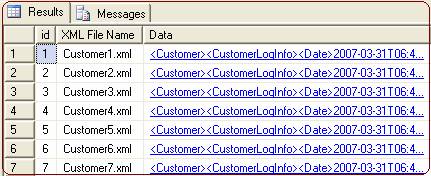
Fig 1.1
i. Click on the XML data links to produce the result shown below.
<Customer>
  <CustomerLogInfo>
    <Date>2007-03-31T06:40:38.0000000-05:00</Date>
    <user>Dancing.Doll</user>
    <Userid>1AE</Userid>
    <ls>A-Accessible</ls>
    <eqtid>761</eqtid>
    <es>Stopped</es>
    <tp>30</tp>
  </CustomerLogInfo>
  <CustomerLogInfo>
    <Date>2007-03-31T06:40:38.0000000-05:00</Date>
    <user>Dancing.Doll</user>
    <Userid>1AE</Userid>
    <ls>Not-Accessible</ls>
    <eqtid>870</eqtid>
    <es>Stopped</es>
    <tp>30</tp>
  </CustomerLogInfo>
  <CustomerLogInfo>
    <Date>2007-03-31T06:40:38.0000000-05:00</Date>
    <user>Dancing.Doll</user>
    <Userid>1AE</Userid>
    <ls>A-Accessible</ls>
    <eqtid>97F</eqtid>
    <es>Started</es>
    <tp>30</tp>
  </CustomerLogInfo>
</Customer>
Conclusion
This article has examined how to upload multiple XML files to an SQL Server database XML data type column.