


In the first article of this series, we enabled change tracking on the HumanResources.Department table. Now how do we get the changed data? With the CHANGETABLE function, we can get change tracking information. This function provides two modes: CHANGES and VERSION. In the CHANGES mode, the CHANGETABLE(CHANGES table , last_sync_version) takes the name of the table being tracked and a version number, and returns all the changes to the table after the version. In the VERSION mode, the CHANGETABLE(VERSION table, primary_key_column_name [ , …n ] , (primay_key_column_value [ , …n ] ) ) takes a table name, primary key column(s), and primary key column value(s). The key values identify a row in the table. The VERSION mode returns the current version and change context that is associated with the specific row.
Data changes need to be compared to a baseline. When you first synchronize your client (a .NET application and/or another SQL Server table) with the HumanResources.Department table, you obtain an initial data set from all rows of the table. You also get the baseline version number, i.e., the maximum version number of all the rows, at that time and record it for the next synchronization request. At the next synchronization request, the system determines which rows have been modified since the baseline version, and a new baseline version is saved for the next synchronization. The algorithm is shown below.
-- Obtain the current synchronization version. This will be used

the next time CHANGETABLE(CHANGES...) is called.
SET @synchronization_version = CHANGE_TRACKING_CURRENT_VERSION();

-- If this is the first synchronization session
IF (@sync_initialized = 0)
BEGIN
	  -- Initialize from the table
	  SELECT DepartmentID, Name, GroupName, ModifiedDate
	  FROM HumanResources.Department
END
ELSE
BEGIN
    -- Obtain incremental changes by using the synchronization version
obtained the last time the data was synchronized.
    SELECT CT.SYS_CHANGE_OPERATION,
	  DepartmentID, Name, GroupName, ModifiedDate
    FROM HumanResources.Department
    RIGHT OUTER JOIN
	  CHANGETABLE(CHANGES HumanResources.Department,
@last_synchronization_version) AS CT
    ON
	  P.DepartmentID = CT.DepartmentID
END
In our example, let’s first query all the rows from the HumanResources.Department table to get a baseline and get a baseline version.
DECLARE @synchronization_version bigint
-- Obtain the current synchronization version. This will be used
the next time CHANGETABLE(CHANGES...) is called.
SET @synchronization_version = CHANGE_TRACKING_CURRENT_VERSION()
SELECT @synchronization_version

-- Initialize from the base table
SELECT DepartmentID, Name, GroupName, ModifiedDate
FROM HumanResources.Department
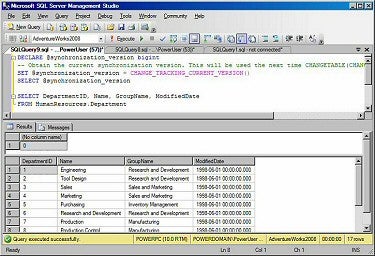
As shown above, the baseline version number is 0 since we just enabled change tracking in the database.
Let’s insert a new row into the table and update an existing row.
INSERT INTO HumanResources.Department
(Name, GroupName, ModifiedDate)
VALUES ('Product Design', 'Research and Development', GETDATE())

UPDATE HumanResources.Department
SET GroupName='Accounting'
WHERE DepartmentID=10
To obtain the changes since the last version 0, run the following script.
DECLARE @synchronization_version bigint
-- Obtain the current synchronization version. This will be used the next time CHANGETABLE(CHANGES...) is called.
SET @synchronization_version = CHANGE_TRACKING_CURRENT_VERSION()
SELECT @synchronization_version

-- Obtain incremental changes by using the synchronization version obtained the last time the data was synchronized.
SELECT CT.SYS_CHANGE_VERSION, CT.SYS_CHANGE_OPERATION, CT.DepartmentID, Name, GroupName, ModifiedDate
FROM HumanResources.Department D
RIGHT OUTER JOIN
	CHANGETABLE(CHANGES HumanResources.Department, 0) AS CT
ON
	D.DepartmentID = CT.DepartmentID
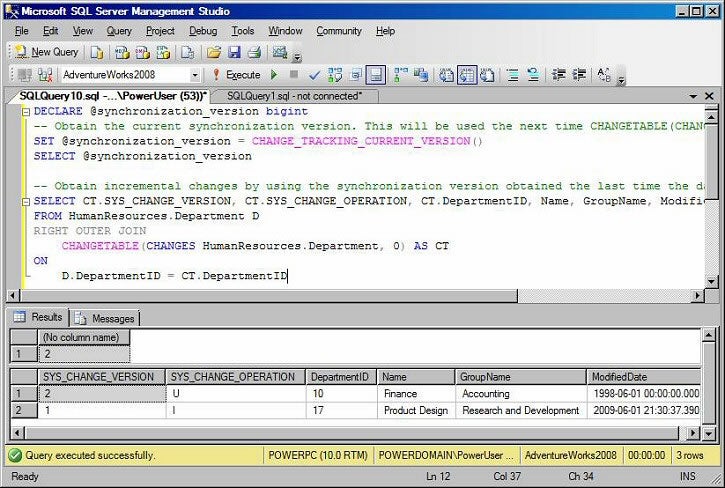
As you can see in the figure, the current version has increased to 2. The row with DepartmentID=10 was updated as indicated by the value “U” in the SYS_CHANGE_OPERATION column. The row with DepartmentID=17 was inserted as indicated by the value “I” in the SYS_CHANGE_OPERATION column.
If you have column tracking enabled on the HumanResources.Department table, you can get the data from only the columns that were changed.
DECLARE @synchronization_version bigint
-- Obtain the current synchronization version. This will be used the next time CHANGETABLE(CHANGES...) is called.
SET @synchronization_version = CHANGE_TRACKING_CURRENT_VERSION()
SELECT @synchronization_version

-- Obtain incremental changes by using the synchronization version obtained the last time the data was synchronized.
SELECT CT.SYS_CHANGE_VERSION, CT.SYS_CHANGE_OPERATION, CT.DepartmentID,
CASE CHANGE_TRACKING_IS_COLUMN_IN_MASK
(COLUMNPROPERTY(OBJECT_ID('HumanResources.Department'), 'Name', 'ColumnId'), SYS_CHANGE_COLUMNS)
WHEN 1 THEN Name ELSE NULL END as Name,
CASE CHANGE_TRACKING_IS_COLUMN_IN_MASK(COLUMNPROPERTY
(OBJECT_ID('HumanResources.Department'), 'GroupName', 'ColumnId'), SYS_CHANGE_COLUMNS)
WHEN 1 THEN GroupName ELSE NULL END AS GroupName,
ModifiedDate
FROM HumanResources.Department D
RIGHT OUTER JOIN
	CHANGETABLE(CHANGES HumanResources.Department, 0) AS CT
ON
	D.DepartmentID = CT.DepartmentID
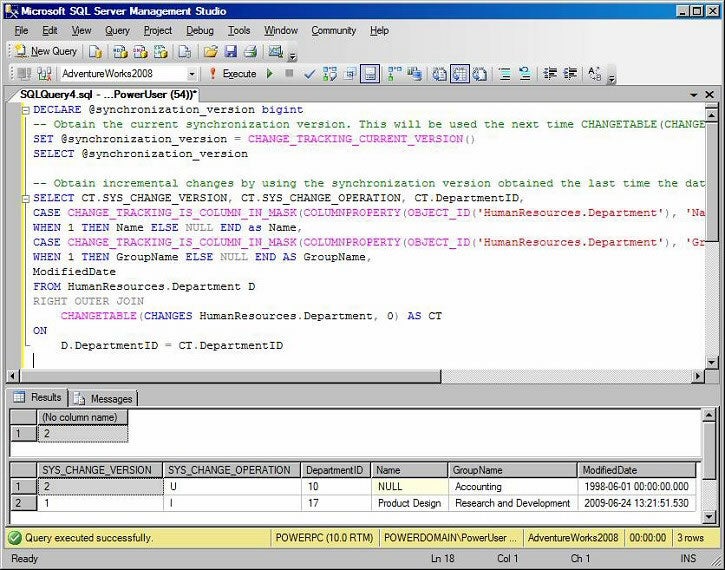
As you can see in the figure, the value of the Name column was not returned for the first row as it was not updated in the update statement. In this example, the Name column is only a nvarchar column and doesn’t take much storage. I only use the column here for demonstration purposes. LOB columns would be better candidates for column tracking as the overhead for enabling column tracking can be small compared to the benefits of retrieving LOB data through the network.
Let’s delete the newly added row.
DELETE FROM HumanResources.Department
WHERE DepartmentID=17
To obtain the changes since the last version 2, run the previous script with a new version 2.
DECLARE @synchronization_version bigint
-- Obtain the current synchronization version. This will be used the next time CHANGETABLE(CHANGES...) is called.
SET @synchronization_version = CHANGE_TRACKING_CURRENT_VERSION()
SELECT @synchronization_version

-- Obtain incremental changes by using the synchronization version obtained the last time the data was synchronized.
SELECT CT.SYS_CHANGE_VERSION, CT.SYS_CHANGE_OPERATION, CT.DepartmentID, Name, GroupName, ModifiedDate
FROM HumanResources.Department D
RIGHT OUTER JOIN
	CHANGETABLE(CHANGES HumanResources.Department, 2) AS CT
ON
	D.DepartmentID = CT.DepartmentID
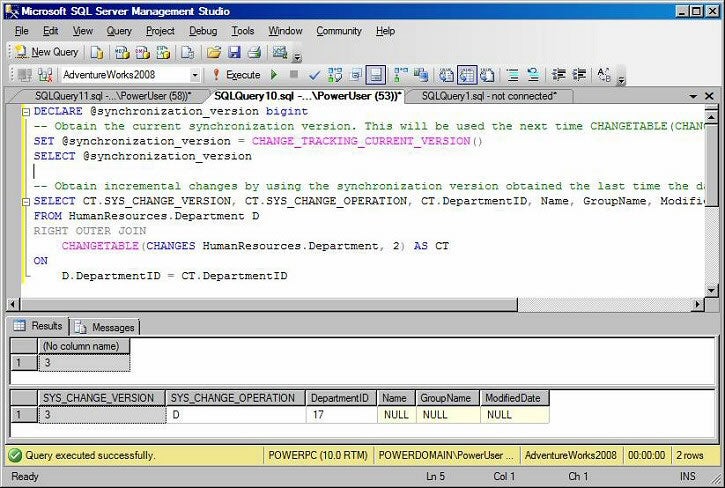
As shown in the figure, the value “D” in the SYS_CHANGE_OPERATION column indicates the row with DepartmentID=17, was deleted.
Because the change tracking information can be purged before the next synchronization runs if the AUTO_CLEANUP option is turned on, we also need to compare @last_synchronization_version with the minimum version saved in the change tracking table for the specified table. If @last_synchronization_version is less than CHANGE_TRACKING_MIN_VALID_VERSION(OBJECT_ID(‘HumanResources.Department’)), we need to reinitialize and get a new baseline containing all the rows from the HumanResources.Department base table. Therefore, the condition
IF (@sync_initialized = 0)
needs to be changed to
IF (@last_synchronization_version <CHANGE_TRACKING_MIN_VALID_VERSION(OBJECT_ID('HumanResources.Department')))
On a busy system, between getting the current version and obtaining the changes from the CHANGETABLE() function, the HumanResources.Department table can be changed by other sessions, or the change tracking information can be removed by the cleanup process and causes CHANGE_TRACKING_MIN_VALID_VERSION to increase. Therefore, it is better to use snapshot isolation to ensure that all change tracking information is consistent during the transaction. The complete algorithm is shown below.
SET TRANSACTION ISOLATION LEVEL SNAPSHOT;
BEGIN TRAN
	DECLARE @synchronization_version bigint
	-- Obtain the current synchronization version. This will be used the next time CHANGETABLE(CHANGES...) is called.
	SET @synchronization_version = CHANGE_TRACKING_CURRENT_VERSION()
	SELECT @synchronization_version

	IF (@last_synchronization_version < CHANGE_TRACKING_MIN_VALID_VERSION(OBJECT_ID('HumanResources.Department')))
	BEGIN
	  -- Initialize from the base table
	  SELECT DepartmentID, Name, GroupName, ModifiedDate
	  FROM HumanResources.Department
END
ELSE
BEGIN
	  -- Obtain incremental changes by using the synchronization version obtained the last time the data was synchronized.
	  SELECT CT.SYS_CHANGE_OPERATION, CT.DepartmentID, Name, GroupName, ModifiedDate
	  FROM HumanResources.Department D
	  RIGHT OUTER JOIN
			CHANGETABLE(CHANGES HumanResources.Department, @last_synchronization_version) AS CT
		ON
			D.DepartmentID = CT.DepartmentID
	END
COMMIT TRAN
Enabling snapshot isolation on a database adds non-trivial performance overhead to the database. If you prefer not to use snapshot isolation, an alternative algorithm to obtain changes is shown below.
DECLARE @synchronization_version bigint

SET @synchronization_version = CHANGE_TRACKING_CURRENT_VERSION()
SELECT @synchronization_version

IF (@last_synchronization_version < CHANGE_TRACKING_MIN_VALID_VERSION(OBJECT_ID('HumanResources.Department')))
	-- Initialize from the base table
	SELECT DepartmentID, Name, GroupName, ModifiedDate
	FROM HumanResources.Department
ELSE
BEGIN
	-- Obtain incremental changes by using the synchronization version obtained the last time the data was synchronized.
	SELECT CT.SYS_CHANGE_OPERATION, CT.DepartmentID, Name, GroupName, ModifiedDate
	FROM HumanResources.Department D
	RIGHT OUTER JOIN
		CHANGETABLE(CHANGES HumanResources.Department, @last_synchronization_version) AS CT
	ON
		D.DepartmentID = CT.DepartmentID
	WHERE (CT.SYS_CHANGE_CREATION_VERSION <= @synchronization_version)
END
Instead of using snapshot isolation, this algorithm uses the new version to make sure no changes since the new version are returned from the CHANGETABLE(CHANGES …) function. However, this algorithm doesn’t solve the problem when CHANGE_TRACKING_MIN_VALID_VERSION changes and @last_synchronization_version becomes invalid.
Summary
This article illustrated how to obtain data changes using the CHANGETABLE function. Two algorithms were presented. You can implement these two algorithms in your .NET application using Sync Services.