


Unit testing provides a structured and automated way of testing individual components of a system. Database unit testing specifically tests the data consumed by different components of the application. As data quality has become increasingly important to any organization, database unit testing also becomes an even more important part of software quality assurance. By developing database unit tests, you can create a collection of tests and run them during development to ensure that your features work as you expect. Such a collection of tests is very useful for regression testing. When an application is upgraded or re-factored, with the unit testing cases you can verify that the data output by the application is consistent between different versions. In this article, I will show you how to implement database unit testing to compare two result sets using C# and LINQ. We will build our test cases on the open-source unit-testing framework, NUnit, as it is written entirely in C#, fast and easy to use. Before using NUnit, you need to go to http://www.nunit.org/index.php?p=download to download the framework and install it on your computer. Installation instructions are at http://www.nunit.org/index.php?p=installation&r=2.5.2. You can follow the approach in this article to develop your own unit test cases. If you are not familiar with programming, there are a few database unit testing software available. AnyDBTest at http://www.anydbtest.com is an excellent product. It is the first and only automated DB unit testing tool available using XML as test case. It also supports data validation between heterogeneous data sources, including Oracle, SQL Server, and MySQL etc.
Assume that you are a DBA working at a furniture store. The sales of your company come from furniture sales and services sales, for example, installation. The existing version of the PnL report only presents the total sales number. The accounting department in your company would like have a breakdown of sales between furniture and services on the PnL report. The developers have developed a new version of the PnL report application. Before releasing the new PnL report, you work with the developers to unit test the data saved in the database tables by the existing and new PnL report application to make sure the numbers are consistent. Here is the schema of the existing and new PnL tables.
Use testDB
GO
CREATE TABLE OldPnLReport
( AccountNumber int,
NetSales decimal(9,2),
Costs decimal(9,2),
NetIncome decimal(9,2),
ReportDate smalldatetime
)
GO
CREATE TABLE NewPnLReport
( AccountNumber int,
FurnitureSales decimal(9,2),
ServiceSales decimal(9,2),
Costs decimal(9,2),
NetIncome decimal(9,2),
ReportDate smalldatetime
)
GO
You would like to compare the aggregated NetSales from FurnitureSales and ServiceSales in NewPnLReport against OldPnLReport. Here are the queries.
SELECT [AccountNumber]
      ,[NetSales]
      ,[Costs]
      ,[NetIncome]
FROM [testDB].[dbo].[OldPnLReport]
WHERE ReportDate='2009-10-16'
GO

SELECT [AccountNumber]
      ,([FurnitureSales] + [ServiceSales]) as [NetSales]
      ,[Costs]
      ,[NetIncome]
  FROM [testDB].[dbo].[NewPnLReport]
  WHERE ReportDate='2009-10-16'
GO
Above are the result sets to compare. In our testing application, we first get our result sets from the database and convert them into in-memory DataTable objects to prepare for the comparison. The constructor of the TestDataTable class accepts a database connection string, and a select query. You can also set the input parameters with the SetInputParameter function. The Table property of the class returns a DataTable containing the result set from the select query.
  class TestDataTable
    {

        private readonly SqlCommand _command;

        public TestDataTable(String connstr, String selectQuery, CommandType commandType)
        {

            SqlConnection conn = new SqlConnection(connstr);

            _command = new SqlCommand(selectQuery, conn);
            _command.CommandType = commandType;

        }


        public void SetInputParameter(string parameterName, object parameterValue)
        {
            if (_command.Parameters.Contains(parameterName))
                _command.Parameters[parameterName] =
                    new SqlParameter(parameterName, parameterValue);
            else
                _command.Parameters.AddWithValue(parameterName, parameterValue);
        }

        public DataTable Table
        {
            get
            {
                DataTable _dataTable = new DataTable();

                SqlDataAdapter da = new SqlDataAdapter(_command);

                da.Fill(_dataTable);
                da.Dispose();

                return _dataTable;
            }
        }
    }
We also need a class to compare two DataTable objects with LINQ, and write the discrepancies between the two result sets into a file specified in a variable logFilePath. The ResultSetComparer class does that.
class ResultSetComparer
    {

        private static StreamWriter sw = null;

        private static void InitWriter(String filePath)
        {
            sw = new StreamWriter(filePath, true);
        }

        private static void Write(DataTable dt)
        {
            int i = 0;
            try
            {
                sw.WriteLine(System.DateTime.Now.ToString());

                sw.WriteLine();

                for (i = 0; i < dt.Columns.Count - 1; i++)
                {
                    sw.Write(dt.Columns[i].ColumnName + " | ");
                }
                sw.Write(dt.Columns[i].ColumnName);
                sw.WriteLine();

                foreach (DataRow row in dt.Rows)
                {
                    object[] array = row.ItemArray;
                    for (i = 0; i < array.Length - 1; i++)
                    {
                        sw.Write(array[i].ToString() + " | ");
                    }
                    sw.Write(array[i].ToString());
                    sw.WriteLine();
                }
                sw.Close();
            }
            catch (Exception ex)
            {
                Console.WriteLine("Invalid Operation when writing data table: \n" + ex.ToString());
            }
        }

        public static bool AreIdenticalResultSets(DataTable dt1, DataTable dt2, String logFilePath)
        {

            var v1 = dt1.AsEnumerable();
            var v2 = dt2.AsEnumerable();

            var diff1 = v1.Except(v2, DataRowComparer.Default);
            var diff2 = v2.Except(v1, DataRowComparer.Default);

            if (diff1.Any())
            {
                InitWriter(logFilePath);

                sw.WriteLine("Rows in the first table, but not in the second table:");

                DataTable diffTbl1 = diff1.CopyToDataTable();
                Write(diffTbl1);

                sw.Close();
            }

            if (diff2.Any())
            {
                InitWriter(logFilePath);

                sw.WriteLine("Rows in the second table, but not in the first table:");

                DataTable diffTbl2 = diff2.CopyToDataTable();
                Write(diffTbl2);

                sw.Close();
            }

            return !(diff1.Any() || diff2.Any());
        }

    }
Now we are ready to build our test case. We will use the following components from the NUnit framework.
TestFixture Attribute
This attribute marks a class that contains tests and, optionally, setup or teardown methods.
SetUp Attribute
This attribute is used inside a TestFixture to provide a common set of functions that are performed just before each test method is called.
Test Attribute
This attribute marks a method inside a TestFixture class as a test.
Assertions
An assertion is a function or macro that verifies the behavior (or the state) of the unit under test. Failure of an assertion throws an exception, aborting the execution of the current test.
Here is our test fixture.
    [TestFixture]
    public class DBTest
    {
        private DataTable dt1;
        private DataTable dt2;

        private String logFilePath = "C:\\Windows\\Temp\\PnLDiff.txt";

        [SetUp]
        public void Init()
        {
            String comparedDate = "2009-10-16";

            String connstr1 = "Data Source=localhost;Initial Catalog=TestDB;Integrated Security=true";
            String selectQry1 = "SELECT [AccountNumber],[NetSales],[Costs],[NetIncome] " +
                "FROM [testDB].[dbo].[OldPnLReport] " +
                "WHERE vol.[ModifiedDate] >= @comparedDate;";

            TestDataTable tdt1 = new TestDataTable(connstr1, selectQry1, CommandType.Text);
            tdt1.SetInputParameter("@comparedDate", comparedDate);

            dt1 = tdt1.Table;

            String connstr2 = "Data Source=localhost;Initial Catalog=TestDB;Integrated Security=true";
            String selectQry2 = "SELECT [AccountNumber],([FurnitureSales] + [ServiceSales]) as [NetSales],[Costs],[NetIncome] " +
                "FROM [testDB].[dbo].[NewPnLReport] " +
                "WHERE [date] >= @comparedDate;";

            TestDataTable tdt2 = new TestDataTable(connstr2, selectQry2, CommandType.Text);
            tdt2.SetInputParameter("@comparedDate", comparedDate);

            dt2 = tdt2.Table;
        }

        [Test]
        public void ResultSetEqual_Test()
        {

            Assert.IsTrue(ResultSetComparer.AreIdenticalResultSets(dt1, dt2, logFilePath ));
        }

    }
Let’s run the nunit-console command to test our case.
cd "C:\Program Files (x86)\NUnit 2.5.2\bin\net-2.0"
nunit-console.exe "D:\DatabaseUnitTesting\DBUnitTestDemo\DBUnitTestDemo\bin\Release\DBUnitTestDemo.dll" /nologo /nodots
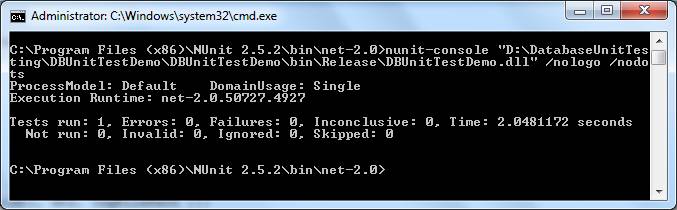
If there is no discrepancy between the existing and new PnL reports, the test would succeed as shown below.
Insert two rows into the two tables to create a failed case.
insert into OldPnLReport
values (1, 5033.00, 2038.00, 2995.00, '2009-10-16');

insert into NewPnLReport
values (1, 2041.00, 2900.00, 2038.00, 2993.00, '2009-10-16');
Run the above command again.
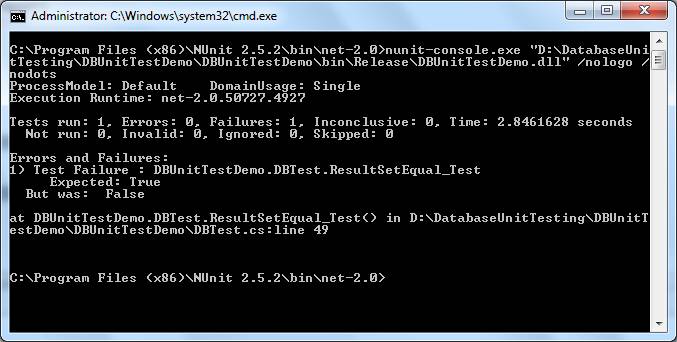
As you can see, this time the test case ResultSetEqual_Test failed. Open the log file in notepad and you will see the difference between the two tables.

Conclusion
Database unit testing is an important part of any database development cycle. In this article, we demonstrated how to create a database unit test case using NUnit framework, C# and LINQ.