


Determining which columns to select for your indexes is critical. Having a little knowledge of how your application is using your database columns and how SQL Server processes indexes helps you make good decisions when you create your indexes.
In my last two articles (Database Indexing Development Lifecycle…Say What? & The Dos and Don’ts of Database Indexing) I talking about indexing guidelines. In this article, I will be discussing some additional considerations you should think about when building your indexes.
Column Considerations
All indexes are made up of one of more columns. To make sure you build indexes that are useful and efficient you want to use some guidelines when selecting your index columns. If you choose inappropriate columns, or order your index column incorrectly, you might not get the most efficient indexes.
One of the first things to think about is unique indexes. A unique index is an index where the key column or set of columns uniquely identifies a single row in a table. Unique indexes provide the database engine the clue that no two rows will have the same index value. This information can be used by the database engine when it processes through an index to reduce the amount of work that the engine needs to perform when traversing an index b-tree structure, for example if you are searching for all rows that have a value less than or equal to a specific unique key value. SQL Server knows it can just read the leaf pages of the index until it hits the unique value for your searching condition. Therefore, if you are going to create a non-clustered index on a column or set of columns that uniquely identify a record then make this key unique. By doing this you will minimize the amount of processing that SQL Server needs to perform for some search conditions.
When you build multi-column indexes on a table do not place more columns then are necessary in the index. If you have a multi-column index do not add more columns than required too uniquely identify each row. If you add additional columns they do not provide any additional value to an index, and they just make your index larger than it needs to be. If the only reason you are adding these extra columns is to create a covering index, then just put the extra columns into the INCLUDE clause of the index. By doing this, those covering index columns are only stored in the leaf pages, so you can minimize the amount of space your index takes up. This also reduces the amount of space to process these indexes.
You should consider using columns in your index that are highly selective. A highly selective column is a column, which has a value that is only contained in a small set of rows. For instance, if we think of two different column values associated with a Person, like SexCode and BirthDate, a SexCode value of “F” would on average be associated with 50% of the rows in the person table, whereas a value for the BirthData column would most like represent a very small percentage of the rows in the Person table. Therefore, the BirthDate column is more selective than the SexCode column. Having highly selective column values as index columns allows the SQL Server engine too quickly reduce large amounts of the index b-tree when searching for specific values of columns, thus reducing the number of I/Os and the amount of time it takes to search an index.
When you have multi-column indexes, the order of the columns is important. You should place your columns in order based on selectivity. The first column of your multi-column index should be the most selective column, followed in order by the next most selective column and so forth.
Where to Place Equality and Inequality Columns
What are Equality and Inequality Columns anyway? A column is identified as an Equality or Inequality column depending on how the column is used in a WHERE or JOIN predicate. When a column is used in a conditional operation like this:
... MyColumn = ‘ABC’...
It is known as an Equality column. Here the column named “MyColumn” is being compared to the string “ABC” using the equal (=) operator. This is why in this case “MyColumn” is considered an Equality column. If a column was used like this:
... MyColumn >= ‘ABC’ ...
Then it is known as an Inequality column. Here “MyColumn” is being compared to the string “ABC”, but the operator is not the equal sign, but is using the greater than or equal sign (>=). The greater than or equal operator makes MyColumn an Inequality column. Also if a column is used with any operator other than the equal sign (=), meaning it is using <>, >, <, <=, etc… then it is considered to be an Inequality column.
When creating a multi-column index it is important to make sure you place equality columns first in your index, prior to inequality columns. This is because the optimizer stops an index seek operation on your index after finding the first inequality column used in your TSQL statement. If you place all the equality columns first in your index, SQL Server can more efficiently perform an index seek operation and allows SQL Server to perform less I/O. Here is some code that you can run to test using Inequality and Equality columns in different orders within an index:
USE AdventureWorks;
GO

CREATE NONCLUSTERED INDEX Inequality_IDX on Person.Contact (Title, LastName);
CREATE NONCLUSTERED INDEX Equality_IDX on Person.Contact (LastName, Title);
GO

SET STATISTICS IO ON;
SELECT * FROM Person.Contact WITH (INDEX(Inequality_IDX))
WHERE Title <> 'Mr.' and LastName = 'Adams';
SELECT * FROM Person.Contact WITH (INDEX(Equality_IDX))
WHERE Title <> 'Mr.' and LastName = 'Adams';
SET STATISTICS IO OFF;

DROP INDEX Person.Contact.Equality_IDX;
DROP INDEX Person.Contact.Inequality_IDX;
If you run this code and then review the I/Os used you will see when the Inequality_IDX index is used, meaning the first column in the index is an Inequality column, it consumes more I/O. In my case the first SELECT statement, which used the Inequality_IDX index, used 11 I/O’s verses eight when the Equality_IDX was used. Note that the Inequality_IDX has the inequality column first in the index.
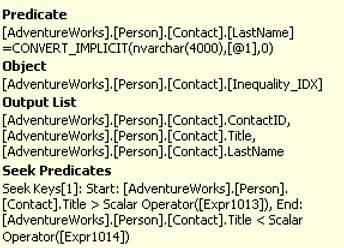
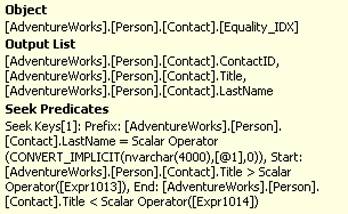
You can also look at the execution plans for these two different queries and identify the different ways the index SEEK operation is performed against the index. The query that has the inequality column first (Title) in the non-clustered index only performs the “Seek Predicate” using the Title column, and requires an extra “Predicate” operation on the LastName column. Whereas, the query that has the equality column first is able to use both the Title and LastName in the “Seek Predicates” operation, and this does not require a “Predicate” operation. This is why the second query performed less I/O operations.
Below I have included part of the output of the SEEK operation of the execution plan from the first and second query. Note how the first query has a “Predicate” operation at the top, where as the second one does not. Also if you look at the “Seek Predicates” output you will see that only the “Title” column was used in the first query, whereas the second query was able to use both columns.
Output from the first query:
Output from the second query:
If you think about why SQL Server needs to perform the extra “Predicate” operation on the first one it make perfect sense. When the equality columns are first in the index, SQL Server is able to take equality column values and just search down the upper index pages to find the location of those values and then it can continue seeking on the inequality value because it knows the indexes at this point will be ordered by the inequality column. However, when the inequality column is first in the index, SQL server is only able to search the upper index pages until it finds the value that meets your inequality value. After finding the inequality value, it cannot be sure that index is order by the equality column after that. Most likely it is not since it is highly likely that there will be multiple values for the equality columns in most situations. Because of this, SQL Server needs to return all the values for the equality columns that meet the inequality operation then use the “Predicate” operation to select the rows that actually match the equality column value specified in your query. This is why having the inequality columns first requires more I/O operations.
Selecting and Placing Columns Is Important
Determining which columns to select for your indexes is critical. If you select the correct ones your application performance is excellent, but when you select the incorrect ones your indexes are very inefficient for resolving your queries. You also need to place your columns within your multi-column indexes based on whether they are used in equality or inequality operations. Having a little knowledge of how your application is using your database columns and how SQL Server processes indexes helps you make good decisions when you create your indexes.