


Rob Gravelle demonstrates a solution for passing MySQL dynamic field names to the group_concat function using a combination of stored proc input parameters, string concatenation, and prepared statements.
Although there is no direct support for dynamic declaration of column and table names in MySQL stored procedures, by utilizing user variables and prepared statements we can achieve the same result. In the MySQL Input Parameters Add Flexibility to Crosstab Stored Procedures article, we created six input parameters in order to pass columns and even aggregate functions to our proc. So far, we’ve added every field except for the REGION_CODE. That one will take some doing, so we will make it our prime focus today.
The SortColumnField Parameter
The SortColumnField parameter will replace the hard-coded REGION_CODE in the proc and will set the column sorting, much like the SortRowField sets the row sorting (the new parameter appears in Red):
CREATE PROCEDURE `p_case_counts_per_region_by_month` (IN AggregateFunction VARCHAR(64),
                                                      IN ColumnField       VARCHAR(64),
                                                      IN RowField          VARCHAR(64),
                                                      IN ColumnFieldAlias  VARCHAR(64),
                                                      IN RowFieldAlias     VARCHAR(64),
                                                      IN SortRowField      VARCHAR(64),
                                                      IN SortColumnField   VARCHAR(64))
LANGUAGE SQL
NOT DETERMINISTIC
CONTAINS SQL
SQL SECURITY DEFINER
BEGIN
SELECT concat(
  "SELECT CASE WHEN sort_row_field IS NULL", "\n",
  "            THEN 'TOTAL'", "\n",
  "            ELSE row_field", "\n",
  "       END        AS '", RowFieldAlias, "',", "\n",
          group_concat(DISTINCT concat("       agg_fld_", ColumnField,
                                       "  AS '", ColumnFieldAlias, ColumnField, "',", "\n"
                                )
                       order by ColumnField
                       separator ''
          ),
  "       TOTAL", "\n",
  "FROM  (       SELECT   ", SortRowField, "\t\t\t\t\t\t\t\tAS sort_row_field," , "\n",
  "\t\t", RowField, " \t\t\t\t\t\tAS row_field,", "\n",
  group_concat(
  DISTINCT concat("\t\t\t\t", AggregateFunction, "(CASE WHEN ", SortColumnField, " ='", SortColumnField,
                  "' THEN ", ColumnField, " ELSE NULL END) AS 'agg_fld_",
                  SortColumnField, "',", "\n"
           )
    order by SortColumnField
    separator ''
  ),
  "              ", AggregateFunction, "(", ColumnField, ")\t\t\t\t\tAS 'TOTAL'", "\n",
  "              FROM  TA_CASES", "\n",
  "              WHERE YEAR(CREATION_DATE)=", YEAR(CREATION_DATE), "\n",
  "              GROUP BY SortRowField WITH ROLLUP) AS CA;"
) statement
into @sql_stmt
FROM TA_CASES
WHERE YEAR(CREATION_DATE)=1998;
  prepare case_counts_per_region_by_month
  from @case_counts_per_region_by_month;
  execute case_counts_per_region_by_month;
  deallocate prepare case_counts_per_region_by_month;
END
Let’s call the updated proc with the extra parameter, passing in the REGION_CODE field:
mysql>call p_case_counts_per_region_by_month("COUNT",
-->   "FEE_NUMBER",
-->   "MONTHNAME(CREATION_DATE)",
-->   "REGION",
-->   "Month",
-->   "MONTH(CREATION_DATE)",
-->   "REGION_CODE");
For some reason, the proc does not work as expected, and throws the following error!
mysql>SQL Error: Unknown column 'AggFld_REGION_CODE' in 'field list'
A closer look at the dynamically generated SQL reveals the source of the error. The last “REGION_CODE” parameter is being interpreted as a string literal rather than a field name! Recall that, while most of the code is part of a concat() function, the group_concat() is accessing the field directly from the TA_CASES table. The following code snippet highlights direct references to the REGION_CODE field within the group_concat() functions:
    group_concat( DISTINCT concat("       REGION_", REGION_CODE,
                                  "  AS 'REGION ", REGION_CODE, "',", "\n"
                           )
                  order by REGION_CODE
                  separator ''
                ),
...
    group_concat(
        DISTINCT concat("\t\t\t\tCOUNT(CASE WHEN REGION_CODE ='", REGION_CODE,
                        "' THEN FEE_NUMBER ELSE NULL END) AS 'REGION_",
                        REGION_CODE, "',", "\n"
                 )
        order by REGION_CODE
        separator ''
    ),
...
FROM TA_CASES
WHERE YEAR(CREATION_DATE)=1998;
A closer look at the generated SQL statement confirms the above assessment. While the case statements are coming out exactly as expected, the outer SELECT field values contain literal strings instead of the REGION_CODE field’s value:
SELECT CASE WHEN SortRowField IS NULL
            THEN 'TOTAL'
            ELSE RowField
       END        AS 'Month',
       AggFld_REGION_CODE  AS 'REGION REGION_CODE',
       TOTAL
FROM  ( SELECT MONTH(CREATION_DATE)                          AS SortRowField,
               MONTHNAME(CREATION_DATE)             AS RowField,
               COUNT(CASE WHEN REGION_CODE ='01' THEN FEE_NUMBER ELSE NULL END) AS 'AggFld_01',
               COUNT(CASE WHEN REGION_CODE ='02' THEN FEE_NUMBER ELSE NULL END) AS 'AggFld_02',
               COUNT(CASE WHEN REGION_CODE ='03' THEN FEE_NUMBER ELSE NULL END) AS 'AggFld_03',
               COUNT(CASE WHEN REGION_CODE ='04' THEN FEE_NUMBER ELSE NULL END) AS 'AggFld_04',
               COUNT(CASE WHEN REGION_CODE ='05' THEN FEE_NUMBER ELSE NULL END) AS 'AggFld_05',
               COUNT(FEE_NUMBER )
         FROM  TA_CASES
         WHERE YEAR(CREATION_DATE)=1998
         GROUP BY SortRowField WITH ROLLUP) AS CA;
Proposed Solution: Generate the Outer SQL Statement
We can get around this issue in the same way that we did with the other fields, by creating a prepared statement and then executing it to retrieve the query results. The challenge here is to insert the existing dynamically generated strings into the new one while preserving the syntax.
The Escape Character
Inserting a string within another takes a solid grasp of character escaping. In computer languages, an escape character is used to invoke an alternative interpretation on the subsequent character(s) in a character sequence. Usually it is used to toggle a character’s default behavior between being interpreted as “just a character”, or one with special meaning or function. MySQL uses the backslash character (\). We’ve already used the escape character for newlines (“\n”) and tabs (“\t”). Here is the complete list of escape characters in MySQL:
|
\0 |
An ASCII NUL (0x00) character. |
|
\’ |
A single quote (“’”) character. |
|
\” |
A double quote (“””) character. |
|
\b |
A backspace character. |
|
\n |
A newline (linefeed) character. |
|
\r |
A carriage return character. |
|
\t |
A tab character. |
|
\Z |
ASCII 26 (Control-Z). See note following the table. |
|
\\ |
A backslash (“\”) character. |
|
\% |
A “%” character. See note following the table. |
|
\_ |
A “_” character. See note following the table. |
For all other escape sequences, the backslash is ignored. That is, the escaped character is interpreted as if it was not escaped. For example, “\x” becomes just “x”.
Writing Quote Characters within a String
Strings that contain quotes require extra consideration, as there are several ways to include quote characters within a string:
- A “‘” inside a string quoted with “‘” may be written as “””.
- A ““” inside a string quoted with ““” may be written as ““””.
- Precede the quote character by an escape character (“\”).
- A “‘” inside a string quoted with ““” needs no special treatment and need not be doubled or escaped. In the same way, ““” inside a string quoted with “‘” needs no special treatment.
The following SELECT statements demonstrate how quoting and escaping work:
mysql> SELECT 'hello', '"hello"', '""hello""', 'hel''lo', '\'hello';
+-------+---------+-----------+--------+--------+
| hello | "hello" | ""hello"" | hel'lo | 'hello |
+-------+---------+-----------+--------+--------+

mysql> SELECT "hello", "'hello'", "''hello''", "hel""lo", "\"hello";
+-------+---------+-----------+--------+--------+
| hello | 'hello' | ''hello'' | hel"lo | "hello |
+-------+---------+-----------+--------+--------+
For consistency, I am keeping with the backslash character for all character escaping.
Rather than manually searching for instances of each field or quotes, it may be easier to use a Search and Replace function such as those found in most text editors:
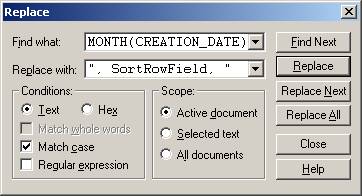
To get you started, here’s the code for the inner and outer SELECT strings, along with the first instance of string within a string syntax to assign the SQL code into the @sql_stmt variable:
SELECT concat(
  "SELECT concat(", "\n",
  "    \"SELECT CASE WHEN sort_row_alias IS NULL\", \"\\n\",", "\n",
...
  ") statement", "\n",
  "into @sql_stmt", "\n",
  "FROM TA_CASES", "\n",
  "WHERE YEAR(CREATION_DATE)=1998;"
) statement
into @sql_stmt;
Be sure to build up the SQL string slowly and test the code often so that you catch syntax errors as they come up. If you have access to a text editor that supports syntax highlighting, such as TextPad, I would suggest that you make use of that feature. It will make your life a whole lot easier!
Fetching the data will now require an additional step because the first execution of the prepared statement will only get us to the original outer SQL statement. It must also be executed to arrive at the final SQL:
CREATE PROCEDURE `p_case_counts_per_region_by_month` (IN AggregateFunction VARCHAR(64),
                                                      IN ColumnField       VARCHAR(64),
                                                      IN RowField          VARCHAR(64),
                                                      IN ColumnFieldAlias  VARCHAR(64),
                                                      IN RowFieldAlias     VARCHAR(64),
                                                      IN SortRowField      VARCHAR(64),
                                                      IN SortColumnField   VARCHAR(64))
LANGUAGE SQL
NOT DETERMINISTIC
CONTAINS SQL
SQL SECURITY DEFINER
BEGIN
SELECT concat(
  "SELECT concat(", "\n",
  "    \"SELECT CASE WHEN sort_row_alias IS NULL\", \"\\n\",", "\n",
  "    \"            THEN 'TOTAL'\", \"\\n\",", "\n",
  "    \"            ELSE row_name\", \"\\n\",", "\n",
  "    \"       END        AS '", RowFieldAlias, "',\", \"\\n\",", "\n",
  "    group_concat( DISTINCT concat(\t\"       AggFld_\", ", SortColumnField, ",", "\n",
  "\t\t\t\t\t\t\t\t\t\"  AS '", ColumnFieldAlias, " \", ", SortColumnField, ", \"',\", \"\\n\"", "\n",
  "                )", "\n",
  "                order by ", SortColumnField, "\n",
  "                separator ''", "\n",
  "                ),", "\n",
  "    \"       TOTAL\", \"\\n\",", "\n",
  "    \"FROM  ( SELECT   ", SortRowField, "\t\t\t\t\t\t\t\tAS sort_row_alias,\", \"\\n\",", "\n",
  "    \"                 ", RowField, "\t\t\t\t\t\t\t\tAS 'row_name',\", \"\\n\",", "\n",
  "    group_concat(", "\n",
  "        DISTINCT concat(\"\t\t\t\t", AggregateFunction, "(CASE WHEN ", SortColumnField, " ='\", ", SortColumnField, ",", "\n",
  "                        \"' THEN ", ColumnField, " ELSE NULL END) AS 'AggFld_\",", "\n"
  "                        ", SortColumnField, ", \"',\", \"\\n\"", "\n",
  "                 )", "\n"
  "        order by ", SortColumnField, "\n",
  "        separator ''", "\n",
  "    ),", "\n",
  "    \"        ", AggregateFunction, "(", ColumnField, ")\t\t\t\t\tAS 'TOTAL'\", \"\\n\",", "\n",
  "    \"                 FROM  TA_CASES\", \"\\n\",", "\n",
  "    \"                 WHERE YEAR(CREATION_DATE)=\", YEAR(CREATION_DATE), \"\\n\",", "\n",
  "    \"                 GROUP BY row_name WITH ROLLUP) AS CA;\"", "\n",
  ") statement", "\n",
  "into @sql_stmt", "\n",
  "FROM TA_CASES", "\n",
  "WHERE YEAR(CREATION_DATE)=1998;"
) statement
into @sql_stmt;
  prepare case_counts_per_region_by_month_stmt
  from @sql_stmt;
  execute case_counts_per_region_by_month_stmt;
  deallocate prepare case_counts_per_region_by_month_stmt;

  prepare case_counts_per_region_by_month_stmt
  from @sql_stmt;
  execute case_counts_per_region_by_month_stmt;
  deallocate prepare case_counts_per_region_by_month_stmt;

END
To Format or Not to Format?
You may find it easier to omit the newline and tab formatting codes, as they are not necessary for the SQL to run. They are there for our benefit; so that we can easily read the generated SQL should we run into any trouble. We can remove the last prepared statement and select the @sql_stmt variable to verify that the SQL matches what we had previously:
SELECT concat(
  "SELECT concat(", "\n",
  "    \"SELECT CASE WHEN sort_row_alias IS NULL\", \"\\n\",", "\n",
  ...
  "into @sql_stmt", "\n",
  "FROM ", Tables, "\n",
  "WHERE ", Criteria, ";"
) statement
into @sql_stmt;
--replace the prepared statement code with the following line to
--examine the generated SQL code:
select @sql_stmt;
Including the Table and Criteria Parameters
To make the proc truly dynamic, we have to add input parameters for the table(s) and select criteria. This would allow us to include multiple tables and specify complex selection criteria:
CREATE PROCEDURE `p_case_counts_per_region_by_month` (IN AggregateFunction VARCHAR(64),
                                                      IN ColumnField       VARCHAR(64),
                                                      IN RowField          VARCHAR(64),
                                                      IN ColumnFieldAlias  VARCHAR(64),
                                                      IN RowFieldAlias     VARCHAR(64),
                                                      IN SortRowField      VARCHAR(64),
                                                      IN SortColumnField   VARCHAR(64),
                                                      IN Tables            VARCHAR(64),
                                                      IN Criteria          VARCHAR(64))
LANGUAGE SQL
NOT DETERMINISTIC
CONTAINS SQL
SQL SECURITY DEFINER
BEGIN
SELECT concat(
  "SELECT concat(", "\n",
  "    \"SELECT CASE WHEN sort_row_alias IS NULL\", \"\\n\",", "\n",
  "    \"            THEN 'TOTAL'\", \"\\n\",", "\n",
  "    \"            ELSE row_name\", \"\\n\",", "\n",
  "    \"       END        AS '", RowFieldAlias, "',\", \"\\n\",", "\n",
  "    group_concat( DISTINCT concat(\t\"       AggFld_\", ", SortColumnField, ",", "\n",
  "\t\t\t\t\t\t\t\t\t\"  AS '", ColumnFieldAlias, " \", ", SortColumnField, ", \"',\", \"\\n\"", "\n",
  "                )", "\n",
  "                order by ", SortColumnField, "\n",
  "                separator ''", "\n",
  "                ),", "\n",
  "    \"       TOTAL\", \"\\n\",", "\n",
  "    \"FROM  ( SELECT   ", SortRowField, "\t\t\t\t\t\t\t\tAS sort_row_alias,\", \"\\n\",", "\n",
  "    \"                 ", RowField, "\t\t\t\t\t\t\t\tAS 'row_name',\", \"\\n\",", "\n",
  "    group_concat(", "\n",
  "        DISTINCT concat(\"\t\t\t\t", AggregateFunction, "(CASE WHEN ", SortColumnField, " ='\", ", SortColumnField, ",", "\n",
  "                        \"' THEN ", ColumnField, " ELSE NULL END) AS 'AggFld_\",", "\n"
  "                        ", SortColumnField, ", \"',\", \"\\n\"", "\n",
  "                 )", "\n"
  "        order by ", SortColumnField, "\n",
  "        separator ''", "\n",
  "    ),", "\n",
  "    \"        ", AggregateFunction, "(", ColumnField, ")\t\t\t\t\tAS 'TOTAL'\", \"\\n\",", "\n",
  "    \"                 FROM  ", Tables, "\", \"\\n\",", "\n",
  "    \"                 WHERE ", Criteria, "\", \"\\n\",", "\n",
  "    \"                 GROUP BY row_name WITH ROLLUP) AS CA;\"", "\n",
  ") statement", "\n",
  "into @sql_stmt", "\n",
  "FROM ", Tables, "\n",
  "WHERE ", Criteria, ";"
) statement
into @sql_stmt;
  prepare case_counts_per_region_by_month_stmt
  from @sql_stmt;
  execute case_counts_per_region_by_month_stmt;
  deallocate prepare case_counts_per_region_by_month_stmt;
  prepare case_counts_per_region_by_month_stmt
  from @sql_stmt;
  execute case_counts_per_region_by_month_stmt;
  deallocate prepare case_counts_per_region_by_month_stmt;
END
There are other solutions than the one that is presented here, but we’ll leave those for another day. Having accomplished our goal for this series, which was to explore how Crosstab Queries could be generated within MySQL, we will be moving on to something fresh next time.