


Part one
of this series provided some real-life scenarios for which Oracle Label
Security (OLS) could be used to effectively enforce the corresponding business
rules and the dynamics by which OLS secures data at the row level. In this
article, we will delve into how to set up OLS on an Oracle 9i database, how to
create a security policy and its label components, and how to apply those
security label components to both end users and to the data that needs to be
secured.
Preparation:
Installing OLS Components
Configuring the DBMS
The first step in applying OLS security
is to configure the database and server to utilize OLS. Unfortunately, OLS is
not one of the default options when the Oracle DBMS software is first installed
on the target server; it must be selected as a custom option from the Oracle
Universal Installer (OUI).
Fortunately, if OLS was not installed
initially, this can be easily remedied via OUI. Here is a sample OUI screen
showing where to locate the option under Oracle 9iR2 for Windows; of course,
your installation may vary for UNIX or other operating systems:
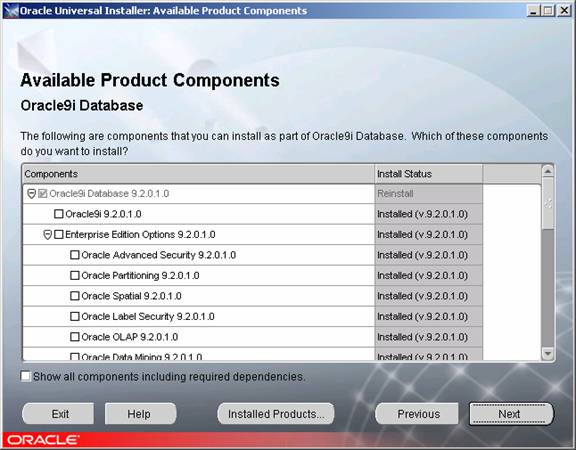
Figure
1. Installing OLS from OUI.
Configuring the Database.
After installing OLS via OUI, the
corresponding database objects must be installed on the target database as
well. The Oracle Database Configuration Assistant (DBCA) allows you to install
OLS features by first selecting the Configure database options in a database
choice, supplying the SYS user id and password and then selecting the Oracle
Label Security option (see below):
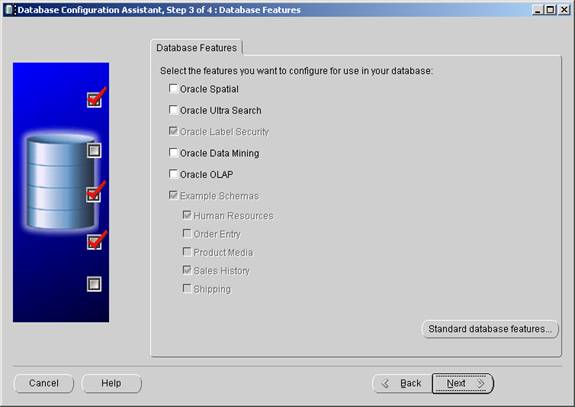
Figure
2. Installing OLS Components in an existing database.
However,
if scripts are being used to create the new database, or if the target database
already exists, OLS can be installed by logging into the target database via
SQLPLUS, connecting as the SYS user in SYSDBA mode, and then executing the $ORAHOME\rdbms\admin\catols.sql script. This script creates a new user, LBACSYS,
with a default password of LBACSYS, and creates all necessary OLS objects and
stores them in the LBACSYS schema.
It is
important to note that both of these aforementioned steps must be
completed for OLS to work properly, otherwise the Oracle Policy Manager feature
will not be able to manage security policy information.
Verifying
the Configuration
Once OLS
has been installed in the DBMS and the database via the prior steps, it is a
good idea to verify that OLS is installed successfully by checking for the
existence of the LBACSYS user and its schema objects. The following queries
verify how many objects have been created and if they are in a VALID state, and
also query DBA_REGISTRY via the following script to show what version of OLS
has been successfully installed:
SELECT
     object_type
    ,COUNT(*)
  FROM dba_objects
 WHERE owner=’LBACSYS’
 GROUP BY object_type;
OBJECT_TYPE          COUNT(*)
—————— ———-
FUNCTION                   32
INDEX                      26
LIBRARY                    10
LOB                         1
PACKAGE                    23
PACKAGE BODY               22
PROCEDURE                   2
SEQUENCE                    3
TABLE                      16
TRIGGER                     8
TYPE                        6
TYPE BODY                   5
VIEW                       57
13 rows selected
COL comp_name FORMAT A32
COL version   FORMAT A16
SELECT
     comp_id
    ,comp_name
    ,version
  FROM dba_registry;
COMP_ID                        COMP_NAME                        VERSION
—————————— ——————————– ———
CATALOG                        Oracle9i Catalog Views           9.2.0.1.0
CATPROC                        Oracle9i Packages and Types      9.2.0.1.0
OWM                            Oracle Workspace Manager         9.2.0.1.0
JAVAVM                         JServer JAVA Virtual Machine     9.2.0.1.0
XML                            Oracle XDK for Java              9.2.0.2.0
CATJAVA                        Oracle9i Java Packages           9.2.0.1.0
CONTEXT                        Oracle Text                      9.2.0.1.0
XDB                            Oracle XML Database              9.2.0.1.0
OLS                            Oracle Label Security            9.2.0.1.0
9 rows selected
Figure3. Results of Successful OLS Install.
If the installation
has been unsuccessful, Oracle recommends that the CATOLS script mentioned
previously should be rerun. Be aware, however, that re-executing the script
causes the destruction and recreation of the LBACSYS user and its schema’s
objects, so any OLS security policies and components information previously
created in that schema will cease to exist.
Finally,
note that OLS can be completely removed from a database by running the $ORAHOME\rdbms\admin\catnools.sql
script from the SYS user in SYSDBA mode.