


To secure sensitive data,
Oracle provides developers with the DBMS_OBFUSCATION_TOOLKIT. This supplied
PL/SQL package, available in both the Standard and Enterprise
editions, is the industrial strength version of the DBMS_RANDOM package. Upon
reading Oracle’s documentation about this package, you will need a decoder just
to keep track of all the acronyms and to decrypt the errors in Oracle’s sample
code. However, once you see how easy it is to use, you will be able to take Oracle’s
code example and modify it for your own use.
If you have never worked or
dealt with encryption, Oracle’s documentation provides a short summary of
encryption principles in the Oracle9i Supplied PL/SQL Packages and Types Reference documentation. Like many other
things in Oracle, just because you can do something does not mean you should do
it. Encryption is one of those features best used when used appropriately. What
is not pointed out is this truism: what is created by man can be broken by man.
How does this apply to Oracle’s obfuscation toolkit? Let’s look at the one of
the Data Encryption Standard options.
Oracle
states that the “Triple DES
(3DES) is a far stronger cipher than DES; the resulting ciphertext (encrypted
data) is much harder to break using an exhaustive search: 2**112 or 2**168
attempts instead of 2**56 attempts.” What is the significance of these numbers?
Suppose you build a computer capable of making 1000 attempts each second. How
long would it take to exhaust 2 to the 56 (256) attempts? Before you
get your calculator, take a wild guess. Did you guess something close to just
over two million years? A very significant obstacle in launching a brute force
attack against encrypted data is time. If you are dealing with 2 to the 168
attempts, your next biggest obstacle, after time itself, is the sun, because it
will go supernova many billions of years before you’ll finish.
Unlike port assignments,
when it comes to encryption, the standards are much clearer, and in fact, are
promulgated by the government. You can read more about the standards (plus get
some background on encryption) at http://www.itl.nist.gov/fipspubs/fip46-2.htm.
Oracle’s documentation
One example Oracle uses in
its documentation may leave you feeling a bit mystified. Why is that? Because
of the errors in the code, that’s why. If you use the example shown in Chapter
14 of the Oracle9i Application Developer’s Guide –
Fundamentals, you will need to make the changes shown in the code below.
DECLARE
 input_string        VARCHAR2(16) := ‘tigertigertigert’;
 key_string          VARCHAR2(8)  := ‘scottsco’;
 encrypted_string    VARCHAR2(2048);
 decrypted_string    VARCHAR2(2048);
 error_in_input_buffer_length EXCEPTION;
 PRAGMA EXCEPTION_INIT(error_in_input_buffer_length, -28232);
   INPUT_BUFFER_LENGTH_ERR_MSG VARCHAR2(100) :=
    ‘*** DES INPUT BUFFER NOT A MULTIPLE OF 8 BYTES ***’;
BEGIN
   dbms_output.put_line(‘> ========= BEGIN TEST =========’);
   dbms_output.put_line(‘> Input string                 : ‘ ||
 input_string);
   –BEGIN <– ignore this, typo in Oracle’s documentation
      dbms_obfuscation_toolkit.DESEncrypt(
                   input_string => input_string,
                   key_string => key_string,
                   encrypted_string => encrypted_string );
      dbms_output.put_line(‘> Encrypted string             : ‘ ||
                   encrypted_string);
— Add DESDecrypt as shown, change raw to key_string
      dbms_obfuscation_toolkit.DESDecrypt(
                   input_string => encrypted_string,
                   key_string => key_string,
                   decrypted_string => decrypted_string);
      dbms_output.put_line(‘> Decrypted output             : ‘ ||
                   decrypted_string);
      dbms_output.put_line(‘>  ‘);
      if input_string =
                   decrypted_string THEN
         dbms_output.put_line(‘> DES Encryption and Decryption successful’);
      END IF;
EXCEPTION
   WHEN error_in_input_buffer_length THEN
      dbms_output.put_line(‘> ‘ || INPUT_BUFFER_LENGTH_ERR_MSG);
END;
Let’s run
this and see what the output is like.
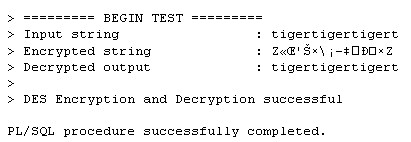
The encrypted string portion
may look different in your SQL*Plus session because some of the characters will
appear as darkened rectangles (the ANSI equivalent of “I don’t know how to
display this character, so here’s a black rectangle for you.”). Once you get
past the long package and subprogram names, using the toolkit is pretty simple.
The example shown in Chapter 34 of the Oracle9i Supplied PL/SQL Packages and Types
Reference actually works as is and produces the output shown below.
DECLARE
   input_string   VARCHAR2(16) := ‘tigertigertigert’;
   raw_input      RAW(128) := UTL_RAW.CAST_TO_RAW(input_string);
   key_string     VARCHAR2(8)  := ‘scottsco’;
   raw_key        RAW(128) := UTL_RAW.CAST_TO_RAW(key_string);
   encrypted_raw               RAW(2048);
   encrypted_string            VARCHAR2(2048);
   decrypted_raw               RAW(2048);
   decrypted_string            VARCHAR2(2048);
   error_in_input_buffer_length EXCEPTION;
   PRAGMA EXCEPTION_INIT(error_in_input_buffer_length, -28232);
   INPUT_BUFFER_LENGTH_ERR_MSG VARCHAR2(100) :=
    ‘*** DES INPUT BUFFER NOT A MULTIPLE OF 8 BYTES – IGNORING
EXCEPTION ***’;
   double_encrypt_not_permitted EXCEPTION;
   PRAGMA EXCEPTION_INIT(double_encrypt_not_permitted, -28233);
   DOUBLE_ENCRYPTION_ERR_MSG VARCHAR2(100) :=
    ‘*** CANNOT DOUBLE ENCRYPT DATA – IGNORING EXCEPTION ***’;
— 1. Begin testing raw data encryption and decryption
   BEGIN
   dbms_output.put_line(‘> ========= BEGIN TEST RAW DATA =========’);
   dbms_output.put_line(‘> Raw input                        : ‘ ||
                 UTL_RAW.CAST_TO_VARCHAR2(raw_input));
   BEGIN
      dbms_obfuscation_toolkit.DESEncrypt(input => raw_input,
               key => raw_key, encrypted_data => encrypted_raw );
      dbms_output.put_line(‘> encrypted hex value              : ‘ ||
               rawtohex(encrypted_raw));
      dbms_obfuscation_toolkit.DESDecrypt(input => encrypted_raw,
               key => raw_key, decrypted_data => decrypted_raw);
      dbms_output.put_line(‘> Decrypted raw output             : ‘ ||
                    UTL_RAW.CAST_TO_VARCHAR2(decrypted_raw));
      dbms_output.put_line(‘>  ‘);
      if UTL_RAW.CAST_TO_VARCHAR2(raw_input) =
                    UTL_RAW.CAST_TO_VARCHAR2(decrypted_raw) THEN
         dbms_output.put_line(‘> Raw DES Encyption and Decryption successful’);
      END if;
   EXCEPTION
      WHEN error_in_input_buffer_length THEN
             dbms_output.put_line(‘> ‘ || INPUT_BUFFER_LENGTH_ERR_MSG);
   END;
   dbms_output.put_line(‘>  ‘);
— 2. Begin testing string data encryption and decryption
   dbms_output.put_line(‘> ========= BEGIN TEST STRING DATA =========’);
   BEGIN
      dbms_output.put_line(‘> input string                     : ‘
                           || input_string);
      dbms_obfuscation_toolkit.DESEncrypt(
               input_string => input_string,
               key_string => key_string,
               encrypted_string => encrypted_string );
      dbms_output.put_line(‘> encrypted hex value              : ‘ ||
                   rawtohex(UTL_RAW.CAST_TO_RAW(encrypted_string)));
      dbms_obfuscation_toolkit.DESDecrypt(
               input_string => encrypted_string,
               key_string => key_string,
               decrypted_string => decrypted_string );
      dbms_output.put_line(‘> decrypted string output          : ‘ ||
                 decrypted_string);
      if input_string = decrypted_string THEN
         dbms_output.put_line(‘> String DES Encyption and Decryption successful’);
      END if;
   EXCEPTION
      WHEN error_in_input_buffer_length THEN
             dbms_output.put_line(‘ ‘ || INPUT_BUFFER_LENGTH_ERR_MSG);
   END;
   dbms_output.put_line(‘>  ‘);
END;
> ========= BEGIN TEST RAW DATA =========
> Raw input              : tigertigertigert
> encrypted hex value    : 5AAB8C0D278AD75CA1968790D00FD75A
> Decrypted raw output   : tigertigertigert
>
> Raw DES Encyption and Decryption successful
>
> ========= BEGIN TEST STRING DATA =========
> input string           : tigertigertigert
> encrypted hex value    : 5AAB8C0D278AD75CA1968790D00FD75A
> decrypted string output: tigertigertigert
> String DES Encyption and Decryption successful
This does the same thing as
the previous example, except that the output is shown using hexadecimal values
(it’s more “readable?”).
Putting it to use
Let’s take the code from
Oracle and modify it for our use. We will not worry about the exception code,
and we will take input from the user to encrypt a 16-digit credit card number.
Here is the shortened code,
turned into a procedure, along with the sample data.
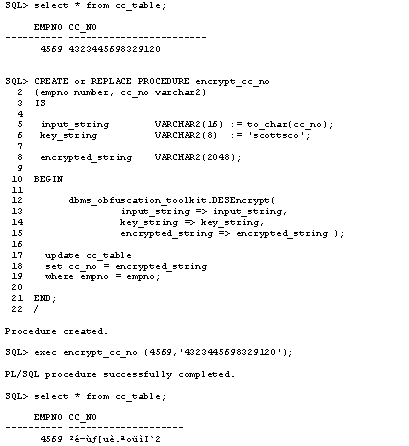
So far, so good. Can the
credit number be unencrypted? Let’s see.
SQL> CREATE or REPLACE PROCEDURE decrypt_cc_no
  2  (empno number)
  3  IS
  4
  5   key_string          VARCHAR2(8)  := ‘scottsco’;
  6
  7   encrypted_string    VARCHAR2(2048);
  8   decrypted_string    VARCHAR2(2048);
  9
 10  BEGIN
 11    select cc_no into encrypted_string
 12    from cc_table
 13    where empno = empno;
 14
 15    dbms_obfuscation_toolkit.DESDecrypt(
 16                     input_string => encrypted_string,
 17                     key_string => key_string,
 18                     decrypted_string => decrypted_string);
 19
 20    update cc_table
 21    set cc_no = decrypted_string
 22    where empno = empno;
 23
 24  END;
 25  /
Procedure created.
SQL> exec decrypt_cc_no(4569);
PL/SQL procedure successfully completed.
SQL> select * from cc_table;
     EMPNO CC_NO
———- ——————
      4569 4323445698329120
We are good to go! The
credit number was successfully restored to its unencrypted value.
In closing
Although the examples shown
were quite simple (and many of the variable names stayed the same to help with
comparing code), the power and ease of use of the DBMS_OBFUSCATION_TOOLKIT is
readily seen. If you were charged with encrypting a table’s worth of credit
card numbers, you would probably use a cursor to gather all of the empno’s and
then use a cursor for loop to update the records in one fell swoop. I hope that
this article has “decrypted” some of the mystery behind one of Oracle’s more
powerful features.