


As mentioned in Parts 1 and 2, there are several relatively easy steps you can take to improve performance. One of those steps involves using an automated tool to “guide” you in writing SQL statements. There are several vendors who manufacture analysis or performance tuning tools, and in the next two articles, we will look at one of them.
Quest Software
Many DBAs and developers use a tool named Toad, produced by Quest Software. According to a statement at Quest Software’s Web site, the Toad user community numbers around 500,000 users. One of Toad’s features is its ability to optimize SQL queries. In other words, Oracle Corporation does not own the market on tuning advisor type of tools.
Knowing that you have several choices with respect to advisory tools, and understanding what it is they do, what do you use them on if you are not working in a production or development environment? And perhaps just as likely, even if you are in a development environment, you may not have any bulk data to use. Generating bulk or large amounts of data is the focus of this article, and the tool we will look at for this purpose is another Quest Software product: DataFactory® for Oracle.
DataFactory
The purpose of DataFactory is to “quickly create meaningful test data for multiple database platforms.” The platforms include Oracle, DB2, Sybase and any ODBC compliant database. Normally retailing at $595 per server, a free 30-day version is available for download at Quest Software’s Web site.
To obtain the software (current version of 5.5.0), you must register using a “real” email address. Hotmail and Gmail addresses were rejected, but Comcast went through just fine. Once you register, you will receive an email that contains a key to unlock the application and start the 30-day free trial clock.
The installation process is quick and straightforward. If you are running Microsoft AntiSpyware, you may receive one or more errors. Disable the real time protection and attempt to reinstall DataFactory.
Creating Tutorial Objects
An excellent way to get to know the application is to use its tutorial objects. The general process is to:
- Create a project
- Create tables in a schema
- Run a script to load data
Unfortunately, an excellent way to get a refresher on disabling system-named referential constraints is to use the built-in tutorial objects. Using an iterative process, you can disable constraints one at a time until the load script runs through without error. However, while Quest is working on fixing this bug, we can take a short excursion into identifying and disabling a constraint.
After starting DataFactory, you can choose to start the tutorial. The instructions on how to load the tutorial objects (as is all help) are in HTML files.
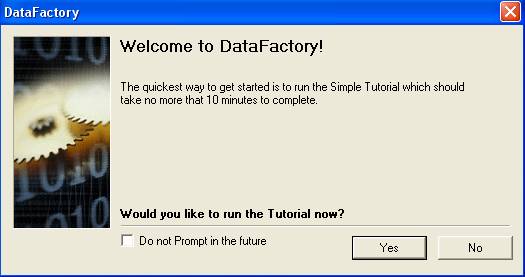
The instructions from the help system state that the tables are populated. That is not correct. The tables (15 in all, named using a “DF_” prefix) are populated after an additional step.
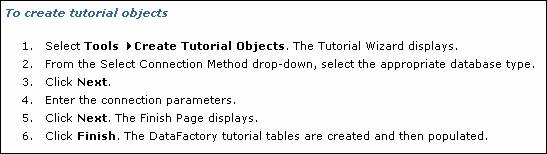
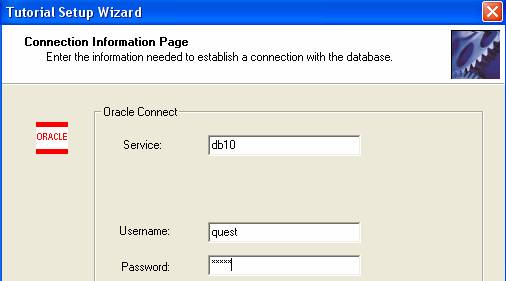
Prior to creating the tables, you may want to create a separate schema in your database. Using Oracle10g, I created a user/schema owner named quest (granting connect and resource will be sufficient). You will be prompted for a username/password combination and database information.
So, following Tools>Create Tutorial Obects –
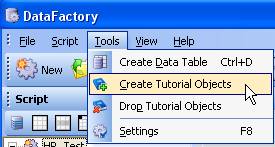
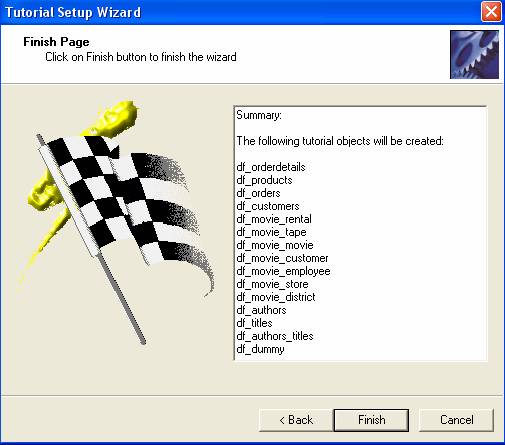
– the Tutorial Setup Wizard appears (with its own version of the Oracle logo).
A list of tables appears on the Finish Page.
Upon successful creation, DataFactory tells you so.
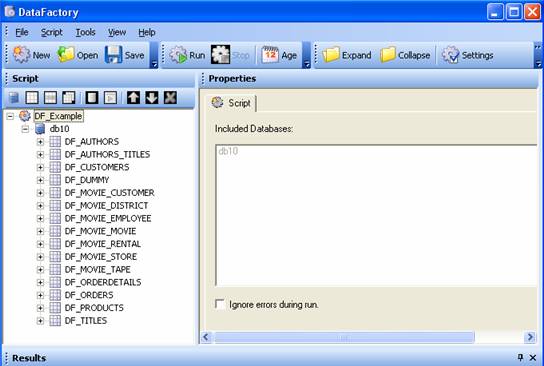
The project folder appears in the left frame
Click the Run button on the main menu. The ORA-02291 integrity constraint violated error will appear quite a few times (some tables more than once) because the loaded data in a foreign key-designated column does not correspond with data in a parent table. Almost all of the constraints use the SYS_Cxxxxxx naming structure, meaning they are not explicitly named.

To work around the integrity constraint violation, you can disable the constraint (once you know which table to alter). The query and ALTER TABLE statement below show one method to identify and disable the problem constraint.
SQL> select owner, constraint_name, table_name, column_name
  2  from all_cons_columns
  3  where constraint_name like '%9814%';
OWNER CONSTRAINT_NAME                TABLE_NAME           COLUMN_NAME
----- ------------------------------ -------------------- ------------
QUEST SYS_C009814                    DF_ORDERS            CUSTID
SQL> alter table df_orders
  2  disable constraint sys_c009814;
Table altered.
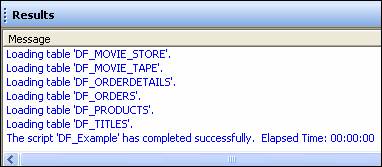
The Results window showing that your project-named script has completed successfully means we are ready to start looking around at what was created.
Instead of analyzing each table one at a time, use the DBMS_STATS built-in (which Oracle recommends to use for most analyze operations). If you are using Oracle10g, you may want to add a WHERE dropped=’NO’ to prevent dropped tables from appearing in queries on user_tables or tab (as an example).
SQL> execute dbms_stats.gather_schema_stats('QUEST');
PL/SQL procedure successfully completed.
SQL> select table_name, num_rows
  2  from user_tables
  3  where dropped='NO';
TABLE_NAME             NUM_ROWS
-------------------- ----------
DF_TITLES                   100
DF_MOVIE_CUSTOMER          1100
DF_MOVIE_EMPLOYEE           900
DF_DUMMY                   1100
DF_AUTHORS_TITLES          1100
DF_MOVIE_RENTAL             700
DF_PRODUCTS                 100
DF_MOVIE_TAPE               400
DF_CUSTOMERS               1100
DF_AUTHORS                 1100
DF_MOVIE_DISTRICT          1100
DF_ORDERS                   101
DF_MOVIE_MOVIE              900
DF_ORDERDETAILS             200
DF_MOVIE_STORE              500
15 rows selected.
Back in the project hierarchy or list of tables, selecting a table in the list will show its columns and their datatypes (you may have to toggle between the Children and Results tabs at the bottom of the application).
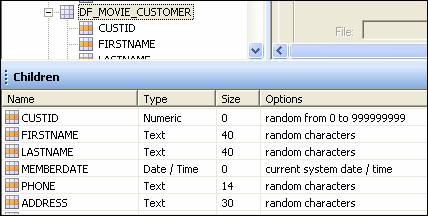
Using the DF_MOVIE_CUSTOMER table as an example, how does its data look? The “random characters” option definitely produces exactly that.

More on the Tutorial Tables
Are there any indexes on the foreign key columns?
SQL> select index_name, table_name, column_name, column_position
  2  from user_ind_columns;
INDEX_NAME   TABLE_NAME           COLUMN_NAME          COLUMN_POSITION
------------ -------------------- -------------------- ---------------
SYS_C009823  DF_MOVIE_DISTRICT    DISTRICTID                         1
SYS_C009827  DF_MOVIE_STORE       STOREID                            1
SYS_C009830  DF_MOVIE_EMPLOYEE    EMPID                              1
SYS_C009837  DF_MOVIE_CUSTOMER    CUSTID                             1
SYS_C009841  DF_MOVIE_MOVIE       MOVIEID                            1
SYS_C009845  DF_MOVIE_TAPE        TAPEID                             1
SYS_C009850  DF_MOVIE_RENTAL      TAPEID                             1
SYS_C009850  DF_MOVIE_RENTAL      CUSTID                             2
SYS_C009850  DF_MOVIE_RENTAL      RENTDATE                           3
SYS_C009810  DF_CUSTOMERS         CUSTID                             1
SYS_C009813  DF_ORDERS            ORDERID                            1
SYS_C009816  DF_PRODUCTS          PRODUCTID                          1
SYS_C009819  DF_ORDERDETAILS      ORDERID                            1
SYS_C009819  DF_ORDERDETAILS      PRODUCTID                          2
14 rows selected.
What does the output suggest? You can immediately identify the fact that for one, not every table has a primary key. There are 15 tables, but only 14 rows (or 11 distinct tables as some indexes are composites). Why do we know this? Because one of the benefits of creating a primary key is that you get an index for free. If you disabled all of the referential integrity constraints that arise in the load script, what else might you suspect?
Oracle recommends indexing foreign key columns as they are frequently used in joins, and the general rule is to index columns used in WHERE clauses (which is obviously where joins are listed). Given the lack of indexes, your suspicion should be that the “create table” component of the tutorial tables does not index foreign key columns.
The query below shows the table name/column name foreign keys (they all have position 1 meaning only a single column was used).
SQL> select a.constraint_name, b.constraint_type,
  2  a.table_name, a.column_name
  3  from user_cons_columns a, all_constraints b
  4  where a.constraint_name=b.constraint_name
  5  and constraint_type = 'R';
CONSTRAINT_NAME  C TABLE_NAME           COLUMN_NAME
---------------- - -------------------- -------------
SYS_C009831      R DF_MOVIE_EMPLOYEE    SUPERVISORID
SYS_C009828      R DF_MOVIE_STORE       DISTRICTID
SYS_C009821      R DF_ORDERDETAILS      PRODUCTID
SYS_C009820      R DF_ORDERDETAILS      ORDERID
DFMOVIESTOREFK2  R DF_MOVIE_STORE       MANAGERID
SYS_C009852      R DF_MOVIE_RENTAL      TAPEID
SYS_C009851      R DF_MOVIE_RENTAL      CUSTID
SYS_C009838      R DF_MOVIE_CUSTOMER    STOREID
SYS_C009814      R DF_ORDERS            CUSTID
SYS_C009846      R DF_MOVIE_TAPE        MOVIEID
DFMOVIEEMPFK2    R DF_MOVIE_EMPLOYEE    STOREID
11 rows selected.
The end result? Suspicion confirmed; the foreign keys were not indexed.
From a management or maintenance perspective, why are only two of the referential integrity constraints explicitly named while the rest are system named? As it turns out, of the 51 constraints in this schema, these happen to be the only two user named constraints.
In Closing
The key point to take away from this exploration of a tool such as DataFactory is that while the tool (or a script you create) can generate millions of rows of test or sample data, what good is any of it if it misses the boat on referential integrity or other best practices with respect to data modeling? If you are trying to tune queries for an application, the test data needs to reflect how the application uses it. If you are relying on referential integrity, your test data needs to support and honor parent table-child table relationships.
From a design standpoint, two best practices that were violated include failure to index foreign key columns, and failure to explicitly name three major items (primary keys, foreign keys, and indexes). A possible third violation concerns not having a primary key on every table. Does every table in a schema require a primary key? No, but for the most part, every table (to support normalization) should, and if not, you should at least know why. Put another way, to not normalize a table should be a conscious decision, not an oversight.