A Brief Pep talk
Since the last article, I have received several e-mails requesting a description on the installation of Clusterware on a 2-node windows 2003 server with VMware. We will cover the installation issue on RHEL4 Release 2 (Nahant) as well, in a later article.
You hear all kinds of claims and see written material that says a lot but actually proves or demonstrates very little. The purpose of showing errors is to show that not everything works like a charm. My purpose in writing this article is to show you every detailed version of the scenario that you will be trying out with the necessary tools in hand.
Prerequisites:
- VMware software: A VMware workstation or an Evaluation version of a GSX Server.
- A Server (if you’re lucky) or just a plain PC/Desktop with 2G memory. (Remember we will do a real 2-node scenario here so give those machines at least 800 Mb each).
- Lots of patience (This is sage advice for us all). You will mess things up now and then, so have patience.
- If you can set up a simple machine [well you guessed it right, another VM with a simple LDAP(ADS)/DNS] server then it’s good BUT if you do have an active/working LDAP/DNS server the better. I will not go into detail on creating an ADS /DNS server; it is simple. Do a search on Google and you will find tons of information on that.
- BACKUP!!! The great thing about VMware is that you can do a progressive backup, meaning you can go on with creating Virtual Machines > Successful? > Back up > Install OS’s successful? > Overwrite the Backup > and so on. This way you will save a lot of time and frustration.
- Oracle software: Go to Oracle’s site and download the necessary software (that would be Database and Clusterware). If you do not have an account at OTN, get it. It’s FREE!
OK now let’s take a look at the overview/architecture of our servers.
Architecture Overview of the 2-node Oracle 10g Release 2 RAC on Windows 2003 Virtual Machine with VMware
I always draw a simple sketch of what I will be needing, what I have in my hand and how the whole architecture will look when I am done with the setup and of course, keep the scalability factor at the back of your mind, as we want to build a 64 node RAC cluster, right? Remember Planning is crucial.
All right then, without much ado let’s started with the Clusterware setup.
Finally Setting up the Virtual Machines for Oracle 10g Release 2 Clusterware Installation
Your Clusterware is very sensitive to a lot of scenarios and doing everything on the Virtual Machines makes it all the more challenging. You need to set up Shared disks.
Setting up Shared SCSI Disks
Step 1: We did see in the last article how you can set up shared disks with the plaindisk scenario, well now I have a better proposal. Just go to your vmware root directory and do the following:
D:\Program Files\VMware\VMware Workstation> vmware-vdiskmanager.exe -c -s 10Gb -a lsilogic -t 2 ASM1.vmdk
Check out the command reference
Exactly one major option should be specified.
VMware Virtual Disk Manager – build 13124.
Usage: vmware-vdiskmanager.exe OPTIONS diskName | drive-letter:
Offline disk manipulation utility
Options:
-c |
: create disk; need to specify other create options | |
-d |
: defragment the specified virtual disk | |
-k |
: shrink the specified virtual disk | |
-n <source-disk> |
: rename the specified virtual disk; need to specify destination disk-name | |
-p |
: prepare the mounted virtual disk specified by the drive-letter for shrinking | |
-q |
: do not log messages | |
-r <source-disk> |
: convert the specified disk; need to specify destination disk-type | |
-x <new-capacity> |
: expand the disk to the specified capacity |
Additional options for create and convert:
-a <adapter> |
: adapter type (ide, buslogic or lsilogic) |
-s <size> |
: capacity of the virtual disk |
-t <disk-type> |
: disk type id |
Disk types:
0 |
: single growable virtual disk |
1 |
: growable virtual disk split in 2Gb files |
2 |
: preallocated virtual disk |
3 |
: preallocated virtual disk split in 2Gb files |
The capacity can be specified in sectors, Kb, Mb or Gb.
The acceptable ranges:
ide adapter : [100.0Mb, 950.0Gb]
scsi adapter: [100.0Mb, 950.0Gb]
As you can see, I choose lsilogic, which was default to my environment. In any case, go ahead and create the *.vmdk disks. I would suggest that you allocate all space to it, it is faster to create a *growable* disk but clusterware might complain during installation, as the disk has to grow during installation.
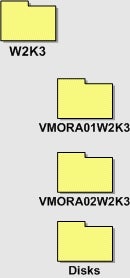
Step 2: Now try to store all your *.vmdk disks in separate folders, something like this. And remember what I said about backups, then all you need is to just backup your root folder W2K3.
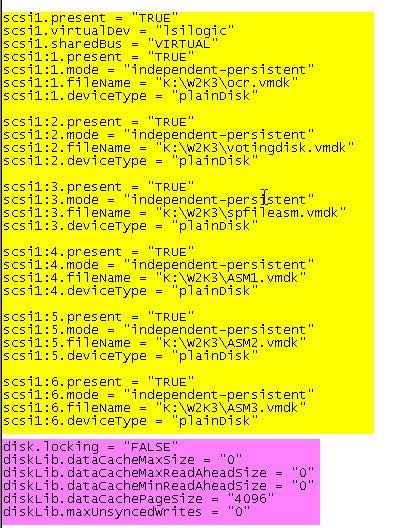
Step 3: Edit both the Virtual Machines *.vmx files like this:
Step 4: Having created the disks, you will need to convert these newly created and discovered disks on both machines into RAW disks before going for OCFS and/or ASM scenario. See Part II of this series for more details.
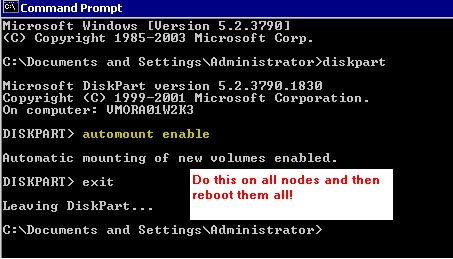
Step 5: Enable automount on all nodes.