No, really, you may have to do this one day: enable the use of barcodes in Oracle Reports. Is this a database administration or administrator responsibility? Yes and no. It is obviously not related to anything having to do with data, but it can certainly falls under the “who is our Oracle and all things Oracle-related product expert?” scenario. Of course, that is you, the resident DBA.
There are two ways to categorize the implementation of barcode printing, and they are easy versus hard. More technically, they are Windows versus UNIX. This is a case where installation on a Windows server is much simpler than on a UNIX variant. Let’s assume you want to use the Barcode 3 of 9 font. This font is widely used and can be read by many barcode scanners. Some of the confusion behind which barcode font to use is due to its many names (e.g., code 39, type 3 of 9, and alpha39, to name a few). The leading and trailing characters are asterisks, and in between is the string (alphanumeric and a few special symbols) to be encoded. You can find many places where the font is freely available, but getting it to work for printing is another matter.
For fonts in general, as in installing a new font for Oracle Reports, the documentation for Application Server has for some time now included a chapter or two on managing fonts. In the 10g (to include 9.0.4 version) realm, look in Oracle Application Server Reports Services Publishing Reports to the Web, and in 11g, look in Oracle Fusion Middleware Publishing Reports to the Web with Oracle Reports Services.
What happens when you print reports on UNIX? By and large, the process is the same regardless of the OS version, where Reports goes through a search of various files. The files include uiprint.txt, uifont.ali, and font files for PPD, AFM, HPD and TFM. PPD is for PostScript, AFM is for Adobe, and the other two are for HP glue files. Oracle first looks at the TK60 (or 90) type, then in ORACLE_type, and finally, in the global directory. A search for PPD files would then be TK90_PPD, then ORACLE_PPD, and finally, ORACLE_HOME/guicommon9/tk90/admin/PPD.
Not to confuse matters more, but Oracle Reports in E-Business Suite has some additional complexity involved because you may be using IX (bit-mapped reports) and PASTA (a mechanism for font embedding in PostScript output for character based reports). Several support notes can assist you with these steps (the top two are a good place to start).
551630.1 How to setup, map, and print custom reports with a barcode / MICR font
240864.1 Activating and Configuring IX Library
356501.1 How to Setup Pasta Quickly and Effectively
267026.1 How To Set The PASTA Debug Option
You can also find information in Volume 1 of Oracle Applications System Administration Guide.
For printing Oracle Reports in UNIX and Windows, the process is diagrammed in the publishing references cited earlier. You can see by illustration how much simpler Windows processing is because of what the APIs do.
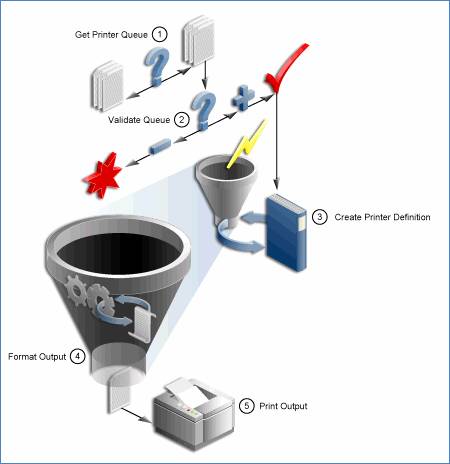
Oracle Reports printing on UNIX
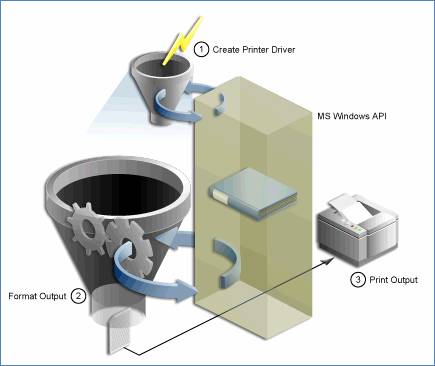
Oracle Reports printing on Microsoft Windows
For a quick example of the differences between Windows and UNIX, let’s install the Barcode 3 of 9 font on a Windows machine. Your own PC works as the “machine” in this example. Step one is to first find the font file and download it to the server/machine of interest. Go into Control Panel, select Fonts, and click File at the top menu. Select Install New Font… and follow the rest of the steps in the Add Fonts dialog window.
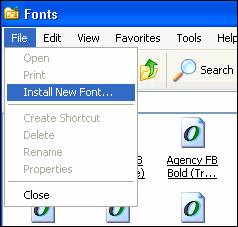
When Windows reads the file, it will detect the name of the font. In this example, the “3 of 9 Barcode (True Type)” name appeared.
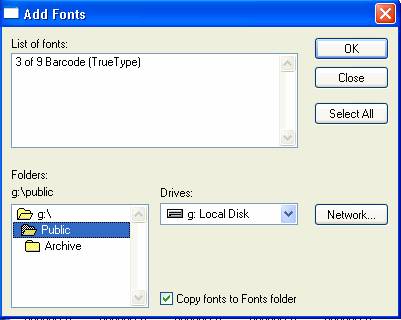
Select the font in the list, click OK, and the font will appear in your Fonts window.
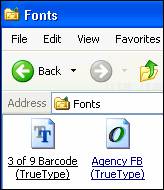
Once the font is installed, you now have a poor man’s way of printing barcodes outside of Reports. In any Word document (or application that reads fonts from your font picker list of values), simply select the 3 of 9 Barcode font. The fonts may also appear as a barcode value in the list of fonts.
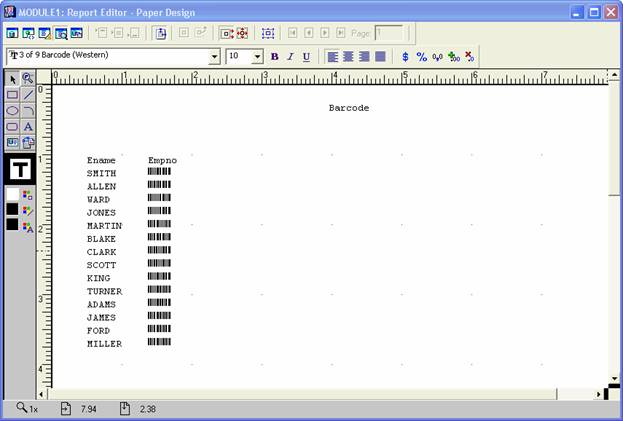
In Report Builder, format your field(s) of interest and the barcode representation of the field appears. As a simple example, create a report based on select ename, empno from emp in the Scott schema, and in the results, format the empno field using the barcode font. In the picture below, selecting the Ename field shows the font (look in the top left corner) to be Courier New (Western) and when the Empno field is selected, you can see the font displayed as the TrueType 3 of 9 Barcode.
So, for “basic” Oracle Reports where the report server is hosted on a Windows server, you have it made fairly easy when it comes to installing a barcode font (or any font for that matter). Now comes the UNIX side.