


by Paul C. Zikopoulos, IBM Canada
In a previous series of articles, I covered the rich application development integration between the Microsoft Visual Studio .NET integrated development environment (IDE), the native IBM DB2 Universal Database (DB2 UDB) managed provider for .NET, and the .NET framework.
I have received a lot of feedback from readers who are surprised at just how productive application developers in the .NET world can be when developing to the DB2 UDB database platform. I have also received inquiries as to the level of integration between DB2 and Java technology. In this series of articles, I have decided to change the application programming interface (API) to Java (JDBC or SQLJ), and the IDE to IBM Rational Application Developer for WebSphere Software, and to take these developers through the integration that the DB2 UDB database provides them.
In Part 1, I start with the Database Explorer. Subsequent parts in this series will include:
- Data definition
- Schema wizards for object creation.
- Entity modeling
- Application deployment.
- Java routines.
- and more…
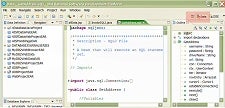
This article assumes that you are working with the Rational Application Developer IDE in the Data Perspective, as shown below:
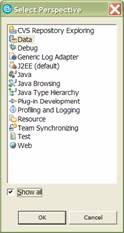
If you don’t see this perspective in the top-right corner of the IDE, click the Open Perspective button (it looks like  ), then click Other, and select the Data perspective from the Select Perspective dialog box, as shown below. (You may need to select the Show all check box to see this perspective, depending on how your IDE has been configured.)
This series also assumes that you have the SAMPLE database created on your local machine. If you don’t, you can create it by entering the db2sampl command from your operating system’s command prompt. In addition to this, create another database called NEWSMPL (which we will use throughout this series when warranted) using the DB2 CREATE DATABASE NEWSMPL statement. If you don’t have a copy of DB2 UDB, you can download a free trial copy at: http://www.ibm.com/developerworks/downloads/im/udb/ or a free licensed copy for personal development purposes at: http://www.software.ibm.com/webapp/download/search.jsp?go=y&rs=db2udbpde.
The Database Explorer
Most application developers are familiar with explorer-style environments in an IDE. Even if you are not an application developer, think Windows Explorer, and you will get the point.
The Database Explorer window in Rational Application Developer is shown below:
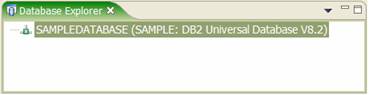
You can see in the previous figure that I have already added the SAMPLE database to this window.
You can perform all sorts of functions from the Database Explorer such as generating SQL to run against target databases, adding database connections, importing the database schema into the Database Definition workbench, which houses your projects, generating the Data Definition Language (DDL) for a corresponding object, visualizing the schema, and more.