Discarding Results of a Query Execution in SQL Server Management Studio | Database Journal

Discarding Results of a Query Execution in SQL Server Management Studio

Written By
Gregory Larsen
Gregory Larsen
Jun 28, 2021
1 minute read

Have you ever been testing a query in SQL Server Management Studio (SSMS) and you really didn’t want to see all the rows of output coming back in the result window? Well, if you have then there is a way to turn off those distracting results when you run your query.

You might ask why would you want to do that?

One reason is that you might want to do some performance testing and the results of the query themselves are not important. By discarding the results of your query, you are testing the performance of the query at the server itself, without taking into account the time it takes to send all the bits in the result set across the network.

To discard the results of a query within SQL Server Management Studio (SSMS) perform the following steps:

  1. Click on the Query menu item in SSMS.
  2. Click on the Query Option item to bring up the Query Options window.
  3. Click on the Results item in the left pane, and then check the Discard results after execution item as shown in the window below:
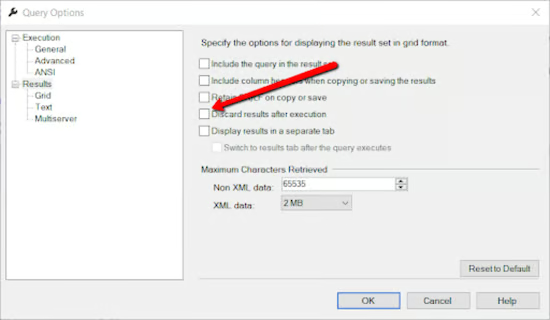
Screenshot shows how to discard results in SQL Server.

Once you do this, click on the “OK” button to make this query option stick. After doing this any query you run will discard the result set when it is executed. All you will get is the number of rows affected by the query. Don’t forget to turn off this option, by unclicking the option, should you eventually want to start seeing the complete results.

Gregory Larsen

Gregory A. Larsen is a DBA at Washington State Department of Health (DOH). Greg is responsible for maintaining SQL Server and other database management software. Greg works with customers and developers to design and implement database changes, and solve database/application related problems. Greg builds homegrown solutions to simplify and streamline common database management tasks, such as capacity management.

Database Journal Logo

DatabaseJournal.com publishes relevant, up-to-date and pragmatic articles on the use of database hardware and management tools and serves as a forum for professional knowledge about proprietary, open source and cloud-based databases--foundational technology for all IT systems. We publish insightful articles about new products, best practices and trends; readers help each other out on various database questions and problems. Database management systems (DBMS) and database security processes are also key areas of focus at DatabaseJournal.com.

Property of TechnologyAdvice. © 2026 TechnologyAdvice. All Rights Reserved

Advertiser Disclosure: Some of the products that appear on this site are from companies from which TechnologyAdvice receives compensation. This compensation may impact how and where products appear on this site including, for example, the order in which they appear. TechnologyAdvice does not include all companies or all types of products available in the marketplace.