


As mentioned in Part 1,
there are several relatively easy steps you can take to improve performance. From
the user’s perspective, one of the most frequently used interfaces with a
database involves SQL statements, so getting a handle on them is a good place
to start in terms of being able to see an immediate improvement.
In the interest of being
complete, I will cover some preliminary steps that will be needed in order to
view what is taking place. These steps include running the plustrce SQL
script, creating an “EXPLAIN_PLAN” table, granting a role, and configuring your
SQL*Plus environment to see execution plans. All of these steps are covered in
“Using Autotrace in SQL*Plus” in Oracle9i
Database Performance Tuning Guide and Reference Release 2 (9.2). For
Oracle10g, the steps are covered in “Tuning SQL*Plus” in SQL*Plus®
User’s Guide and Reference Release 10.2.
Preliminary Steps
If the PLUSTRACE role does
not exist, create it using the PLUSTRCE SQL script found in ORACLE_HOME\sqlplus\admin.
The script is pretty simple:
drop role plustrace;
create role plustrace;
grant select on v_$sesstat to plustrace;
grant select on v_$statname to plustrace;
grant select on v_$mystat to plustrace;
grant plustrace to dba with admin option;
Check for the role using:
SQL> select role from dba_roles where role = ‘PLUSTRACE’;
ROLE
—————-
PLUSTRACE
The user must have (or have
access to) a PLAN_TABLE (it can named something else, but for now, the
“default” name is fine). This table is created using the UTLXPLAN SQL script
found in ORACLE_HOME\rdbms\admin.
SQL> show user
USER is “SYSTEM”
SQL> @?\rdbms\admin\utlxplan
Table created.
SQL> create public synonym plan_table for system.plan_table;
Synonym created.
SQL> grant select, update, insert, delete on plan_table to <your user name>;
Grant succeeded.
SQL> grant plustrace to <your user name>;
Grant succeeded.
The user for these examples
is HR (found in the sample schemas provided by Oracle).
SQL> conn hr/hr
Connected.
SQL> set autotrace on
SQL> select * from dual;
D
–
X
With autotrace set to on,
you can confirm your ability to see an execution plan and some statistics. You
should see output similar to the following:
Execution Plan
———————————————————-
   0    SELECT STATEMENT Optimizer=ALL_ROWS (Cost=2 Card=1 Bytes=2)
   1    0 TABLE ACCESS (FULL) OF ‘DUAL’ (TABLE) (Cost=2 Card=1 Bytes=2)
Statistics
———————————————————-
         24  recursive calls
          0  db block gets
          6  consistent gets
          1  physical reads
          0  redo size
        389  bytes sent via SQL*Net to client
        508  bytes received via SQL*Net from client
          2  SQL*Net roundtrips to/from client
          0  sorts (memory)
          0  sorts (disk)
1 rows processedTo suppress the results of
the query, use “traceonly” in the set statement.
Using Bind Variables
On any number of DBA help
type of Web sites, a frequently seen bit of advice is to use bind variables,
but rarely are the steps or instructions for this step included. Here is a
simple way to create and use a bind variable.
SQL> variable department_id number
SQL> begin
  2  :department_id := 80;
  3  end;
  4  /
PL/SQL procedure successfully completed.
SQL> print department_id
DEPARTMENT_ID
————-
           80
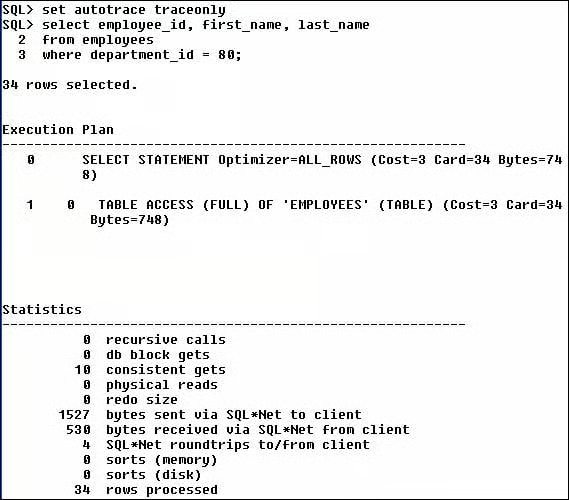
Now let’s make a comparison
between querying for employee ID and name with and without the bind variable
(with the output turned off using traceonly).
Now let’s use the bind
variable.
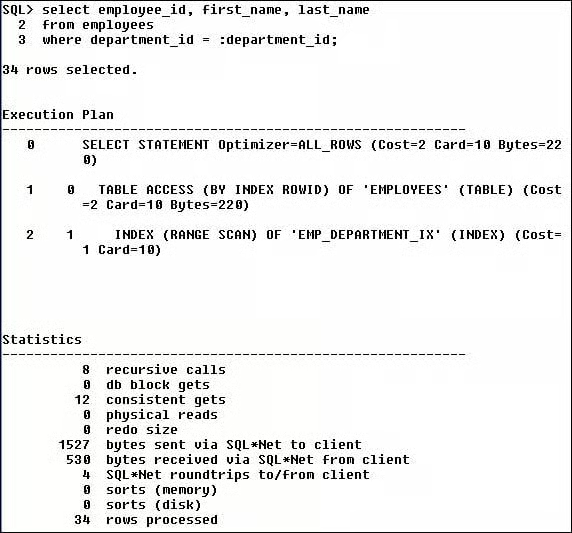
Okay, so the difference isn’t
that great (the cost went from 3 to 2), but this was a small example (the table
only has 107 rows). Is there much of a difference when working with a larger
table? Use the SH schema and its SALES table with its 900,000+ rows.
SQL> select prod_id, count(prod_id)
  2  from sales
  3  where prod_id > 130
  4  group by prod_id;
Same query, but this time
using a bind variable.
SQL> variable prod_id number
SQL> begin
  2  :prod_id := 130;
  3  end;
  4  /
PL/SQL procedure successfully completed.
SQL> print prod_id
   PROD_ID
———-
       130
SQL> select prod_id, count(prod_id)
  2  from sales
  3  where prod_id > :prod_id
  4  group by prod_id;
The cost went from 540 to
33, and that is fairly significant. One of the main benefits is that the query
using the bind variable, that is, the work done parsing the query, stays the
same each and every time. All you have to do is substitute a new value for the
variable.