
About the Series …
This article is a member of the series, MDX Essentials. The series is designed to provide hands-on application of the fundamentals of the Multidimensional Expressions (MDX) language, with each session progressively adding features and capabilities designed to meet specific real-world needs.
Virtually all of the MDX we have constructed in earlier articles can now be used in the SQL Server Management Studio, SQL Server Business Intelligence Studio, and various other areas within the Microsoft integrated Business Intelligence solution, and much of what we construct going forward can be executed in the Analysis Services 2000 MDX Sample Application (assuming connection to an appropriate Analysis Services data source). MDX as a language continues to evolve and expand: we will focus on many new features in articles to come, while still continuing to examine business uses of MDX in general. The use of MDX to meet the real-world needs of our business environments will continue to be my primary concentration within the MDX Essentials series.
For more information about the series in general, as well as the software and systems requirements for getting the most out of its member lessons, please see Set Functions: The DrillDownMember() Function, where important information is detailed regarding the applications, samples and other components required to complete our practice exercises.
Overview
Microsoft Analysis Services (“Analysis Services“), as most of us know, leads the enterprise business intelligence arena with its rich set of analytical and reporting tools. Within the sphere of analysis and reporting with OLAP data sources, most of these tools rely upon functions based in the MDX query language. MDX is integrated not only within Analysis Services, but also throughout the entire Microsoft integrated Business Intelligence solution, in applications that include MSSQL Server, Analysis Services and Reporting Services, and that extend throughout Microsoft Office and other applications. This integration provides a distinct advantage for users of the platform over those who are limited to the offerings of the expensive, once-dominant enterprise BI solutions (few of which even accommodate direct editing of MDX within their “drag and drop” interfaces), and, particularly in the case of numerical and set functions, allows for easy, consistent application of built-in logic.
In this article, we will extend our examination of MDX functions to concentrate upon the basic, but useful, Distinct() function. We will discuss the straightforward purpose of the function, to return a set without duplicates from a set we specify within the function, as well as the manner in which the function manages to do this.
Along with an introduction to the Distinct() function, this lesson will include:
- an examination of the syntax comprising the function;
- illustrative examples of uses of the function in practice exercises;
- a brief discussion of the MDX results obtained within each of the practice examples.
The Distinct() Function
Introduction
According to the Books Online, the Distinct() function “returns a set, removing duplicate tuples from a specified set.” Moreover, the Books Online state that, in cases where the Distinct() function finds duplicate tuples within the specified Set Expression, only the first instance of the duplicate tuple is retained within the returned results dataset.
Although Distinct() eliminates duplicate tuples within the specified Set Expression, the function leaves the order of the original set intact. Distinct() is useful in many applications, and, as is the case with most MDX functions, pairing it with other MDX functions can help us to leverage its power even further.
We will examine in detail the syntax for the Distinct() function after our customary overview in the Discussion section that follows. Following that, we will conduct practice examples within a couple of scenarios, constructed to support hypothetical business needs that illustrate uses for the function. This will afford us an opportunity to explore some of the delivery options that Distinct() can offer the knowledgeable user. Hands-on practice with Distinct(), where we will create queries that employ the function, will help us to activate what we have learned in the Discussion and Syntax sections.
Discussion
To restate our initial explanation of its operation, the Distinct() function removes duplicates that occur within a specified Set. If the specified Set contains duplicates, all except the first instance of the duplicated tuples are discarded – that is, duplicates are removed from the tail of the Set. The first instance (or only instance, if there are no duplicates) is returned within a Set that is ordered just as the Set specified within the function. (As we might expect, specification of an empty Set within the Distinct() function results in the return of an empty set).
Let’s look at syntax specifics to further clarify the operation of Distinct().
Syntax
Syntactically, anytime we employ the Distinct() function to return the distinct tuples of a specified set, we specify the Set Expression within the parentheses to the right of the Distinct keyword. The general syntax is shown in the following string:
Distinct(Set_Expression)
Let’s take a look at an illustration. The following snippet employs the Distinct() function:
DISTINCT(
  {[Geography].[Geography].[State-Province].[Georgia].CHILDREN,
     [Geography].[Geography].[City].[Atlanta],
        [Geography].[Geography].[City].[McDonough]}
            )
                ON AXIS(1)
This rows-axis specification, within a query executed against the Adventure Works sample cube that, say, specified the Reseller Sales Amount measure on the columns ( Axis(0) ), and which contained a Calendar Year 2004 slicer, would produce a results dataset similar to that partially depicted in Illustration 1.
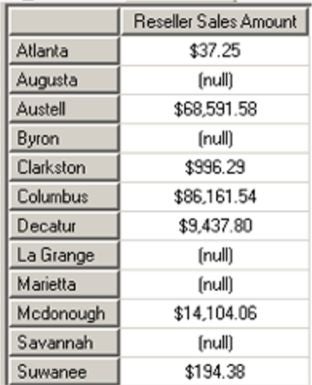
Illustration 1: Results Dataset – Distinct() Function with Specified Set Containing Duplicates
In the example dataset, we see that the Cities of the State of Georgia appear in the order in which they would have appeared had we simply defined the row axis as [Geography].[Geography].[State-Province].[Georgia].CHILDREN. We have intentionally specified duplicates (the Cities of Atlanta and McDonough) within our query to illustrate the fact that the first instance of the duplicated Cities is retained, and the second instance discarded. This illustrates the manner in which duplicates are removed from the tail of the set within the results dataset.