
About the Series …
This article is a member of the series, MDX Essentials. The series is designed to provide hands-on application of the fundamentals of the Multidimensional Expressions (MDX) language, with each session progressively adding features and capabilities designed to meet specific real-world needs.
Virtually all of the MDX we have constructed in earlier articles can now be used in the SQL Server Management Studio, SQL Server Business Intelligence Studio, and various other areas within the Microsoft integrated Business Intelligence solution, and much of what we construct going forward can be executed in the Analysis Services 2000 MDX Sample Application (assuming connection to an appropriate Analysis Services data source). MDX as a language continues to evolve and expand: we will focus on many new features in articles to come, while still continuing to examine business uses of MDX in general. Exploiting MDX to meet the real-world needs of our business environments will continue to be my primary concentration within the MDX Essentials series.
For more information about the series in general, as well as the software and systems requirements for getting the most out of its member lessons, please see Set Functions: The DrillDownMember() Function, where important information is detailed regarding the applications, samples and other components required to complete our practice exercises.
Overview
While MDX functions comprise the lion’s share of the MDX Essential series, numerous operators are supported within the language. (We examined a group of basic operators in my Database Journal article MDX Operators: The Basics). Of the logical, comparison, set, string, and unary operators provided by MDX, we will examine a logical operator in this session. The IS operator, like other logical operators, evaluates values and returns a Boolean value. The IS operator’s utility becomes clear when we leverage it to perform comparisons between objects of any kind within Analysis Services.
In this article, we will extend our examination of MDX functions to concentrate upon the useful IS operator. We will discuss the straightforward purpose of the operator, to ascertain the equivalence of two object expressions, the manner in which IS manages to do this, and ways we can employ the operator to perform efficient comparisons, and to help us to meet various business needs in our own environments.
Along with an introduction to the IS operator, this lesson will include:
- an examination of the syntax surrounding the operator;
- illustrative examples of uses of the operator in practice exercises;
- a brief discussion of the MDX results obtained within each of the practice examples.
The Is Operator
Introduction
According to the Books Online, the IS operator “performs a logical comparison on two object expressions.” Moreover, the Books Online state that “the IS operator is often used to determine whether tuples and members are idempotent,” or unchanged in value following multiplication by themselves. A Boolean value of “true” is returned if both object expressions refer to the same object, otherwise IS returns “false.”
Another common use of the IS operator is to compare a given object expression with the NULL keyword. When we use NULL with IS, the operator allows us to ascertain existence, returning “true” if the expression to which it is compared is null, and returning “false” if not.
We will examine in detail the syntax for the IS operator after our customary overview in the Discussion section that follows. Following that, we will conduct practice examples within a couple of scenarios, constructed to support hypothetical business needs that illustrate uses for the operator. This will afford us an opportunity to explore some of the options that IS can offer the knowledgeable user. Hands-on practice with IS, where we will create queries that employ the function, will help us to activate what we have learned in the Discussion and Syntax sections.
Discussion
To restate our initial description of its operation, the IS operator performs a comparison between two object expressions, returning “true” if the object expressions are identical, and “false” if not. Using IS to compare an object expression to the NULL keyword is often used as an “existence” test for the object under consideration. As we have noted to be the case with most MDX functions and operators, pairing the IS operator with other MDX operators and functions can help us to leverage its power even further.
Let’s look at syntax specifics to further clarify the operation of IS.
Syntax
Syntactically, we employ the IS operator between the two object expressions upon which we wish to perform a logical comparison. The general syntax is shown in the following string:
Object_Expression IS ( Object_Expression | NULL )
Both Object Expressions are valid MDX expressions that represent, or return, an MDX object reference. As we have noted, the operator returns a Boolean value of “true” if both Object Expressions refer to the same object; otherwise it returns “false.” If the NULL keyword is substituted for the right Object Expression, then the IS operator returns “true” if the left Object Expression is null; otherwise it returns “false.”
Let’s take a look at an illustration. The following snippet, taken from the WITH section of a query, where it helps to define a calculated member that is subsequently specified in the SELECT section of the query, employs the IS operator:
WITH
MEMBER
[Measures].[Annual Adjusted Sales]

AS

  'IIF([Date].[Calendar].CURRENTMEMBER IS

     [Date].[Calendar].[Calendar Year].[CY 2004],

         [Measures].[Internet Sales Amount],

            ([Measures].[Internet Sales Amount] * .8)
Let’s say that the above-defined calculated member, together with the existing Internet Sales Amount measure, is crossjoined with the members of the Calendar Year level of the Date dimension (Calendar hierarchy) within the rows-axis specification. Moreover, we will assume that we specify All Products in the column-axis specification, and that the query that emerges is executed against the Adventure Works sample cube. Our query would produce a results dataset similar to that depicted in Illustration 1.
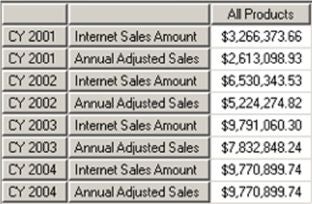
Illustration 1: Results Dataset – IS Operator Used in Definition of the Calculated Member …
In the example dataset, we see that the IIF() function, using the IS operator, is effectively comparing the current year member (the Object Expression to the left of the IS operator), to Calendar Year 2004. The calculated member whose definition contains this comparison thus returns Annual Adjusted Sales equal to the Internet Sales Amount for 2004, while returning the adjusted Internet Sales Amount (80 percent of the measure) as Annual Adjusted Sales for the other years within the cube.
NOTE: For details surrounding the .CurrentMember function, see MDX Member Functions: “Relative” Member Functions, a member of my MDX Essentials series here at Database Journal.
We will examine the workings of the operator in more detail in the Practice section that follows.