
About the Series …
This article is a member of the series, MDX Essentials. The series is designed to provide hands-on application of the fundamentals of the Multidimensional Expressions (MDX) language, with each tutorial progressively adding features designed to meet specific real-world needs.
For more information about the series in general, as well as the software and systems requirements for getting the most out of the lessons included, please see my first article, MDX at First Glance: Introduction to MDX Essentials.
Note: Current updates are assumed for MSSQL Server, MSSQL Server Analysis Services, and the related Books Online and Samples.
Overview
In this lesson, we will explore the HAVING clause, which makes its debut in the MDX language with Analysis Services 2005. As we shall see, HAVING does not endow us with any capabilities we might not have achieved in other ways, with approaches that were fully available before Analysis Services 2005. What HAVING offers us is a way to apply a filter that is, perhaps, more easily understandable for a reader. More importantly, it offers us another means of manipulating context from the perspectives of our queries. Such manipulation can mean more optimal processing, and the sort of finesse that we can apply easily to an existing query structure – often without a rewrite, and more as an addition to syntax. These are the kinds of scenarios within which one can easily envision parameterization constructs, among other extended concepts in the Analysis Services and the reporting layers within the integrated business intelligence solution.
Along with an introduction to the HAVING clause, this lesson will include:
- an examination of the syntax and positioning involved in the use of the clause;
- illustrative examples of uses of the clause within practice exercises;
- comparative approaches in obtaining similar results with the MDX FILTER()function;
- a brief discussion of the MDX results obtained within each of the practice examples.
The HAVING Clause
Introduction
As we put our growing MDX knowledge to work within business scenarios, we find that, beyond the knowledge of query basics and the utilization of MDX functions, the inevitable motivation emerges to optimize our expressions and queries. The concept of context comes into play, from various perspectives, within the queries we assemble. Webster’s Dictionary defines “context” as “the part or parts of something written or printed, as of Scripture, which precede or follow a text or quoted sentence, or are so intimately associated with it as to throw light upon its meaning.” More germane, perhaps, to the concept of context within a query and calculation language like MDX, is the definition as found within the Free On-line Dictionary of Computing: “That which surrounds, and gives meaning to, something else. In a grammar it refers to the symbols before and after the symbol under consideration.”
Nowhere is the concept of context more apropos than within the multidimensional world. From the perspective of MDX (where execution and session context are of primary importance) many things determine context – some implicit and some explicit; some based upon how invalid or missing data / members are interpreted; some surrounding which of multiple properties associated with a cell are considered within the query. Data types alone can be a significant consideration, requiring precise control within MDX calculations to ensure that the desired end result is generated.
Many factors come into play when we consider context in general, a great number of which we examine throughout the series from specific points of view. At the heart of defining what exists within individual cells amid the juxtaposition / intersection of members of axis / slicer specifications ( with each axis’ sets often being dependent upon the performance of calculations with cells whose existence is based upon regular or calculated members) lies the concept of resolution order. Understanding the way in which queries are resolved and calculations are carried out is key to optimization, as well as to the intended operation of our applications – particularly those created based upon context and other considerations within Analysis Services 2000, because of the changes that come along in Analysis Services 2005.
While the subject of context itself is both wide and deep, a good understanding of resolution order begins with an understanding of the primary execution stages of an MDX query. These ordered stages consist of the following resolutions:
- the FROM clause;
- the WHEREclause;
- the WITH clause – Named Sets;
- the tuples on each axis.
Once these four resolution stages are accomplished, a final execution stage – wherein calculation of the cells returned within the intersections specified among the axes transpires – takes place. Within this execution stage, a couple more resolutions take place, as dictated by the design of the query: the resolution of NON EMPTY intersections and the resolution of the HAVING clause.
This focus of this article begins, as it were, within this last execution stage, with the HAVING clause. As we shall see, HAVING affords us a means of applying a “post NON EMPTY” filter, as well as an alternate means of applying filtering in general. The advantages that accrue depend upon the backdrop within which we seek to employ the clause, and can include more optimal performance of the query involved, together with the more cosmetic effects of simpler maintenance and more intuitive coding. We will examine the syntax surrounding the HAVING clause after our customary overview in the Discussion section that follows. Following that, we will conduct practice examples within a couple of scenarios, constructed to support simple, hypothetical business needs that illustrate a use for the clause. This will afford us an opportunity to explore some of the basic options that HAVING can offer the knowledgeable user. Hands-on practice with HAVING, where we will create queries that employ the clause, will help us to activate what we have learned in the Discussion and Syntax sections.
Discussion
As we have intimated, the HAVING clause is particularly useful in cases where we need to insert a means of filtering within our query so as to take advantage of the fact that NON EMPTY logic has already been applied. We will examine a couple of instances of this within the practice session that follows. While HAVING does not, as we have mentioned, enable us to do anything, from the standpoint of sheer filtering, that we might not have been able to do before the advent of the HAVING clause in Analysis Services 2005 (as we shall also see within our examples, it simply supplies an alternative means of accomplishing something that we can also accomplish via the FILTER() function), it does allow us to perform such filtering subsequent to the application of NON EMPTY in an easy manner. Moreover, as we shall see, the HAVING clause not only offers us another means of optimizing queries, but it can help us to make them easier to read, and to be maintained by, others.
Let’s look at syntax specifics to further clarify the operation of HAVING.
Syntax
We typically employ the HAVING clause at the axis level. The HAVING expression is applied against each of the axis’ tuples – and therefore operates within the scope of the axis. The following snippet shows an example of placement of the HAVING clause within a row axis:
NON EMPTY
   {[Sales Territory].[Sales Territory Group].CHILDREN}

       HAVING [Measures].[Reseller Sales Amount] > 0
   ON AXIS(1)
In this case, the “filter-effect” of the HAVING clause is enacted within the scope of the row axis, as is relatively intuitive by its placement. The expression in this case is applied to [Sales Territory].[Sales Territory Group].CHILDREN, combining [Sales Territory].[Sales Territory Group].CHILDREN with the context it enforces.
We see the above within a larger query in the example shown immediately below:
-- MDX053: Syntax Sample with HAVING Clause in Row Axis
SELECT
CROSSJOIN(
   {[Date].[Calendar].[Calendar Quarter].[Q1 CY 2004].CHILDREN},

      {[Measures].[Reseller Sales Amount] } )

    ON AXIS(0),
NON EMPTY
   {[Sales Territory].[Sales Territory Group].CHILDREN}

       HAVING [Measures].[Reseller Sales Amount] > 0
   ON AXIS(1)

FROM
   [Adventure Works]
WHERE
   ([Reseller].[Reseller Type].[Business Type].[Value Added Reseller])
The above query would retrieve a result set similar to that shown in Illustration 1.
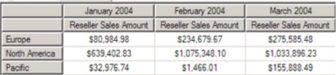
Illustration 1: Results Dataset Retrieved via Query Employing HAVING Clause
In effect, too, the placement of the HAVING clause would result in the same outcome as that of the following query, where the FILTER() expression is substituted for HAVING in the above:
-- MDX053: Syntax Sample Substituting FILTER() Function for HAVING
SELECT
CROSSJOIN(
   {[Date].[Calendar].[Calendar Quarter].[Q1 CY 2004].CHILDREN},

      {[Measures].[Reseller Sales Amount] } )

    ON AXIS(0),
NON EMPTY
   FILTER(

      {[Sales Territory].[Sales Territory Group].CHILDREN},

         [Measures].[Reseller Sales Amount] > 0

      )
   ON AXIS(1)

FROM
   [Adventure Works]
WHERE
   ([Reseller].[Reseller Type].[Business Type].[Value Added Reseller])
Other placements of HAVING are, of course, possible, and the HAVING clause can leverage functions, in combination with the relevant tuples, as we shall see in a subsequent article.
NOTE: For more detail surrounding the FILTER() function, see Basic Set Functions: The Filter() Function, a member of my Database Journal MDX Essentials series.
We will get some hands-on practice with the HAVING function in the section that follows.