Part I of this series illustrated how to use simple case functions in queries. In Part II of the series, I am going to discuss how to use case functions in different types of scenarios.
Method 4: Usage of searched case function
Let us assume that we have the following table.
use tempdb
go
if exists (select * from dbo.sysobjects
where id = object_id(N'[emp]') and OBJECTPROPERTY(id, N'IsUserTable') = 1)
drop table [emp]
GO
create table Emp
(id int, [First name] varchar(50), [Last name] varchar(50), Salary money)
go
insert into Emp (id,[First name],[Last name], salary )
values (1,'John','Smith',120000)
insert into Emp (id,[First name],[Last name], salary )
values (2,'James','Bond',95000)
insert into Emp (id,[First name],[Last name], salary )
values (3,'Alexa','Mantena',200000)
insert into Emp (id,[First name],[Last name], salary )
values (4,'Shui','Qui',36000)
insert into Emp (id,[First name],[Last name], salary )
values (5,'William','Hsu',39000)
insert into Emp (id,[First name],[Last name], salary )
values (6,'Danielle','Stewart',50000)
insert into Emp (id,[First name],[Last name], salary )
values (7,'Martha','Mcgrath',400000)
insert into Emp (id,[First name],[Last name], salary )
values (8,'Henry','Fayol',75000)
insert into Emp (id,[First name],[Last name], salary )
values (9,'Dick','Watson',91000)
insert into Emp (id,[First name],[Last name], salary )
values (10,'Helen','Foster',124000)
go
Let us assume that want to create a column, Tax, on the fly, based on the salary range.
Select [id],[Full Name]=[First name]+ [Last name],Salary,Tax = case
When salary between 0 and 36000 then Salary*.24
When salary between 36000 and 450000 then Salary*.28
When salary between 45000 and 75000 then Salary *.30
When salary between 75000 and 150000 then Salary *.32
else Salary*.40 end
from Emp
This would produce the following result:
id Full Name Salary Tax
----------- -------------------------------- ---------------------
1 JohnSmith 120000.00 33600.000000
2 JamesBond 95000.00 26600.000000
3 AlexaMantena 200000.00 56000.000000
4 ShuiQui 36000.00 8640.000000
5 WilliamHsu 39000.00 10920.000000
6 DanielleStewart 50000.00 14000.000000
7 MarthaMcgrath 400000.00 112000.000000
8 HenryFayol 75000.00 21000.000000
9 DickWatson 91000.00 25480.000000
10 HelenFoster 124000.00 34720.000000
Method 5: Usage case function in an ORDER by clause
Let us assume that we have the following table in Books.
use tempdb
go
if exists (select * from dbo.sysobjects where id = object_id(N'[Books]') and
OBJECTPROPERTY(id, N'IsUserTable') = 1)
drop table [Books]
GO
create table Books
(Bookid int, Title varchar(100), Authorname varchar(100), state char(2))
go
insert into Books (Bookid, Title, Authorname, state)
values (1, 'The Third Eye','Lobsang Rampa','CA')
insert into Books (Bookid, Title, Authorname, state)
values (2, 'Service Oriented Architecture For Dummies', 'Judith Hurwitz','NJ')
insert into Books (Bookid, Title, Authorname, state)
values (3, 'Business Reference for Students and Professionals','Ray Myers','NY')
insert into Books (Bookid, Title, Authorname, state)
values (4, 'More Java Gems','Dwight Deugo', 'FL')
insert into Books (Bookid, Title, Authorname, state)
values (5, 'Six Sigma Workbook For Dummies','Craig Gygi','FL')
insert into Books (Bookid, Title, Authorname, state)
values (6, 'Performance Appraisals: How to Achieve Top Results',
'Priscilla A. Glidden', 'NC' )
insert into Books (Bookid, Title, Authorname, state)
values (7, 'Talent Management: From Competencies to Organizational Performance',
'John Smith','FL')
insert into Books (Bookid, Title, Authorname, state)
values (8, 'Using Unix','Howard Johnson','CT')
insert into Books (Bookid, Title, Authorname, state)
values (9, 'Mastering Oracle','Erina Zolotrova','CT')
insert into Books (Bookid, Title, Authorname, state)
values (10, 'How to become CEO','Olga Zohaskov','NY')
go
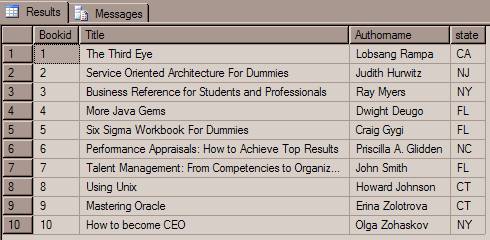
Let us query all the values from the table, using the query below.
Select * from Books
This would produce the following result. Refer Fig 1.0
Fig 1.0
Let us assume that we want to display all of the books that are printed in NY first, then CA, then NJ and then CT and FL respectively.
This could be achieved using the CASE function as follows:
select Title, Authorname, state from Books order by case
when state ='NY' then 1
when state ='CA' then 2
when state ='NJ' then 3
when state ='CT' then 4
when state ='FL' then 5 else 6 end
This would produce the result, shown below.
Title Authorname state
------------------------------------------------------------------ ----------------------- -----
Business Reference for Students and Professionals Ray Myers NY
How to become CEO Olga Zohaskov NY
The Third Eye Lobsang Rampa CA
Service Oriented Architecture For Dummies Judith Hurwitz NJ
Using Unix Howard Johnson CT
Mastering Oracle Erina Zolotrova CT
More Java Gems Dwight Deugo FL
Six Sigma Workbook For Dummies Craig Gygi FL
Talent Management: From Competencies to Organizational Per John Smith FL
Performance Appraisals: How to Achieve Top Results Priscilla A. Glidden NC
Conclusion
Part I and part II of this series has illustrated the usage of case functions in SQL Server. The next article will discuss how to use case functions in a GROUP BY clause.
» See All Articles by Columnist MAK