


In Part I,
part
II and part
III of this article series, we saw how to use simple case expressions in
queries. In this installment, I illustrate how to use case functions in clauses
like ‘group by’.
Method
7: Usage of the
simple case function in GROUP BY clause
Let us
assume we have the following table.
set quoted_identifier off
go
use tempdb
go
if exists (select * from dbo.sysobjects where id = object_id(N’[emp]’)
 and OBJECTPROPERTY(id, N’IsUserTable’) = 1)
drop table [emp]
GO
create table Emp (id int, [First name] varchar(50),
 [Last name] varchar(50), Salary money, state char(2))
go
insert into Emp (id,[First name],[Last name], salary,
 State ) values (1,’John’,’Smith’,120000,’WA’)
insert into Emp (id,[First name],[Last name], salary,
 State ) values (2,’James’,’Bond’,95000,’OR’)
insert into Emp (id,[First name],[Last name], salary ,
 State) values (3,’Alexa’,’Mantena’,200000,’WY’)
insert into Emp (id,[First name],[Last name], salary,
 State ) values (4,’Shui’,’Qui’,36000,’CO’)
insert into Emp (id,[First name],[Last name], salary,
 State ) values (5,’William’,’Hsu’,39000,’NE’)
insert into Emp (id,[First name],[Last name], salary ,
 State) values (6,’Danielle’,’Stewart’,50000,’TX’)
insert into Emp (id,[First name],[Last name], salary ,
 State) values (7,’Martha’,’Mcgrath’,400000,’PA’)
insert into Emp (id,[First name],[Last name], salary,
 State ) values (8,’Henry’,’Fayol’,75000,’NJ’)
insert into Emp (id,[First name],[Last name], salary,
 State ) values (9,’Dick’,’Watson’,91000,’NY’)
insert into Emp (id,[First name],[Last name], salary,
 State ) values (10,’Helen’,’Foster’,124000,’AK’)
go
Let us
assume that we have six tables that hold the IDs of employees that belong to
different time zones, as shown below.
if exists (select * from dbo.sysobjects
 where id = object_id(N’[eastern]’)
 and objectproperty(id, N’isusertable’) = 1)
drop table [eastern]
go
create table eastern (id int)
if exists (select * from dbo.sysobjects
 where id = object_id(N’[mountain]’)
 and objectproperty(id, N’isusertable’) = 1)
drop table [mountain]
go
create table mountain (id int)
if exists (select * from dbo.sysobjects
 where id = object_id(N’[hawaii]’)
 and objectproperty(id, N’isusertable’) = 1)
drop table [hawaii]
go
create table hawaii (id int)
if exists (select * from dbo.sysobjects
 where id = object_id(N’[central]’)
 and objectproperty(id, N’isusertable’) = 1)
drop table [central]
go
create table central (id int)
if exists (select * from dbo.sysobjects
 where id = object_id(N’[alaskan]’)
 and objectproperty(id, N’isusertable’) = 1)
drop table [alaskan]
go
create table alaskan (id int)
if exists (select * from dbo.sysobjects
 where id = object_id(N’[pacific]’)
 and objectproperty(id, N’isusertable’) = 1)
drop table [pacific]
go
create table pacific (id int)
go
insert into pacific (id) values (1)
insert into pacific (id) values (2)
insert into mountain (id) values (3)
insert into mountain (id) values (4)
insert into central (id) values (5)
insert into central (id) values (6)
insert into eastern (id) values (7)
insert into eastern (id) values (8)
insert into eastern (id) values (9)
insert into alaskan (id) values (10)
go
If we want
to know all of the employees belonging to Eastern time zone, we would probably
execute a query similar to the one below.
select e.id,[First Name],[Last name], Salary, State
from emp e join eastern ee on e.id=ee.id
This
would produce the following result, as shown below.
id First name  Last name       salary         Timezone
——————————————————–
7 Martha Mcgrath  400000.00 PA
8 Henry Fayol  75000.00 NJ
9 Dick Watson  91000.00 NY
Now let
us assume we want to create a script that would accept a time zone in a
variable and show the result based on the variable’s value. This
could be achieved using in clause and case function as showb below.
declare @group varchar(10)
set @group=’Pacific’
select ee.id,ee.[First Name],ee.[Last Name],Salary, State, @group as TimeZone from emp ee
left join mountain m on m.[id]=ee.[id]
left join alaskan a on a.[id]=ee.[id]
left join hawaii h on h.[id]=ee.[id]
left join central c on c.[id]=ee.[id]
left join pacific p on p.[id]=ee.[id]
left join eastern e on e.[id]=ee.[id]
where ee.id in ( case @group
when ‘Eastern’ then e.id
when ‘Mountain’ then m.id
when ‘Pacific’ then p.id
when ‘Alaskan’ then a.id
when ‘Hawaii’ then h.id
when ‘Central’ then c.id
end)
This
would produce the following result, as shown below.
id First name Last name       salary      state   TimZone
—————————————————————-
1 John Smith  120000.00 WA Pacific
2 James Bond  95000.00 OR Pacific
The above
script could be written as a procedure:
create procedure emp_timezone @Zone varchar(10)
as
select ee.id,ee.[First Name],ee.[Last Name],Salary, State, @Zone as TimeZone from emp ee
left join mountain m on m.[id]=ee.[id]
left join alaskan a on a.[id]=ee.[id]
left join hawaii h on h.[id]=ee.[id]
left join central c on c.[id]=ee.[id]
left join pacific p on p.[id]=ee.[id]
left join eastern e on e.[id]=ee.[id]
where ee.id in ( case @Zone
when ‘Eastern’ then e.id
when ‘Mountain’ then m.id
when ‘Pacific’ then p.id
when ‘Alaskan’ then a.id
when ‘Hawaii’ then h.id
when ‘Central’ then c.id
end)
Let us
execute the procedure, as shown below.
exec emp_timezone 'Eastern'
This
would produce the following result, as shown below. [Fig 1.0]
id First name Last name       salary      state   TimZone
—————————————————————-
7 Martha Mcgrath  400000.00 PA Eastern
8 Henry Fayol  75000.00 NJ Eastern
9 Dick Watson  91000.00 NY Eastern
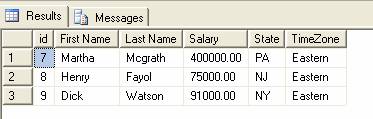
Fig 1.0
Conclusion
Part I,
Part II, Part III and Part IV illustrated the usage of case expressions in SQL
Server in various situations. Part IV illustrated the usage of the case
function in the IN Clause, as mentioned in the beginning of the article.