
About the Series …
This article is a member of the series, MDX Essentials. The series is designed to provide hands-on application of the fundamentals of the Multidimensional Expressions (MDX) language, with each tutorial progressively adding features designed to meet specific real-world needs.
For more information about the series in general, as well as the software and systems requirements for getting the most out of the lessons included, please see my first article, MDX at First Glance: Introduction to MDX Essentials.
Note: Current updates are assumed for MSSQL Server, MSSQL Server Analysis Services, and the related Books Online and Samples.
Overview
In this lesson, we will introduce a new addition to MDX with Analysis Services 2005, the CASE statement. Classed as an MDX scripting statement within the Microsoft MDX documentation, CASE can return values based upon multiple comparisons. There are two general types of CASE statements. The simple CASE statement (which returns specific values based upon its comparison of an expression to a set of simple expressions) is the subject of this article. We introduce the other type, the searched CASE statement (which returns specific values based upon its evaluation of a set of Boolean expressions) in another article of this series. In either of its general types, CASE is similar to the IIF() function, which we explored in String / Numeric Functions: Introducing the IIF() Function and in String / Numeric Functions: More on the IIF() Function (both members of the Database Journal MDX Essentials series), but can handle more conditions, as we shall see.
The CASE statement provides far-reaching capabilities within MDX, via its capacity to perform conditional tests within multiple comparisons, whereby it determines the values that it returns. The powerful capabilities of CASE as a mechanism for influencing query results through the application of logical tests become even more formidable when the statement is used in conjunction with other MDX functions. I have found the CASE statement to provide excellent support within the implementation of OLAP solutions with MSSQL Server Analysis Services, as well as for extending enterprise Business Intelligence within MSSQL Server Reporting Services, in a wide array of client environments and business requirements.
Along with an introduction to the CASE statement, this lesson will include:
- an examination of the syntax options surrounding the statement;
- illustrative examples of the uses of the statement in rudimentary practice exercises;
- a brief discussion of the results datasets we obtain in the practice examples.
The CASE Statement
Introduction
According to the MSSQL Server 2005 Books Online, the CASE statement enables us “… to conditionally return specific values from multiple comparisons.” We will examine the statement’s manner of accomplishing its comparison of an expression to a set of simple expressions to return specific values in the sections that follow. Our objective, of course, is to gain a richer understanding of the capabilities found within the CASE statement, together with a feel for its many diverse applications in supporting the business needs of our clients and employers.
We will examine the syntax for the simple CASE statement in general, building to representative uses to which it can be put in meeting needs that arise in the real world. Part of our focus will be the use of the CASE statement to extend a cube’s metadata to support conditional formatting to the Reporting layer, but the concepts behind how CASE works are applicable to other general uses, as well.
We will examine in detail the syntax for the simple CASE statement after our customary overview in the Discussion section that follows. Following that, we will conduct practice examples within a couple of scenarios, constructed to support simple, hypothetical business needs that illustrate a use for the function. This will afford us an opportunity to explore some the basic options that CASE can offer the knowledgeable user. Hands-on practice with the CASE statement, where we will create queries that employ the function, will help us to activate what we have learned in the Discussion and Syntax sections.
Discussion
The simple CASE statement affords us a means of comparing an input expression to one or more “when expressions.” Beginning with the first comparison, if the input expression and a when expression match, the CASE statement returns the value assigned the respective when expression. If the two expressions do not match, the next WHEN clause is compared to the input expression. The evaluations continue until a match occurs, or, if comparison to all the WHEN clauses evaluate to “false,” then the value of the ELSE clause (if provided) is returned. When none of the tests has a “true” outcome and no “default” (ELSE) clause is in place, NULL is returned by the CASE statement.
Let’s look at a syntax illustration to further clarify the operation of CASE.
Syntax
Syntactically, the Input Expression upon which the evaluation of “true or false” is to be applied by the CASE statement is placed to the right of the CASE keyword, and is then followed by the WHEN / THEN pairs against which comparisons are performed. Each occurrence of WHEN is followed by a When Expression, and then followed by the THEN keyword (with a When True Result Expression). After all the WHEN / THEN pairs comes the ELSE keyword followed by the corresponding Else Result Expression – the optional “default result,” to which we referred earlier, which is returned if none of the When Expressions that precede it evaluate to “true.”
The syntax is shown in the following strings:
CASE <<Input Expression>>
    WHEN <<When Expression>>
       THEN  <<When True Result Expression>>
    [ ... other WHEN / THEN combinations ...]
    ELSE  <<Else Result Expression>>
END
To reiterate, the related When True Result Expression is returned for the first When Expression that is evaluated as “true.” When comparison with a When Expression evaluates to “false,” then comparison testing occurs against the next When Expression, and the process continues until a “true” evaluation results (whereupon a When True Result Expression is returned), or until comparison with all When Expressions have been evaluated as “false,” at which point the Else Result Expression is returned. (If this default clause is not supplied, the final result of the CASE statement is NULL, as we noted earlier).
The Input Expression is an MDX expression that resolves to a scalar value. The When Expression(s) are scalar values against which the Input Expression is evaluated, with the When True Result Expression, another scalar value, being returned when the evaluation results in a “true” condition. The Else Result Expression is a scalar value that is returned, as we have seen, when the WHEN clauses preceding it have all evaluated to “false.” An empty cell results, once again, in a scenario where all WHEN clauses evaluate to “false” and the ELSE clause is absent.
Employing the CASE statement is straightforward. It is considerably easier to construct and maintain than the nested IIF() syntax that was our only practical option, prior to the advent of the CASE statement with Analysis Services 2005, for conditionally returning specific values from multiple comparisons. As we have seen, the CASE statement affords us a means of testing against multiple criteria and changing the flow of our MDX scripts based upon the outcomes – using a construct that resembles closely the SQL CASE statement, with which many of us are already familiar.
As an example, let’s preview an exercise we will perform together in the Practice section below, within a query executed against the sample Adventure Works cube. The following pseudo-expression might be used within the definition of a calculated member we could use in an MDX query to drive “color coding” of returned results. (We could use the returned color code to set font / cell color properties, for example, in a report we crafted in Reporting Services, so as to give each Country a different color in a pie chart or other data region, as a means of presenting operating results to information consumers.)
WITH
   MEMBER [Measures].[Color]
   AS
      CASE [Geography].[Country].Currentmenber
         WHEN [Geography].[Country].[Australia] THEN 'Blue'
         WHEN [Geography].[Country].[Canada] THEN 'Green'
         WHEN [Geography].[Country].[France] THEN 'Yellow'
         WHEN [Geography].[Country].[Germany] THEN 'Red'
         WHEN [Geography].[Country].[United Kingdom] THEN 'Black'
         WHEN [Geography].[Country].[United States] THEN 'White'
         ELSE 'Gray'
      END
Were we to construct a query that positioned the above-defined calculated member alongside the Reseller Sales Amount, with our row axis specifying the members of the Country attribute hierarchy of the Geography dimension, we might expect a returned dataset similar to that depicted in Illustration 1.
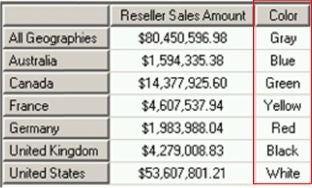
Illustration 1: Results Dataset containing a Calculated Member Based upon the CASE Statement
NOTE: For hands-on guidance in an Analysis Services – based approach for driving conditional formatting in the Reporting layer in general, see Positing the Intelligence: Conditional Formatting in the Analysis Services Layer, a member of the Database Journal Introduction to MSSQL Server Analysis Services series. Moreover, for an approach to using calculated members in Analysis Services to drive conditional formatting within Reporting Services specifically, see Intelligent Layering: Leverage Conditional Formatting Logic from Analysis Services, a member of the Database Journal MSSQL Server Reporting Services series.
We will practice some uses of the CASE statement in the section that follows.