
About the Series …
This article is a member of the series, MDX Essentials. The series is designed to provide hands-on application of the fundamentals of the Multidimensional Expressions (MDX) language, with each tutorial progressively adding features designed to meet specific real-world needs.
For more information about the series in general, as well as the software and systems requirements for getting the most out of the lessons included, please see my first article, MDX at First Glance: Introduction to MDX Essentials.
Note: Current updates are assumed for MSSQL Server, MSSQL Server Analysis Services, and the related Books Online and Samples.
Overview
In this article, we will introduce another “staple” MDX numeric function, the Min() function. Min(), like Max(), is one of several aggregate functions with which we can choose to perform aggregations upon a set of values. (We introduce other aggregate functions within individual articles of the MDX Essentials series.) Min(), like the rest of these functions, aggregates a set of (one or more) measure values associated with a set of dimension members. Simple examples might include the selection of the minimum revenue from a set of products or the minimum monthly personnel headcount over a range of months.
As many of us are already aware, Min() can be leveraged throughout a wide range of activities, from the generation of minimums from simple sets of dimensional members to the composition of multidimensional juxtapositions, for more sophisticated results. As is the case with many MDX functions, Min() can serve as an excellent tool to support sophisticated conditional logic, as well as other calculations, and to deliver exactly the analysis and reporting presentations required by our clients and employers. We will introduce the function, commenting upon its operation and touching upon creative effects that we can employ it to deliver. As a part of our discussion, we will:
- Examine the syntax surrounding the function;
- Undertake illustrative examples of the uses of the function in practice exercises;
- Briefly discuss the results datasets we obtain in the practice examples.
The Min() Function
Introduction
According to the Analysis Services Books Online, the Min() function “returns the minimum value of a numeric expression that is evaluated over a set.” Min() has myriad applications, ranging from those that are obvious and intuitive to even the most inexperienced MDX users, to others that offer sophisticated solutions for more elaborate business requirements, such as the selection of transaction or balance values as of the “earliest” date, in combination with other dimensional components, within our cubes. The function can be leveraged within queries to create datasets, in reporting applications such as MSSQL Server Reporting Services, for the support of presentations of simple minimums, for the support of intelligent default dates within our report parameters, and a host of other creative and useful effects. The Min() function provides an intuitive option anytime we need to present, in a returned dataset, the smallest / lowest value(s), based upon a numeric expression and a set we supply. As is the case with most MDX functions, combining Min() with other functions allows us to further extend its power, as we shall see in the practice exercises that follow.
We will examine the syntax for the Min() function after a brief discussion in the next section. We will then explore, from the straightforward context of MDX queries, and within practice examples constructed to support hypothetical business needs, some of the utility it offers the knowledgeable user. This will allow us to activate what we learn in the Discussion and Syntax sections, and allow us to get some hands-on exposure in creating expressions that employ the Min() function.
Discussion
To restate our initial explanation of its operation, the Min() function returns the minimum value of a numeric expression we supply, for the members of a set which we also specify. Min() can be used for a great deal more than simple “minimum value” retrieval, as we have intimated. When we couple it with other functions or employ it within MDX scripts, among other applications, we can leverage Min() to support a wide range of analysis and reporting utility.
Let’s look at some syntax illustrations to further clarify the operation of Min().
Syntax
Syntactically, we employ the Min() function by specifying a Set Expression (a valid MDX expression that returns the set over which we are attempting to return an associated “minimum” value), followed by a Numeric Expression (a valid numeric expression that is typically an MDX expression of cell coordinates that returns a number) within parentheses to the immediate right of the function. The function takes the Set Expression and Numeric Expression thus appended as its arguments (the two expressions are separated by a comma), and evaluates the Numeric Expression across the set. The minimum value from that evaluation is returned. (If a Numeric Expression is not specified, the set specified by the Set Expression is evaluated in the current context of the members of the set, and the minimum value for the evaluation is returned.) Analysis Services ignores nulls when calculating the minimum value within a set of numbers. Because Min() returns a numeric value, we use it most commonly within the construction of calculated members.
The general syntax is shown in the following string:
Min(Set_Expression, Numeric_Expression)
Putting Min() to work is straightforward. When using the function to return the minimum value(s) of the Numeric Expression we have provided as evaluated over the set we have specified, we simply supply the required Set and Numeric Expressions within the parentheses to the right of the Min keyword. As an example, say we create, within a query executed against the sample Adventure Works cube, a calculated member which we might name “Bottom Orders,” (that is, say, for the “lowest value for the Internet Order Count measure”) containing the following pseudo code:
MIN( [Date].[Calendar Year].[CY 2001]:[Date].[Calendar Year].[CY 2004],
 [Measures].[Internet Order Count] )
Moreover, say that we select the set of the same Date range dimensional members and the calculated member within our column axis, and the Product Category members within our row axis, we might expect to retrieve results similar to those depicted in Illustration 1.
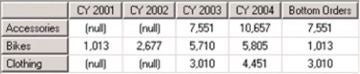
Illustration 1: Example Returned Data: Min() Function Employed in Calculated Member
It is easy to see, within the dataset returned above, that the minimum value, based upon the members of the dimensional date range we have provided, is returned, as the calculated member value presents the lowest value within each of the rows retrieved. Because of the ease with which we can employ Min(), and because of the flexibility with which we can exploit it to meet various business needs, the function becomes a popular member of our analysis and reporting toolsets. We will practice some uses of the Min() function in the section that follows.