


Change
data capture is one of the many features that Microsoft is introducing in SQL
Server 2008. Part 1
and Part2
of the article explored how we could enable Change Data Capture on a
database and on a table. In Part
3 we discussed how to disable and enable the Change Data Capture when the
table structure changes.
This
article illustrates how to generate DML [Data Manipulation language – Insert,
Update and Delete] statements from the history table.
Note:
This article is written based on the SQL Server 2008 – Nov CTP
Step 1
Let’s
create the Database “MYDB2” and the table “EMP” under the database “MyDB2” as
shown below.
USE [master]
GO
/*** Object:  Database [MyDB2]   Script Date: 02/07/2008 18:46:15 ***/
IF  EXISTS (SELECT name FROM sys.databases WHERE name = N’MyDB2′)
DROP DATABASE [MyDB2]
GO
USE [master]
GO
/*** Object:  Database [MyDB1]   Script Date: 02/07/2008 18:46:33 ***/
CREATE DATABASE [MyDB2]
GO
USE [MyDB2]
go
USE [MyDB2]
GO
/**** Object:  Table [dbo].[Emp]    Script Date: 02/10/2008 10:59:21 ****/
IF  EXISTS (SELECT * FROM sys.objects
    WHERE object_id = OBJECT_ID(N’[dbo].[Emp]’) AND type in (N’U’))
DROP TABLE [dbo].[Emp]
GO
USE [MyDB2]
GO
/**** Object:  Table [dbo].[Emp]    Script Date: 02/10/2008 11:02:58 ****/
SET ANSI_NULLS ON
GO
SET QUOTED_IDENTIFIER ON
GO
SET ANSI_PADDING ON
GO
CREATE TABLE [dbo].[Emp](
 [id] [int] NULL,
 [First name] [varchar](50) NULL,
 [Last name] [varchar](50) NULL,
 [gender] [char](1) NULL,
 [Salary] [money] NULL,
 [Bonus] [money] NULL
) ON [PRIMARY]
GO
SET ANSI_PADDING OFF
GO
Step 2
Let’s
enable Change Data Capture on the database “MyDB2” and on the table “EMP” as
shown below.
USE [MyDB2]
GO
EXEC sys.sp_cdc_enable_db_change_data_capture
GO
use [MyDB2]
go
EXEC sys.sp_cdc_enable_table_change_data_capture
@source_schema = ‘dbo’,
@source_name = ‘Emp’,
@role_name = ‘cdc_Emp’
GO
Step 3
Now let
us insert some real data to the “EMP” table, as shown below.
USE [MyDB2]
GO
insert into Emp (id, [First name],[Last name], gender,Salary, Bonus )
 values (1,’John’, ‘Smith’,’m’, 10000, 1000)
insert into Emp (id, [First name],[Last name], gender,Salary, Bonus )
 values (2,’James’, ‘Bond’,’m’, 20000, 2000)
insert into Emp (id, [First name],[Last name], gender,Salary, Bonus )
 values (3,’Alexa’, ‘Mantena’,’f’, 22000, 2000)
insert into Emp (id, [First name],[Last name], gender,Salary, Bonus )
 values (4,’Shui’, ‘Qui’,’f’, 12000, 1200)
insert into Emp (id, [First name],[Last name], gender,Salary, Bonus )
 values (5,’William’, ‘Hsu’,’m’, 3000, 350)
insert into Emp (id, [First name],[Last name], gender,Salary, Bonus )
 values (6,’Danielle’, ‘Stewart’,’F’, 45000, 4500)
insert into Emp (id, [First name],[Last name], gender,Salary, Bonus )
 values (7,’Martha’, ‘Mcgrath’,’F’, 29000, 2000)
insert into Emp (id, [First name],[Last name], gender,Salary, Bonus )
 values (8,’Henry’, ‘Fayol’,’m’, 4500, 450)
insert into Emp (id, [First name],[Last name], gender,Salary, Bonus )
 values (9,’Dick’, ‘Watson’,’m’, 20000, 1200)
insert into Emp (id, [First name],[Last name], gender,Salary, Bonus )
 values (10,’Helen’, ‘Foster’,’F’, 34000, 3400)
go
Step 4
Let’s
Delete some data from the table “EMP” as shown below.
USE [MyDB2]
GO
Delete from Emp where id in (3,7,10)
Go
Result
home\sql2008(HOME\MAK): (3 row(s) affected)
Step 5
Now
update some data from the table “EMP” as shown below.
USE [MyDB2]
GO
Update Emp set Bonus=Salary*.20 where salary >4500
GO
Result
home\sql2008(HOME\MAK): (5 row(s) affected)
Step 6
Let’s
query the history table as shown below. [Fig 1.0]
USE [MyDB2]
GO
Select case __$operation when 1 then ‘Deleting’
when 2 then ‘Inserting’
when 3 then ‘Value before Update’
when 4 then ‘Value after Update’
when 5 then ‘Merge’ end as Operation,__$update_mask,id,[First name],[Last name], gender,Salary, Bonus
from cdc.dbo_Emp_CT
go
Result
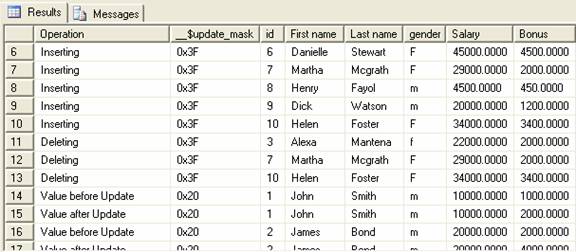
Fig 1.0
Though
the output looks readable, it can’t be used for regenerating the table from the
history.
Step 7
Let’s
create a small script that generates all of the DML statements for the “EMP”
table, as shown below
–Generate DML Statements
set nocount on
declare @tablename varchar(128)
set @tablename=’Emp’
select ‘Set quoted_identifier off’ as [–GenerateDDL]
select ‘go’ as [–GenerateDDL]
Select case __$operation when 1 then
‘Delete from ‘+@tablename+
‘ where id=’+convert(varchar(20),id)+
‘ and [First Name]=”‘+[First Name]+'”‘+
‘ and [Last Name]=”‘+[Last Name]+'”‘+
‘ and [Gender]=”‘+[Gender]+'”‘+
‘ and [Salary]=’+convert(varchar(20),[Salary])+
‘ and [Bonus]=’+convert(varchar(20),[Bonus])
when 2 then ‘Insert into ‘+@tablename+
‘(id, [First name], [Last name], gender, Salary, Bonus ) values (‘+
convert(varchar(20),ID)+’, “‘+
[First Name]+'”‘+’, “‘+
[Last Name]+'”‘+’, “‘+
[Gender]+'”‘+’, ‘+
convert(varchar(20),[Salary])+’, ‘+
convert(varchar(20),[Bonus])+’)’
when 3 then
‘Delete from ‘+@tablename+
‘ where id=’+convert(varchar(20),id)+
‘ and [First Name]=”‘+[First Name]+'”‘+
‘ and [Last Name]=”‘+[Last Name]+'”‘+
‘ and [Gender]=”‘+[Gender]+'”‘+
‘ and [Salary]=’+convert(varchar(20),[Salary])+
‘ and [Bonus]=’+convert(varchar(20),[Bonus])
when 4 then ‘Insert into ‘+@tablename+
‘(id, [First name],[Last name], gender,Salary, Bonus ) values (‘+
convert(varchar(20),ID)+’, “‘+
[First Name]+'”‘+’, “‘+
[Last Name]+'”‘+’, “‘+
[Gender]+'”‘+’, ‘+
convert(varchar(20),[Salary])+’, ‘+
convert(varchar(20),[Bonus])+’)’
when 5 then ‘Merge’ end  as [–GenerateDDL]
from cdc.dbo_Emp_CT
order by __$start_lsn asc
When the
above script is executed, it generates the Insert and Delete statement for all of
the Insert, Delete and Update actions. Remember, the Update statement is
actually a Delete followed by a Insert statement.
Result
–GenerateDDL
Set quoted_identifier off
–GenerateDDL
go
–GenerateDDL
Insert into Emp(id, [First name], [Last name], gender, Salary, Bonus ) values (1, “John”, “Smith”, “m”, 10000.00, 1000.00)
Insert into Emp(id, [First name], [Last name], gender, Salary, Bonus ) values (2, “James”, “Bond”, “m”, 20000.00, 2000.00)
Insert into Emp(id, [First name], [Last name], gender, Salary, Bonus ) values (3, “Alexa”, “Mantena”, “f”, 22000.00, 2000.00)
Insert into Emp(id, [First name], [Last name], gender, Salary, Bonus ) values (4, “Shui”, “Qui”, “f”, 12000.00, 1200.00)
Insert into Emp(id, [First name], [Last name], gender, Salary, Bonus ) values (5, “William”, “Hsu”, “m”, 3000.00, 350.00)
Insert into Emp(id, [First name], [Last name], gender, Salary, Bonus ) values (6, “Danielle”, “Stewart”, “F”, 45000.00, 4500.00)
Insert into Emp(id, [First name], [Last name], gender, Salary, Bonus ) values (7, “Martha”, “Mcgrath”, “F”, 29000.00, 2000.00)
Insert into Emp(id, [First name], [Last name], gender, Salary, Bonus ) values (8, “Henry”, “Fayol”, “m”, 4500.00, 450.00)
Insert into Emp(id, [First name], [Last name], gender, Salary, Bonus ) values (9, “Dick”, “Watson”, “m”, 20000.00, 1200.00)
Insert into Emp(id, [First name], [Last name], gender, Salary, Bonus ) values (10, “Helen”, “Foster”, “F”, 34000.00, 3400.00)
Delete from Emp where id=3 and [First Name]=”Alexa” and [Last Name]=”Mantena”
 and [Gender]=”f” and [Salary]=22000.00 and [Bonus]=2000.00
Delete from Emp where id=7 and [First Name]=”Martha” and [Last Name]=”Mcgrath”
 and [Gender]=”F” and [Salary]=29000.00 and [Bonus]=2000.00
Delete from Emp where id=10 and [First Name]=”Helen” and [Last Name]=”Foster”
 and [Gender]=”F” and [Salary]=34000.00 and [Bonus]=3400.00
Delete from Emp where id=1 and [First Name]=”John” and [Last Name]=”Smith” and [Gender]=”m” and [Salary]=10000.00 and [Bonus]=1000.00
Insert into Emp(id, [First name],[Last name], gender,Salary, Bonus ) values (1, “John”, “Smith”, “m”, 10000.00, 2000.00)
Delete from Emp where id=2 and [First Name]=”James” and [Last Name]=”Bond” and [Gender]=”m” and [Salary]=20000.00 and [Bonus]=2000.00
Insert into Emp(id, [First name],[Last name], gender,Salary, Bonus ) values (2, “James”, “Bond”, “m”, 20000.00, 4000.00)
Delete from Emp where id=4 and [First Name]=”Shui” and [Last Name]=”Qui” and [Gender]=”f” and [Salary]=12000.00 and [Bonus]=1200.00
Insert into Emp(id, [First name],[Last name], gender,Salary, Bonus ) values (4, “Shui”, “Qui”, “f”, 12000.00, 2400.00)
Delete from Emp where id=6 and [First Name]=”Danielle” and [Last Name]=”Stewart”
 and [Gender]=”F” and [Salary]=45000.00 and [Bonus]=4500.00
Insert into Emp(id, [First name],[Last name], gender,Salary, Bonus ) values (6, “Danielle”, “Stewart”, “F”, 45000.00, 9000.00)
Delete from Emp where id=9 and [First Name]=”Dick” and [Last Name]=”Watson” and [Gender]=”m” and [Salary]=20000.00 and [Bonus]=1200.00
Insert into Emp(id, [First name],[Last name], gender,Salary, Bonus ) values (9, “Dick”, “Watson”, “m”, 20000.00, 4000.00)
Conclusion
Based on
the value of the column __$operation we can create scripts that generate DML [Data Manipulation language –
Insert, Update and Delete] statements from the history table.