
About the Series …
This article is a member of the series, MDX Essentials. The series is designed to provide hands-on application of the fundamentals of the Multidimensional Expressions (MDX) language, with each tutorial progressively adding features designed to meet specific real-world needs.
For more information about the series in general, as well as the software and systems requirements for getting the most out of the lessons included, please see my first article, MDX at First Glance: Introduction to MDX Essentials.
Note: Current updates are assumed for MSSQL Server, MSSQL Server Analysis Services, and the related Books Online and Samples.
Overview
In this lesson, we will examine an intrinsic member property, MEMBER_CAPTION. As many of us are aware, the intrinsic member properties supported by SQL Server 2005 Analysis Services are of two types: context sensitive member properties and non-context sensitive member properties. MEMBER_CAPTION belongs to the second group of properties. As a general group, intrinsic member properties provide additional information that can be used by applications to enhance the user’s experience. Support for the non-context sensitive member properties is the same for all members, regardless of individual context.
The purpose of the MEMBER_CAPTION property is to support the return of a caption for the member with which it is associated. MEMBER_CAPTION can be useful in a host of different applications, and, as I have noted to be the case for other functions and properties within the MDX Essentials series, MEMBER_CAPTION allows us to exercise a great deal of presentation “sleight of hand,” in working with MDX in Analysis Services, as well as within Reporting Services and various other reporting applications that can access an Analysis Services cube.
The MEMBER_CAPTION property can be leveraged in activities that range from generating simple lists to supporting sophisticated presentations. It is a particularly effective tool when we need to provide parameter picklist support and the like, as we shall see. We will introduce the function, commenting upon its operation and touching upon examples of effects that we can employ it to deliver. As a part of our discussion, we shall:
- Examine the syntax surrounding the function;
- Undertake illustrative examples of the uses of the function in practice exercises;
- Briefly discuss the results datasets we obtain in the practice examples.
The MEMBER_CAPTION Property
Introduction
According to the Analysis Services Books Online, the MEMBER_CAPTION property specifies “… a label or caption associated with the member. The caption is primarily for display purposes.” MEMBER_CAPTION has many applications, including the rather obvious uses with Analysis Services members that are included in the definition, as well as its pairing with other MDX functions to leverage its power even further. As we have seen is the case with the .Name function in an earlier article of this series, MEMBER_CAPTION can also be synergistically combined with the .CurrentMember function; we will see an example of this combination within the practice exercises that follow.
We will examine the syntax involved in leveraging the MEMBER_CAPTION property after our customary overview in the Discussion section that follows. Following that, we will conduct practice examples within a couple of scenarios, constructed to support hypothetical business needs that illustrate uses for the property. This will afford us an opportunity to explore some of the presentation options that MEMBER_CAPTION can offer the knowledgeable user. Hands-on practice with MEMBER_CAPTION, where we will create expressions that leverage the function, will help us to activate what we learn in the Discussion and Syntax sections that follow.
Discussion
To restate our initial explanation of its operation, the MEMBER_CAPTION property, when acting upon a member, returns the member caption of the object to which it is appended with the period (“.”) delimiter. MEMBER_CAPTION can be used for a great deal more than the support of simple lists of unique object names, as we have intimated. When we couple it with other functions, we can leverage MEMBER_CAPTION to deliver a wide range of analysis and reporting utility. As in so many cases with the Microsoft integrated business intelligence solution, consisting of MSSQL Server, Analysis Services and Reporting Services, this function, residing within the Analysis Services layer, can be extended to support capabilities and attributes in the Reporting Services layer. Knowing “where to put the intelligence” among the various layers is critical to optimization, in many cases. For more of my observations on this subject, see Multi-Layered Business Intelligence Solutions … Require Multi-Layered Architects.
The MEMBER_CAPTION property returns, as we have noted, a label or caption associated with the member, primarily for display purposes. If we are using MEMBER_CAPTION in conjunction with a member for which a caption does not exist, the query returns MEMBER_NAME.
Let’s look at some syntax illustrations to further clarify the operation of MEMBER_CAPTION.
Syntax
Syntactically, anytime we employ the MEMBER_CAPTION property to return the associated caption, the member for which we seek to return the caption is specified to the left of MEMBER_CAPTION. The property takes the object to which it is appended as its argument, and returns, within a string, the Caption of the object specified. The general syntax is shown in the following string:
<<Member_Expression>>.MEMBER_CAPTION
In short, putting MEMBER_CAPTION to work couldn’t be easier. When specifying the property to return the Caption of a member or members, we simply append it to the right of the member(s) under consideration.
As is typically the case with MDX functions, operators and properties, the MEMBER_CAPTION property can often be best leveraged by combining it with other functions, operators or properties, particularly “relative” functions, to generate lists of names, and so forth, as we shall see in short order.
NOTE: For information on several of the “relative” functions, see my article MDX Member Functions: “Relative” Member Functions, within the Database Journal MDX Essentials series.
We will practice some uses of the MEMBER_CAPTION property in the section that follows.
Practice
Preparation
To reinforce our understanding of the basics we have covered so far, we will use the MEMBER_CAPTION property in a couple of examples that illustrate its operation. We will do so in simple scenarios that place MEMBER_CAPTION within the context of meeting business requirements similar to those we might encounter in our respective daily environments. The intent, of course, is to demonstrate the operation of the MEMBER_CAPTION property in a straightforward, memorable manner.
We will turn to the SQL Server Management Studio as a platform from which to construct and execute the MDX we examine, and to view the results datasets we obtain. If you do not know how to access the SQL Server Management Studio in preparation for using it to query an Analysis Services cube (we will be using the sample Adventure Works cube in the Adventure Works DW Analysis Services database), please perform the steps of the following procedure, located in the References section of my articles index:
Prepare MSSQL Server Management Studio to Query Analysis ServicesThis procedure will take us through opening a new Query pane, upon which we can create our first query within the section that follows.
Procedure: Satisfy Business Requirements with MDX
As a basis for our practice example, we will assume that we have received a call from the Reporting department of our client, the Adventure Works organization, requesting our assistance in meeting a specific report presentation need. The client has implemented the integrated Microsoft BI solution, and, in addition to using Analysis Services as an OLAP data source, they use Reporting Services as an enterprise reporting solution. The MDX we explore together, we are told, will thus be adapted and extended for ultimate use within Reporting Services, in multiple parameterized reports.
A group of report authors want to display the Captions of the Customer Geography Cities (the City level members of the Customer Geography hierarchy of the Customer dimension), alongside the respective “MDX Qualified Names” (their term for the qualified names / Unique Names within Analysis Services), to provide an index, or map, for a developer who needs the Unique (“MDX”) Names, alongside the total Internet Sales Amount for each, for a reporting project he has undertaken.
This represents a simple, yet practical, need that we can readily answer using the MEMBER_CAPTION property in conjunction with a relative function, .CurrentMember. The solution we will propose also includes the .UniqueName function, so our example will also serve, to a small extent, as a review of what we covered in String Functions: The .UniqueName Function, an earlier article within this series. We will create a basic query that returns the City names for each U.S. City in which we have customers (whether we have conducted Internet Sales with them or not) with the Unique Name for each respective U.S. City. Some of the Unique Names we generate with the query will ultimately find their way into the Dataset definition of reports that the developer intends to construct within Reporting Services – the “MDX” name for the City can be used in axes, slicers, and so forth, within queries against the Analysis Services cube under consideration.
The requests relayed by the client representatives evidence a need to present multidimensional data in a manner that we think might best be served with the MEMBER_CAPTION property. Once our colleagues provide an overview of the business requirements, and we conclude that MEMBER_CAPTION is likely to be a key component of the option we offer, we provide the details about the function and its use, much as we have done in the earlier sections of this article. We convince the authors that they might best become familiar with the MEMBER_CAPTION property by examining an introductory example, where our objective is to generate a straightforward list of the unique City members, together with corresponding Captions and Internet Sales Amounts, in a results dataset.
Procedure: Use the MEMBER_CAPTION property to Generate a Simple List of Members with a Measure in a Results Dataset
Let’s construct a simple query, therefore, to return the requested Customer City information, presenting the Captions, Unique Names, and Internet Sales Amount in three, side-by-side columns, with the corresponding City member names as rows.
1. Type (or cut and paste) the following query into the Query pane:
-- MDX066-01  Using Member_Caption and .UniqueName
--   to generate a caption / unique name list within the data grid

WITH
MEMBER
  [Measures].[Customer Geography - Caption]
AS
  '[Customer].[Customer Geography].CurrentMember.MEMBER_CAPTION'

MEMBER
   [Measures].[Customer Geography - MDX Qual Name]
AS
   '[Customer].[Customer Geography].CurrentMember.UNIQUENAME'

SELECT
   {[Measures].[Customer Geography - Caption],
      [Measures].[Customer Geography - MDX Qual Name],
         [Measures].[Internet Sales Amount]}
      ON AXIS(0),

   {DESCENDANTS(
      [Customer].[Customer Geography].[Country].&[United States],
         [Customer].[Customer Geography].[City]
      )}
   ON AXIS(1)
FROM
   [Adventure Works]
The Query pane appears, with our input, as depicted in Illustration 1.
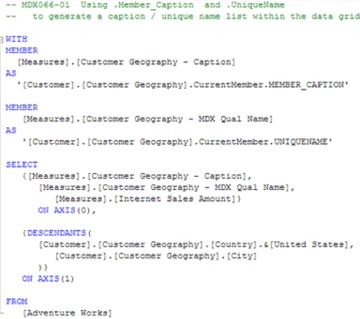
Illustration 1: Our Query in the Query Pane …
2. Execute the query by clicking the Execute (!) button in the toolbar.
The Results pane is populated by Analysis Services, and the dataset partially shown in Illustration 2 appears.
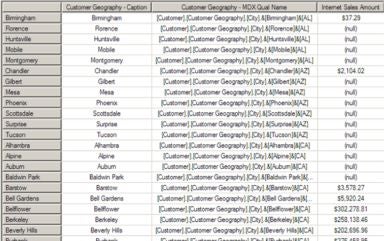
Illustration 2: Results Dataset (Partial View) – Combined Use of MEMBER_CAPTION and .UniqueName with .CurrentMember
We see Customer Geography City captions, the output of the Customer Geography – Caption calculated member, populating the first data column. The respective Customer Geography City Unique Name (a “qualified” MDX name that can, itself, be used within a query against the Adventure Works cube) for each occupies the second data column (which we populate via the Customer Geography – MDX Qual Name calculated member in the query), alongside the corresponding Internet Sales Amount measure. The Customer Geography City members themselves occupy the row axis, as the client has requested.
The calculated members Customer Geography – Caption and Customer Geography – MDX Qual Name employ the MEMBER_CAPTION property and the .UniqueName function, respectively, in conjunction with the “relative” .CurrentMember function, which, as we can easily see from our practical example, results in a combination list of the captions / qualified names of the members that we specify in our row axis. (Similarly, if we had specified the Customer Geography State – Province or Customer Geography Country levels in the row axis instead, we would have obtained a list of the members of those levels as a result). Intersecting the calculations with the members under consideration can be leveraged, in similar fashion, to produce sophisticated results within more elaborate structures and processes.
3. Select File > Save As, name the file MDX066-01, and place it in a meaningful location.
Our client colleagues express satisfaction with our initial solution, and state that it satisfactorily displays the captions of the Customer Geography Cities, alongside the respective qualified / unique names within Analysis Services. They state that they expect this approach to provide the desired index for the developer who needs the Unique (“MDX”) Names, alongside the total Internet Sales Amount for each of the Customer Geography Cities, and that this “map” will equip him to complete the reporting project he has undertaken.