Part I of this series illustrated the
first and foremost check on SQL Serverhow to ping the host. Part 2 examined how to check all of the
windows services related to SQL Server and part 3 discussed how to check the
hardware and operating system information. Part 4
illustrated how to get hard disk and network adapter information from the host
machine. Part 5
demonstrated how we can connect to SQL Server and how we could query SQL Server
related properties and configuration. In this part of the series, we are going
to see how to check all of the databases available in the SQL Server instance
and query database properties.
Step 1
Type or
copy and paste the following code to C:\CheckSQLServer\Checkdatabases.ps1.
function checkdatabases(
[string] $servername
)
{
$SqlConnection = New-Object System.Data.SqlClient.SqlConnection
$SqlCmd = New-Object System.Data.SqlClient.SqlCommand
$SqlAdapter = New-Object System.Data.SqlClient.SqlDataAdapter
$DataSet = New-Object System.Data.DataSet
$DataSet2 = New-Object System.Data.DataSet
$DataSet3 = New-Object System.Data.DataSet
$DataSet4 = New-Object System.Data.DataSet
$SqlConnection.ConnectionString =
"Server=$servername;Database=master;Integrated Security=True"
$SqlCmd.CommandText = "select name from master.dbo.sysdatabases"
$SqlCmd.Connection = $SqlConnection
$SqlAdapter.SelectCommand = $SqlCmd
$SqlAdapter.Fill($DataSet)|out-null
$dbs =$DataSet.Tables[0]
#$dbs
foreach ($db in $dbs)
{
#$db.name
$SqlCmd.CommandText = $db.name+"..sp_spaceused "
$SqlCmd.Connection = $SqlConnection
$SqlAdapter.SelectCommand = $SqlCmd
$SqlAdapter.Fill($DataSet2) |out-null
}
$DataSet2.Tables[0]| format-table -autosize
foreach ($db in $dbs)
{
#$db.name
$SqlCmd.CommandText = "
select '"+$db.name+"' as Dbname,
DATABASEPROPERTY('"+$db.name+"','IsInRecovery') as Inrecovery,
DATABASEPROPERTY('"+$db.name+"','IsInLoad') as InLoad,
DATABASEPROPERTY('"+$db.name+"','IsEmergencyMode') as InEmergency,
DATABASEPROPERTY('"+$db.name+"','IsOffline') as Isoffline,
DATABASEPROPERTY('"+$db.name+"','IsReadOnly') as IsReadonly,
DATABASEPROPERTY('"+$db.name+"','IsSingleUser') as IsSingleuser,
DATABASEPROPERTY('"+$db.name+"','IsSuspect') as IsSuspect,
DATABASEPROPERTY('"+$db.name+"','IsInStandBy') as IsStandby,
DATABASEPROPERTY('"+$db.name+"','Version') as version,
DATABASEPROPERTY('"+$db.name+"','IsTruncLog') as IsTrunclog
"
#$SqlCmd.CommandText
$SqlCmd.Connection = $SqlConnection
$SqlAdapter.SelectCommand = $SqlCmd
$SqlAdapter.Fill($DataSet4) |out-null
}
$DataSet4.Tables[0]| format-table -autosize
$SqlCmd.CommandText = "DBCC SQLPERF(LOGSPACE) WITH NO_INFOMSGS "
$SqlCmd.Connection = $SqlConnection
$SqlAdapter.SelectCommand = $SqlCmd
$SqlAdapter.Fill($DataSet3)|out-null
$DataSet3.Tables[0] | format-table -autosize
$SqlConnection.Close()
}
Step 2
Append C:\CheckSQLServer\CheckSQL_Lib.ps1 with the
following code.
. ./checkdatabases.ps1
Now C:\CheckSQLServer\CheckSQL_Lib.ps1 will have pinghost,
checkservices, checkhardware, checkOS, checkHD, checknet, checkinstance, Checkconfiguration
and checkdatabases as shown below.
#Source all the functions relate to CheckSQL
. ./PingHost.ps1
. ./checkservices.ps1
. ./checkhardware.ps1
. ./checkOS.ps1
. ./checkHD.ps1
. ./checknet.ps1
. ./checkinstance.ps1
. ./checkconfiguration.ps1
. ./checkdatabases.ps1
Note: This
CheckSQL_Lib.ps1 will be updated with sourcing of new scripts, such as
checkdatabases.ps1.
Step 3
Append
C:\CheckSQLServer\CheckSQLServer.ps1 with the following code.
#Objective: To check various status of SQL Server
#Host, instances and databases.
#Author: MAK
#Date Written: June 5, 2008
param (
[string] $Hostname,
[string] $instancename
)
$global:errorvar=0
. ./CheckSQL_Lib.ps1
Write-host "Checking SQL Server....."
Write-host "........................"
Write-host " "
Write-host "Arguments accepted : $Hostname"
write-host "........................"
Write-host "Pinging the host machine"
write-host "........................"
pinghost $Hostname
if ($global:errorvar -ne "host not reachable")
{
Write-host "Checking windows services on the host related to SQL Server"
write-host "..........................................................."
checkservices $Hostname
Write-host "Checking hardware Information....."
Write-host ".................................."
checkhardware $Hostname
Write-host "Checking OS Information....."
Write-host "............................."
checkOS $Hostname
Write-host "Checking HDD Information....."
Write-host "............................."
checkHD $Hostname
Write-host "Checking Network Adapter Information....."
Write-host "........................................."
checknet $Hostname
Write-host "Checking Configuration information....."
Write-host "........................................."
checkconfiguration $instancename |format-table
Write-host "Checking Instance property Information....."
Write-host "............................."
checkinstance $instancename |format-table
Write-host "Checking SQL Server databases....."
Write-host "Checking Database status and size....."
Write-host "............................."
checkdatabases $instancename |format-table
}
Note: This
CheckSQLServer.ps1 will be updated with new conditions and parameters in future
installments of this article series as well.
Sourcing basically loads
the functions listed in the script file and makes it available during the
entire PowerShell session. In this case, we are sourcing a script, which in
turn is going to source many scripts.
Step 4
Now let us execute the
script, CheckSQLServer.ps1, by passing PowerServer3 host as the argument as
shown below.
./CheckSQLServer.ps1 PowerServer3 PowerServer3\SQL2008
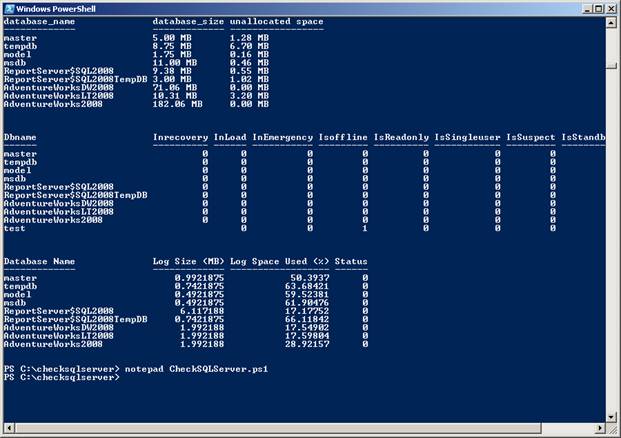
You will get the
following results as shown below. [Refer Fig 1.0]
Results
database_name database_size unallocated space
------------- ------------- -----------------
master 5.00 MB 1.28 MB
tempdb 8.75 MB 6.70 MB
model 1.75 MB 0.16 MB
msdb 11.00 MB 0.46 MB
ReportServer$SQL2008 9.38 MB 0.55 MB
ReportServer$SQL2008TempDB 3.00 MB 1.02 MB
AdventureWorksDW2008 71.06 MB 0.00 MB
AdventureWorksLT2008 10.31 MB 3.20 MB
AdventureWorks2008 182.06 MB 0.00 MB
Dbname Inrecovery InLoad InEmergency Isoffline IsReadonly IsSingleuser I
------ ---------- ------ ----------- --------- ---------- ------------ -
master 0 0 0 0 0 0
tempdb 0 0 0 0 0 0
model 0 0 0 0 0 0
msdb 0 0 0 0 0 0
ReportServer$SQL2008 0 0 0 0 0 0
ReportServer$SQL2008TempDB 0 0 0 0 0 0
AdventureWorksDW2008 0 0 0 0 0 0
AdventureWorksLT2008 0 0 0 0 0 0
AdventureWorks2008 0 0 0 0 0 0
test 0 0 1 0 0
Database Name Log Size (MB) Log Space Used (%) Status
------------- ------------- ------------------ ------
master 0.9921875 50.3937 0
tempdb 0.7421875 63.68421 0
model 0.4921875 59.52381 0
msdb 0.4921875 61.90476 0
Fig 1.0
Step 5
Now lets execute the
script on a machine that doesnt exist, as shown below.
./CheckSQLServer.ps1 TestServer testserver
The results are shown
below. [Refer Fig 1.1]
Results
Checking SQL Server.....
........................
Arguments accepted : TestMachine
........................
Pinging the host machine
........................
TestMachine is NOT reachable
Figure 1.1
Conclusion
This is the sixth part of the article series Check your SQL Server using
Windows PowerShell.
The article illustrated how
to access database status and size information using Windows PowerShell.
Download the scripts for this article.
»
See All Articles by Columnist MAK