


Introduction
This article will examine the Recovery Model options used by SQL Server 2008 and the various methods that can be used to backup a database such as Differential and Transaction Logging. In addition, Transaction Logs, the mechanism that makes Recovery Models possible will be introduced. Backups, Transaction Logs, and Recovery Models are interlinked and the settings of one effect the options of another.
In a previous article (SQL 2008 Backup and Restore), Full Backups and many of the available configuration options available were introduced. Backups from both the command line and SQL Server Management Studio were detailed. In addition, Backup Compression, new in SQL Server 2008 was introduced.
Transaction Logs
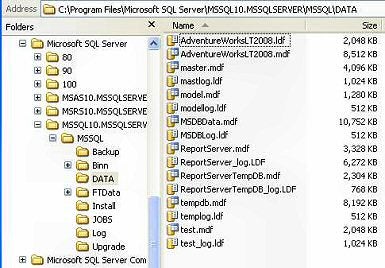
Every SQL Server database consists of at least two physical files on the hard drive, an MDF file and an LDF file. The MDF file contains all of the actual data being stored. The LDF file, or Log file, contains a record of each data change. This logging of each data change makes undo operations and “point in time” backups possible. A point in time backup gives us the ability to restore a database to literally any point in time we wish, yesterday, two hours ago, or two minutes ago. By default, both the MDF and LDF files are located in the SQL Server Server\Version\MSSQL\Data directory on the hard drive.
This recorded history doesn’t remain in the transition log forever though. If it did, the size of the log file over time would become huge and unmanageable. Instead, the log file is periodically cleared, or “Truncated”. The amount of time the log file is allowed to grow before being truncated is determined by the database “Recovery Model”.
Recovery Models
A “Recovery Model” determines how a database’s transaction logs are maintained. Each database has its own Recovery Model setting. Meaning a SQL Server can contain multiple databases, each with its own Recovery Model, separate of how other database are configured.
To View a database Recovery Model setting, open the SQL Server Management Server, right click a database, and then select Properties. Once the properties dialog box opens, select “Options” from the left menu.
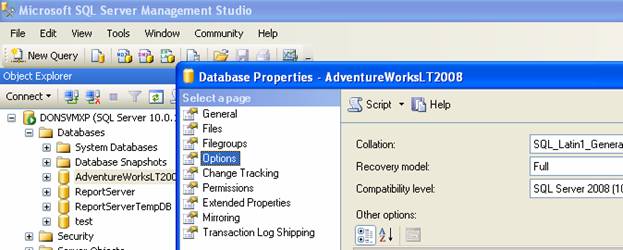
The Recovery Model can be either Full, Simple, or Bulk – logged.
Simple Recovery
When a database is set to Simple Recovery, it means log files are not kept permanently. So when a TSQL statement executes, changes are written to the data and log files, but they are not kept in the log file for long before being Truncated (cleared). This truncating is caused by SQL Server issuing a “Check Point”. For a complete description of the events that cause a Check Point, see the Microsoft article: http://msdn.microsoft.com/en-us/library/ms188748.aspx . What this Truncating of the log file means to us is that the log file cannot be used for a database Restore. This is because we are not in control of when the log is cleared, SQL Servers checkpoints are. Therefore, when a database is set to Simple Recovery, the only backup type available is a Full Backup.

A Full backup restores all your data, you can’t tell it to restore all my data at a specific point in time. For point in time, we need a transaction log.
Full Recovery
Not to be confused with “Full Backups”, Full Recovery refers to a database that keeps a transaction log file history. Because the log file will now be an integral part of the database, thought must be taken as to its creation. When creating a database, there are two file options to consider, “Initial Size”, and “Auto-growth”, both of which can be configured from the SQL Server Management Studios Database Properties screen. Under the Files page, there are settings for both Size and Growth.
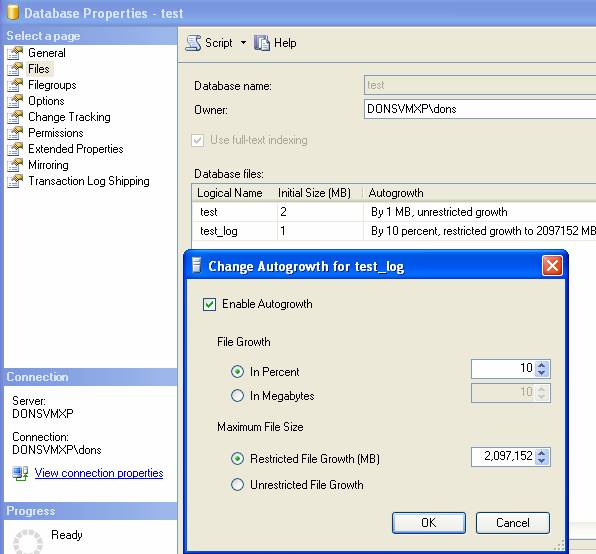
If a database is set to Full Recovery, then the history of each data change operation is saved. If the log file files up or runs out of physical disk space, the database will stop working. This risk can be mitigated by SQL Server’s ability to Auto Grow the log file. To enable Auto Grow, give the log file an initial size in Megabytes. Next, select the “Autogrowth” check box and enter a growth size. The max size of the log file can also be restricted or left to grow indefinably. Without auto-growth, a fixed size for the log file has to be guessed. If the log file fills up, the database stops working. Auto-growth avoids this, but comes with some added overhead. When SQL Server increases the log file size dynamically, it can be resource (memory, CPU, and hard disk) intensive, and database performance may suffer while this happens. Once the log has been adjusted, performance will return to normal.
Differential Backups
When a database is running in “Full Recovery” model, so a transaction log is being kept, we have a couple of new backup options. There are now Differential and Transaction Log backups in addition to Full Backups.
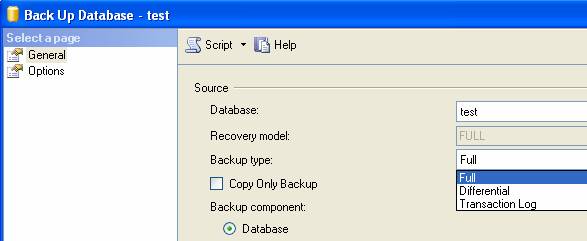
A Differential backup copies all the data changes since the last Full backup. So these backups are usually faster and smaller than Full backups. Over time though, as more data changes happen, the Differential backups will get larger and larger. A Full backup creates a Check Point meaning that new Differential backups will start from that point.
Transaction Log Backups
A Transaction Log Backup will copy all the data changes since the last Full or previous Transaction Log backup. Transaction log backups are typically very fast and small. The downside to them is the recovery. For example, if you create a full backup Monday and Transaction Log backups Tuesday through Friday, and then need to restore on Saturday, the restore procedure would be to recovery Mondays Full, then Tuesday log, Wednesdays Log, Thursdays Log, and finally Fridays Log. While this works, it’s very labor intensive. In addition, if one of the log backups should be bad or unusable for some reason, then the entire chain is broke and not recoverable past the last good Log backup.
Conclusion
SQL Server 2008 offers several Recovery Methods, including Full and Simple. The Recovery Method selected will determine if Transaction Log files are kept, and if so, which type of Backups can be performed, such as Full, Differential, or Transaction Log.