Part
1 of this series, "Auditing made easy by Microsoft SQL Server
2008", covered the various components for auditing and the action
groups provided by Microsoft SQL Server 2008.
In this installment, I am going to illustrate how
to create server level audit and retrieve the audit records.
Before creating the server level audit,
we need to decide where the target is going to be. Let's choose Application
Event log as our target for the server level audit.
Step1 Create Server Audit
Let's create the Server Audit Object
using the following command.
CREATE SERVER AUDIT Compliance_Server_Audit
TO APPLICATION_LOG WITH
( QUEUE_DELAY = 1000, ON_FAILURE = CONTINUE)
Note:
Compliance_Server_Audit is the name of the Server Audit.
Step 2: Enable Server Audit
By default, Server Audit is disabled. Let's
enable the server audit using the following command.
ALTER SERVER AUDIT Compliance_Server_Audit with (STATE = ON)
Step 3: Add Server Audit specification
Server Audit specification is the list of action
groups that Server Audit will audit. Let's add a couple of action groups when
creating the Audit specification.
CREATE SERVER AUDIT SPECIFICATION Compliance_Server_Audit_Spec
FOR SERVER AUDIT Compliance_Server_Audit
ADD (DATABASE_OWNERSHIP_CHANGE_GROUP),
ADD (DBCC_GROUP) WITH (STATE = OFF)
Note:
Compliance_Server_Audit_Spec is the name of the Server Audit specification.
Step 4: Update Server Audit specification
If you want to add action groups to the
existing server audit specification, use the following statement.
ALTER SERVER AUDIT SPECIFICATION Compliance_Server_Audit_Spec
FOR SERVER AUDIT Compliance_Server_Audit
ADD (SUCCESSFUL_LOGIN_GROUP)
Note: You can skip step 4 if you have already
listed all of the action groups in Step 4.
Step 5: Enable Server Audit specification
Enable the Audit specification by using the
following command.
ALTER SERVER AUDIT SPECIFICATION Compliance_Server_Audit_Spec FOR SERVER AUDIT Compliance_Server_Audit WITH (STATE = ON)
Step 6: Read Audit data
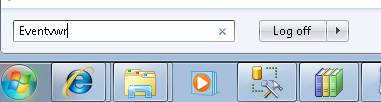
We can launch the Windows Event Viewer to read the
application log. [Refer Fig 1.0 and Fig 1.1]
Fig 1.0
Fig 1.1
Audit data in Application log looks like the data
shown below.
- System
- Provider
[ Name] MSSQLSERVER
- EventID 33205
[ Qualifiers] 16384
Level 0
Task 4
Keywords 0xa0000000000000
- TimeCreated
[ SystemTime] 2010-01-10T07:18:39.000000000Z
EventRecordID 1270
Channel Application
Computer MAK-PC
Security
- EventData
event_time:2010-01-10 07:18:38.4500000 sequence_number:1 action_id:LGIS succeeded:true permission_bitmask:0
is_column_permission:false session_id:51 server_principal_id:261 database_principal_id:0
target_server_principal_id:0 target_database_principal_id:0 object_id:0
class_type:LX session_server_principal_name:MAK-PC\MAK server_principal_name:MAK-PC\MAK
server_principal_sid:01050000000000051500000017a8b69432c5c9beb4825fb7e8030000
database_principal_name: target_server_principal_name: target_server_principal_sid:
target_database_principal_name: server_instance_name:MAK-PC database_name: schema_name: object_name:
statement:-- network protocol: LPC set quoted_identifier on set arithabort off set numeric_roundabort off set
ansi_warnings on set ansi_padding on set ansi_nulls on set concat_null_yields_null on set cursor_close_on_commit
off set implicit_transactions off set language us_english set dateformat mdy set datefirst 7 set transaction
isolation level read committed additional_information:<action_info
xmlns="http://schemas.microsoft.com/sqlserver/2008/sqlaudit_data"><pooled_connection>1
</pooled_connection><client_options>0x28000020</client_options>
<client_options1>0x0001f438</client_options1>
<connect_options>0x00000000</connect_options>
<packet_data_size>8000</packet_data_size>
<address>local machine</address><is_dac>0</is_dac></action_info>
Step 7: Test Audit
We have the following action group added to the
Audit specification.
DATABASE_OWNERSHIP_CHANGE_GROUP
DBCC_GROUP
SUCCESSFUL_LOGIN_GROUP
Now let's test the action group, DBCC_GROUP, by
running a DBCC command.
DBCC CHECKALLOC
Notice that the DBCC command output and status is
logged to the Windows Application Log. [Refer Fig 1.2]
Fig 1.2
Event Data XMl View:
- <Event xmlns="http://schemas.microsoft.com/win/2004/08/events/event">
- <System>
<Provider Name="MSSQLSERVER" />
<EventID Qualifiers="16384">8957</EventID>
<Level>4</Level>
<Task>2</Task>
<Keywords>0x80000000000000</Keywords>
<TimeCreated SystemTime="2010-01-10T07:26:05.000000000Z" />
<EventRecordID>1332</EventRecordID>
<Channel>Application</Channel>
<Computer>MAK-PC</Computer>
<Security UserID="S-1-5-21-2494998551-3200894258-3076489908-1000" />
</System>
- <EventData>
<Data />
<Data>CHECKALLOC</Data>
<Data>master</Data>
<Data />
<Data />
<Data />
<Data>MAK-PC\MAK</Data>
<Data>0</Data>
<Data>0</Data>
<Data>0</Data>
<Data>0</Data>
<Data>5</Data>
<Data>Internal database snapshot has split point LSN = 000000c0:000001e0:0001 and first LSN = 000000c0:000001d8:0001.
This is an informational message only. No user action is required.</Data>
<Binary>FD2200000A000000070000004D0041004B002D00500043000000070000006D00610073007400650072000000</Binary>
</EventData>
</Event>
You can confirm that the Server Audit Object and
the Server Audit Specification Object have been created by selecting from the
system views shown below. [Refer Fig 1.3]
Step 8: Check the Audit metadata
Metadata information on the Server Audit and Audit
specification can be viewed using the following commands.
SELECT * FROM sys.server_audits
SELECT * FROM sys.server_audit_specifications
Fig 1.3
You also check the extended events that are created
by SQL server related to this audit using the following Dynamic management view
command. [Fig 1.4]
select s.name as [session name], se.event_name as [event name], p.name as [package name], t.target_name as [target name]
from sys.dm_xe_sessions s
join sys.dm_xe_session_events se on s.address = se.event_session_address
join sys.dm_xe_packages p on se.event_package_guid = p.guid
join sys.dm_xe_session_targets t on s.address=t.event_session_address
Fig 1.4
Step 9: Stop Server AUDIT
Server Audit can be stopped using the ALTER SERVER
AUDIT command a shown below.
ALTER SERVER AUDIT Compliance_Server_Audit with (STATE = OFF)
Conclusion
Part II of this "Audit made easy by SQL Server
2008" illustrated how to create Server Level Audit, test the audit and
retrieve the audit records.
»
See All Articles by Columnist MAK