


Brief intro
In our last article, we looked
at our ASM issue and ran several SQL and OS specific commands to locate the
problem. As you may have noticed, it wasn’t rocket science but I must tell you
that it wasn’t the first time we digressed from the main issue and got lost,
prolonging downtime. We took the same steps in these article series.
In this article, we will
look at what I encountered on my ESX 3.x Oracle RAC setup. We will do this in a
more conversational style, first encountering the error and then fixing the
problem.
Add Storage on VMware ESX 3.x Server
As you may have guessed, we
need to add storage capacity to our ASM disk group. We can do that either with
the VIC (Virtual Infrastructure Client) or go straight to the ESX console and
use the vmkfstools to create the shared disk.
Option 1: Creating via the Virtual Machine Settings
For the purpose of this demonstration,
we are using the VMware Wokstation 6.0.1 (latest release from Sept. 2007):
Click on the edit settings
and click on “Add”:
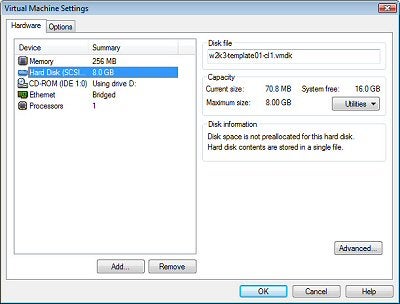
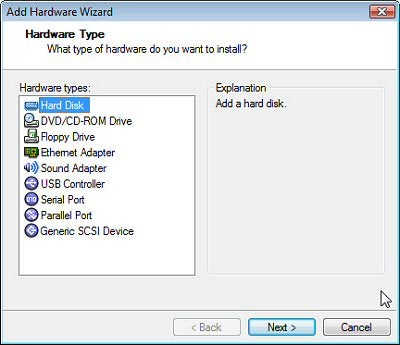
Select “Hard Disk, then click
on “Next”:
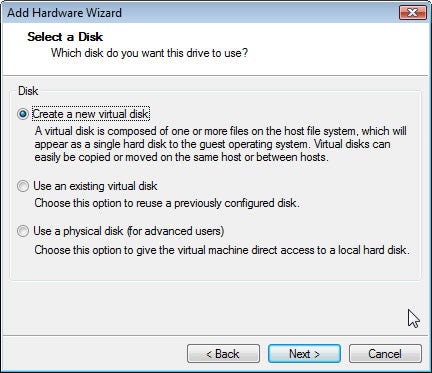
Click “create a new virtual
disk” and click “Next”:
NOTE: If you have used the vmware-vdiskmanager,
if you are using the VMware Workstation 6.x or VMware Server product OR the vmkfstools
for the mainframe virtualization product ESX Server, to create the *vmdk file,
then you can go ahead and choose the option “Use an existing virtual disk”. You
can also, as you see in the option, go ahead and pick the physical disk, if you
have chosen the RDM option with Oracle RAC.
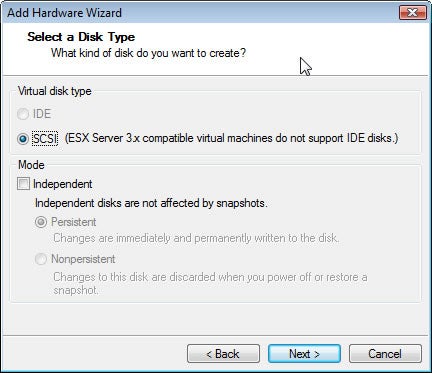
Select the Disk Type:
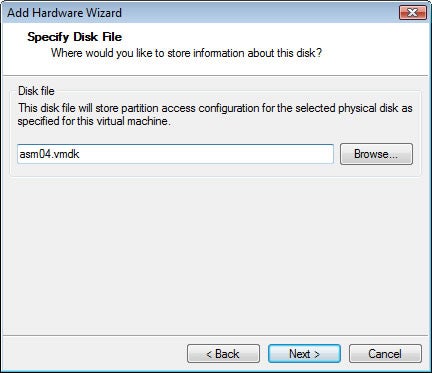
Specify Disk File: for the
sake of simplicity, we will follow our ASM file naming standards and call it
“asm04.vmdk”:
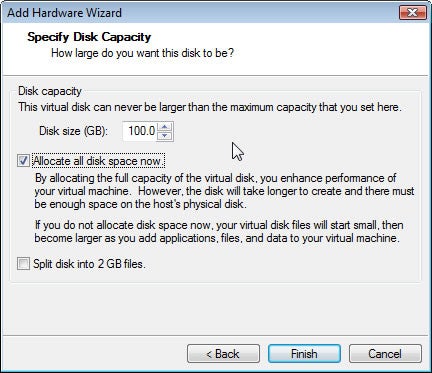
Specify Disk Capacity:
Better safe than sorry, so we go ahead and give it 100GB and click “Finish”:
Option 2: Using “vmkfstools”
on the ESX console using “Putty” (Windows Client) or “SSH” utility with regular
Linux client
[root@hgvmw01esx3 DATA02]# ls
shared
[root@hgvmw01esx3 DATA02]# cd shared
[root@hgvmw01esx3 shared]# ls
asm01-flat.vmdk  asm02-flat.vmdk  asm03-flat.vmdk  ocr-flat.vmdk  spfileasm-flat.vmdk  votingdisk-flat.vmdk
asm01.vmdk       asm02.vmdk       asm03.vmdk       ocr.vmdk       spfileasm.vmdk       votingdisk.vmdk
[root@hgvmw01esx3 shared]# vmkfstools -c 40G -d eagerzeroedthick asm04.vmdk
Creating disk ‘asm04.vmdk’ and zeroing it out…
Create: 100% done.
[root@hgvmw01esx3 shared]#
NOTE: We have stored all of our shared
files in the “Shared” folder and added the disk by choosing the option “eagerzeroedthick”
we make sure that we zero out the existing disk.
Adding the existing disk in Virtual Infrastructure Client)
First, we go to the VI client on our Virtual Center and register that disk to ALL of our nodes. Remember to do
that option to all of your nodes before you start your “Oracle RAC Virtual
Machines”
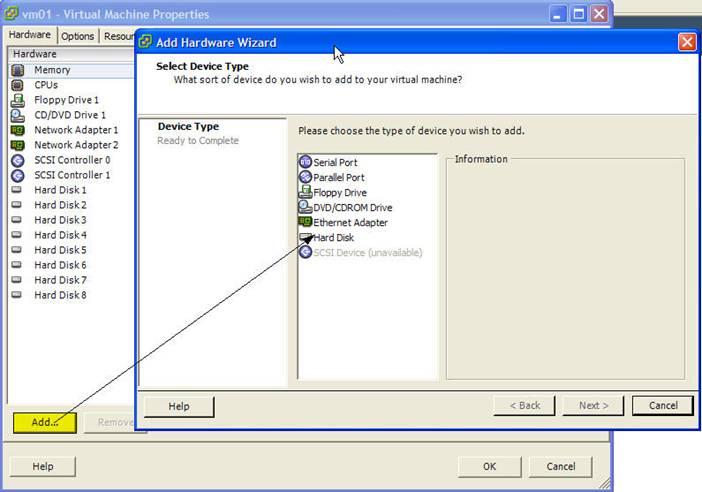
Go to settings, click “Add…” and select
“Hard Disk” and click “Next”:
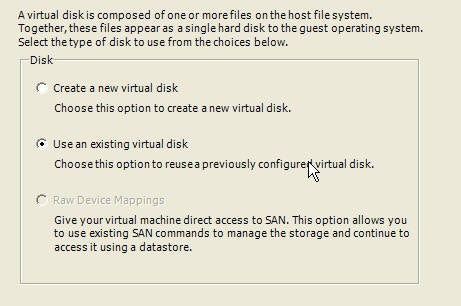
Next, select the “Use an existing virtual
disk” and click “Next”:
We now select the newly created disk and
click “OK”:
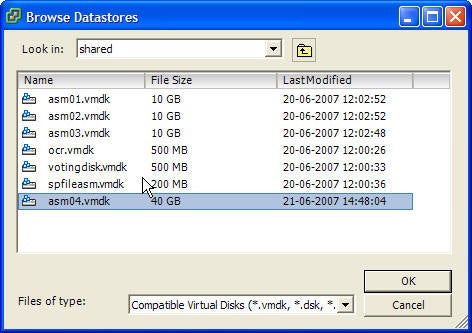
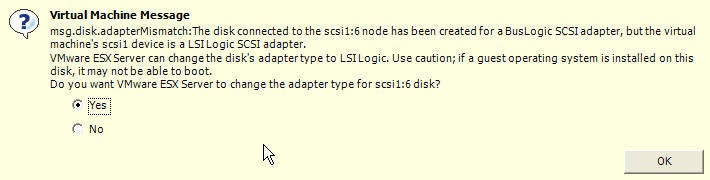
NOTE: Make sure that you have selected
the adaptertype to “LSILogic”, I did that and still received the message
below. The good news is that it suggests that option should you have forgotten
to choose that option:
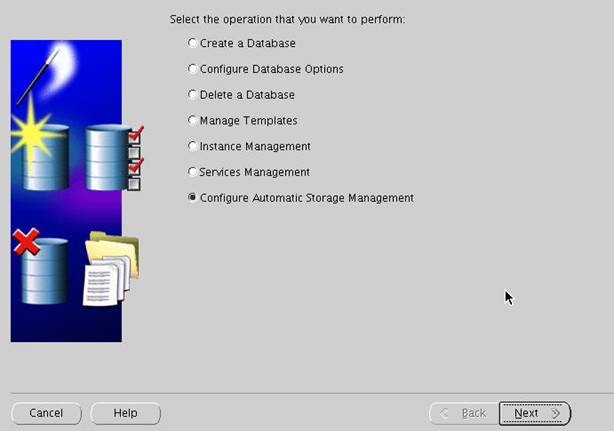
Add the disk in Oracle using DBCA (Database Configuration Assistant) tool:
You first need to list the disk and and make sure that it
appears in the ASM tool console, so that it can be seen by the dbca tool?
Select the “Configure Automatic Storage Management” option.
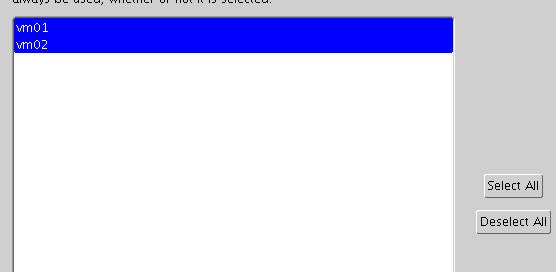
After having clicked “Next”, we see our RAC nodes; click
on “Select All” and then click “Next”:
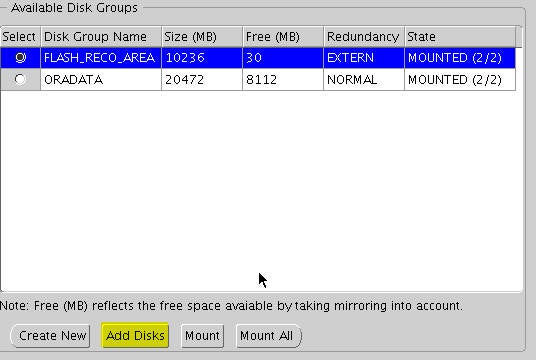
Select the “FLASH_RECO_AREA” and then Click on “Add Disks”.
NOTE: You can also see now in the GUI that you only have
30Mb left!
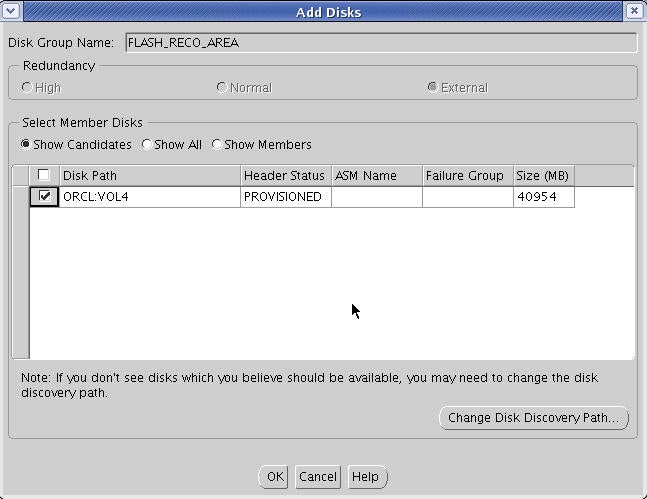
Click the check box and then click “OK”:
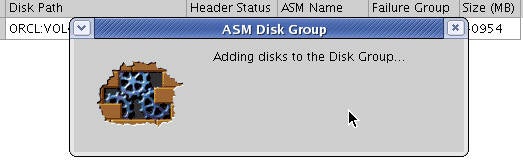
Takes a few seconds…
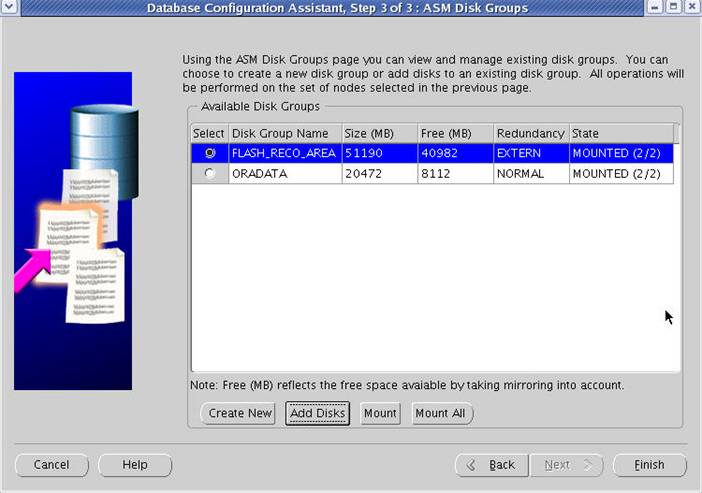
I used the DBCA again to see the status of my “Flash_Reco_Area”
and now it is much larger.
Running the SQL and Cluster commands to restart the cluster
Running SQLs:
[oracle@vm01 bin]$ export ORACLE_SID=+ASM1
[oracle@vm01 bin]$ sqlplus / as sysdba
SQL*Plus: Release 10.2.0.1.0 – Production on Fri Jun 22 11:46:16 2007
Copyright (c) 1982, 2005, Oracle.  All rights reserved.
Connected to:
Oracle Database 10g Enterprise Edition Release 10.2.0.1.0 – Production
With the Partitioning, Real Application Clusters, Oracle Label Security, OLAP
and Data Mining Scoring Engine options
SQL> select type, sum(space)/(1024*1024*1024) from v$asm_file
  2  where group_number=2
  3  group by type;
TYPE				SUM(SPACE)/(1024*1024*1024)
———–		—————————
CONTROLFILE		.046875
DATAFILE			3.43457031
ONLINELOG			.44921875
TEMPFILE			.05859375
Getting disk space information:
SQL> select group_number, name, total_mb, free_mb
  2  from v$asm_diskgroup;
GROUP_NUMBER	NAME				TOTAL_MB	FREE_MB
————  ——————  ——-  ——-
1			FLASH_RECO_AREA 	51190	40982
2			ORADATA			20472	1624
Stopping and Successfully restarting the Oracle Cluster
[oracle@vm01 bin]$ crs_stop -all
Attempting to stop `ora.vm01.gsd` on member `vm01`
Attempting to stop `ora.vm01.ons` on member `vm01`
Attempting to stop `ora.vm02.ons` on member `vm02`
Attempting to stop `ora.vm02.gsd` on member `vm02`
Stop of `ora.vm02.ons` on member `vm02` succeeded.
Stop of `ora.vm02.gsd` on member `vm02` succeeded.
Stop of `ora.vm01.gsd` on member `vm01` succeeded.
Stop of `ora.vm01.ons` on member `vm01` succeeded.
Attempting to stop `ora.vm01.LISTENER_VM01.lsnr` on member `vm01`
Attempting to stop `ora.vm02.LISTENER_VM02.lsnr` on member `vm02`
Stop of `ora.vm02.LISTENER_VM02.lsnr` on member `vm02` succeeded.
Attempting to stop `ora.esxrac.esxrac2.inst` on member `vm02`
Stop of `ora.vm01.LISTENER_VM01.lsnr` on member `vm01` succeeded.
Attempting to stop `ora.esxrac.esxrac1.inst` on member `vm01`
Stop of `ora.esxrac.esxrac2.inst` on member `vm02` succeeded.
Stop of `ora.esxrac.esxrac1.inst` on member `vm01` succeeded.
Attempting to stop `ora.vm01.ASM1.asm` on member `vm01`
Attempting to stop `ora.vm02.ASM2.asm` on member `vm02`
Stop of `ora.vm02.ASM2.asm` on member `vm02` succeeded.
Attempting to stop `ora.vm02.vip` on member `vm02`
Stop of `ora.vm02.vip` on member `vm02` succeeded.
Stop of `ora.vm01.ASM1.asm` on member `vm01` succeeded.
Attempting to stop `ora.vm01.vip` on member `vm01`
Stop of `ora.vm01.vip` on member `vm01` succeeded.
[oracle@vm01 bin]$ crs_start -all
Attempting to start `ora.vm01.vip` on member `vm01`
Attempting to start `ora.vm02.vip` on member `vm02`
Start of `ora.vm02.vip` on member `vm02` succeeded.
Attempting to start `ora.vm02.ASM2.asm` on member `vm02`
Start of `ora.vm01.vip` on member `vm01` succeeded.
Attempting to start `ora.vm01.ASM1.asm` on member `vm01`
Start of `ora.vm01.ASM1.asm` on member `vm01` succeeded.
Attempting to start `ora.esxrac.esxrac1.inst` on member `vm01`
Start of `ora.vm02.ASM2.asm` on member `vm02` succeeded.
Attempting to start `ora.esxrac.esxrac2.inst` on member `vm02`
Start of `ora.esxrac.esxrac1.inst` on member `vm01` succeeded.
Attempting to start `ora.vm01.LISTENER_VM01.lsnr` on member `vm01`
Start of `ora.vm01.LISTENER_VM01.lsnr` on member `vm01` succeeded.
Start of `ora.esxrac.esxrac2.inst` on member `vm02` succeeded.
Attempting to start `ora.vm02.LISTENER_VM02.lsnr` on member `vm02`
Start of `ora.vm02.LISTENER_VM02.lsnr` on member `vm02` succeeded.
CRS-1002: Resource ‘ora.vm01.ons’ is already running on member ‘vm01’
CRS-1002: Resource ‘ora.vm02.ons’ is already running on member ‘vm02’
CRS-1002: Resource ‘ora.esxrac.db’ is already running on member ‘vm02’
Attempting to start `ora.vm01.gsd` on member `vm01`
Attempting to start `ora.vm02.gsd` on member `vm02`
Attempting to start `ora.esxrac.fokeserv.esxrac1.srv` on member `vm01`
Attempting to start `ora.esxrac.fokeserv.esxrac2.srv` on member `vm02`
Start of `ora.vm01.gsd` on member `vm01` succeeded.
Start of `ora.esxrac.fokeserv.esxrac1.srv` on member `vm01` succeeded.
Start of `ora.vm02.gsd` on member `vm02` succeeded.
Start of `ora.esxrac.fokeserv.esxrac2.srv` on member `vm02` succeeded.
CRS-0223: Resource ‘ora.esxrac.db’ has placement error.
CRS-0223: Resource ‘ora.vm01.ons’ has placement error.
CRS-0223: Resource ‘ora.vm02.ons’ has placement error.
[oracle@vm01 bin]$ crs_stat -t
Name           Type           Target    State     Host
————————————————————
ora.esxrac.db  application    ONLINE    ONLINE    vm02
ora….c1.inst application    ONLINE    ONLINE    vm01
ora….c2.inst application    ONLINE    ONLINE    vm02
ora….serv.cs application    ONLINE    ONLINE    vm02
ora….ac1.srv application    ONLINE    ONLINE    vm01
ora….ac2.srv application    ONLINE    ONLINE    vm02
ora….SM1.asm application    ONLINE    ONLINE    vm01
ora….01.lsnr application    ONLINE    ONLINE    vm01
ora.vm01.gsd   application    ONLINE    ONLINE    vm01
ora.vm01.ons   application    ONLINE    ONLINE    vm01
ora.vm01.vip   application    ONLINE    ONLINE    vm01
ora….SM2.asm application    ONLINE    ONLINE    vm02
ora….02.lsnr application    ONLINE    ONLINE    vm02
ora.vm02.gsd   application    ONLINE    ONLINE    vm02
ora.vm02.ons   application    ONLINE    ONLINE    vm02
ora.vm02.vip   application    ONLINE    ONLINE    vm02
[oracle@vm01 bin]$
NOTE: Ignore those errors as those services started
simultaneously and as you see, we are back in business!
Conclusion
I think this article strongly touches on an
important issue (capacity planning) that we often neglect because we
have lots of space on our SAN, lots of CPU to spare. etc. Having storage and
all the computing power in the world is not going to be any help if you haven’t
utilized it before implementing RAC.