


Brief intro
Our last article was the one that took a deeper look into the database from a DBAs perspective. How often do you have the need to benchmark your application? Well, not always, but you do want to have a rough idea of what kind of load is generated in your environment. We will be testing these on our ESX environments, but using the latest product from VMware Server 1.0.3 or Workstation 6.x will do the job as well.
So is benchmarking really necessary?
Yes it is, because good comprehensive, accurate and timely information is the foundation for good decision-making. Unfortunately, DBAs who have influential roles or even IT managers with good judgment have to make many decisions based on little information. You have gone through the process several times where adding capacity means you just go and pack your server with more memory and more CPUs and then it should work, right?
We need information to not only identify the problem accurately but also to design a strategy to tackle it, before asking for more capacity. Benchmarking results and a graphical representation of data and figures as to why your application is struggling make issues clearer to the management. This allows management to focus on the underlying issues and provide a better framework for developing a timely and and effective solution. In any case as technologists, we all know that a good decision begins with solid information and benchmarking provides a framework, structure, and methodology to gather essential analysis. So benchmarking is not just a tool for some external consultants who come up and show you some graphs after having scanned your environments—it is a powerful tool for change by generating credible, comparative information that identifies weaknesses that helps move professionals from a debate about what is wrong to a discussion of how to improve the systems. The more complex the application, the harder it is to pinpoint the right direction to take. Your Oracle RAC has the same characteristics and this is where benchmarking tools come in.
What benchmark tools are available in the market?
There are commercial products in the market such as Quest’s Benchmark Factory, which offers benchmarking for all commercial and open source databases including Oracle, SQL Server, DB2, MySQL and Sybase. For DBAs who are still not sure what the principals of benchmarking are and are curious but are short of cash, they can look at the SwingBench product, which is free of cost. The Oracle UK solutions team has developed this product, which is a Java based utility, to stress test Oracle databases (both versions 9i and 10g are supported). The stable version, as of October 15, 2007 is 2.2 and for the beta enthusiasts there is a 2.3 version available at the download section.
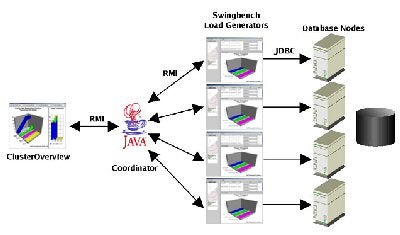
A quick look at the architecture:
And a sample chart:
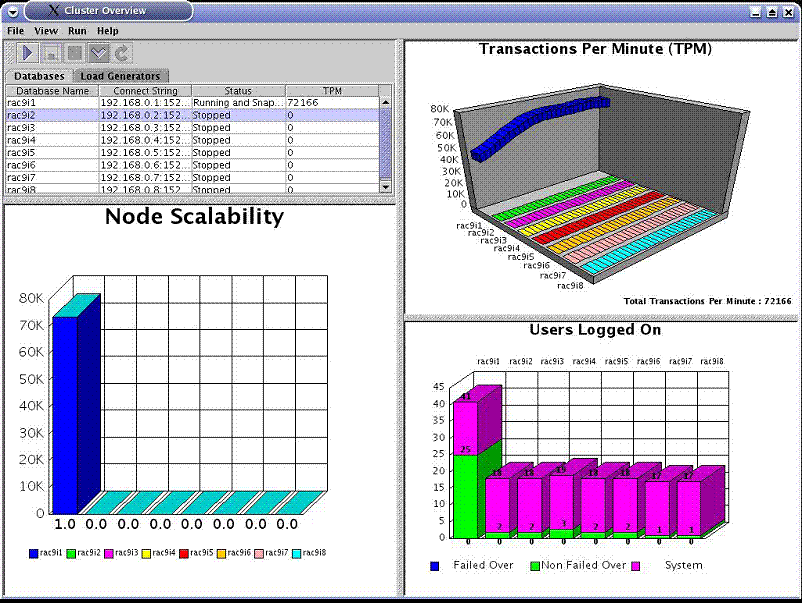
Courtesy SwingBench Manual 2.1
What are the new features for SwingBench 2.2? My favorites are:
- It has included a new lightweight GUI load generator called “minibench”
- Command line options have been increased from the older versions such as start, stop, status
- You can now run the coordinator in the command line or graphical mode
- The charting engine now uses Oracle’s BI-Beans graphing technology
- Users can now turn off jumping to the events panel in SwingBench
- The user chart in clusteroverview now allows users to specify monitored users
- New command line options for coordinator/swingbench/minibench/charbench
- CPU monitor output in charbench
- Simpler configuration for multiple load generators
- Fixes to clusteroverview
- Fixes to wizards
- The order entry benchmark can now be scaled to 100GB
Now getting on to Installation:
You need to have the Java Virtual Machine (JVM) installed in order to run SwingBench on the client platform. Use
Sun’s or IBM’s 1.4 JVMs.
Download and unzip the file first, using Winrar or a zip tool on Windows/Linux to perform the operation:
[oracle@vm01 swingbench]$ unzip swingbench
You need to modify the $SWINGHOME/swingbench.env (for Linux) or $SWINGHOME/swingbenchenv.bat (for Windows) file to perform a default installation:
What does the swingbench.env file looks like?
#!/bin/bash
export ORACLE_HOME=/home/oracle/orasoft/product/10.2
export JAVAHOME=/usr/java/j2sdk1.4.2_09
export SWINGHOME=/home/oracle/swingbench
export ANTHOME=$SWINGHOME/lib
export LD_LIBRARY_PATH=${LD_LIBRARY_PATH}:$ORACLE_HOME/lib
export LOADGENHOSTS='localhost'
export LOADGENUSER=oracle
export
CLASSPATH=$JAVAHOME/lib/rt.jar:$JAVAHOME/lib/tools.jar:$ORACLE_HOME/jdbc/lib/ojdbc14.ja
r:$SWINGHOME/lib/mytransactions.jar:${SWINGHOME}/lib/swingbench.jar:$ANTHOME/ant.jar
The clusteroverview can be invoked on Unix/Linux using the following commands. Do make sure to rad the Clusteroverview configuration before running it!
[oracle@vm01 swingbench]$ cd bin
[oracle@vm01 bin]$ ./clusteroverview
Or on Windows using the following commands.
C:\ cd winbin
C:\ clusteroverview.bat
Running SwingBench
Use -h to get help for all commands
[oracle@vm01 bin]$ ./swingbench -h
usage: parameters:
-D <variable=value> use value for given environment variable
-a run automatically
-c <filename> specify config file
-co <coordinator> specify/override coordinator in configuration
file. i.e. "//<hostname>/CoordinatorServer"
-cpuloc <CPUmonitor > specify/overide location of the cpu monitor.
Value is in the form "//<hostname>/CPUMonitor"
-cs <connectstring> override connect string in configuration file
-dt <drivertype> override driver type in configuration file. Value
is either "thin" or "oci"
-h,--help print this message
-i run interactively (default)
-max <milliseconds> override maximum think time in configuration file
-min <milliseconds> override minimum think time in configuration file
-p <password> override password in configuration file
-r <filename> specify results file
-u <username> override username in configuration file
The character version has a few more parameters, such as:
usage: parameters:
-D <variable=value> use value for given environment variable
-a run automatically
-c <filename> specify config file
-co <coordinator> specify/override coordinator in configuration
file. i.e. "//<hostname>/CoordinatorServer"
-cpuloc <CPUmonitor > specify/overide location of the cpu monitor.
Value is in the form "//<hostname>/CPUMonitor"
-cs <connectstring> override connect string in configuration file
-d <seconds> delay between transaction samples in seconds
-dt <drivertype> override driver type in configuration file. Value
is either "thin" or "oci"
-h,--help print this message
-i run interactively (default)
-max <milliseconds> override maximum think time in configuration file
-min <milliseconds> override minimum think time in configuration file
-p <password> override password in configuration file
-r <filename> specify results file
-s run silent
-u <username> override username in configuration file
-uc <number> override user count in configuration file.
-v display run statistics (vmstat/sar like output)
-vc display run statistics including cpu load
(requires cpu monitor running on server)
-vd display run statistics including DML values
(vmstat/sar like output)
-vt display run statistics including transaction
values (vmstat/sar like output)
Conclusion
As you can see, all you need is a good toolkit to stress test your system and SwingBench is used by many. In the coming weeks we will do some simple benchmark tests to push our ESX servers hosting Oracle RAC 10gs to the limits.