Introduction
Historically, database replication became a huge
topic when distributed and homogeneous systems began to require information that
was not readily available through common database connections or gateways. As
an example, in the early days of Oracle, when SQLNet was not available,
replication took the form of backup and recovery scenarios such as using export
and import. This was not a huge issue twenty-plus years ago when databases were
very small. However, the databases of the last 10 15 years require a much
more robust mechanism to replicate data. The early approach to replication
worked well in homogeneous environments but quickly fell apart when, say,
someone needed to replicate data from an Oracle database to DB2. While most
databases have replication abilities, both native and non-native, this causes
some issues: each database vendor will more than likely have multiple methods
of replication. Oracle, for example, has database links, Oracle Streams,
Materialized Views, Warehouse Builder, and gateway products for replicating
data between non-heterogeneous databasescomplicating not only the choice of
approach but the staffs ability to maintain and administer multiple
technologies effectively.
DBMoto from
HiT Software is one of those products that
cuts to the chase and supplies snapshot and real-time replication capabilities
for all the major database platforms (IBM DB2 UDB, Oracle,
Microsoft SQL Server, Sybase ASE, SQL Anywhere, Cloudscape, MySQL, Informix,
Ingres, PostgreSQL, Microsoft Access, Gupta SQLBase, Firebird, and Solid).
DBMoto helps remove the barriers to replication and enable users to quickly
setup, schedule, and perform replicationeasily eliminating the need to learn
complicated technologies and maintaining dozens of replication environments.
Working with DBMoto
DBMoto has, at a minimum, three connections it
needs for performing replication. One connection is required for source
database tables needing replication, one connection for the target database
where data will be replicated to, and one connection to create, store, and
retrieve metadata information about the replication process. This metadata does
not need to reside in the source or target database and can be in any database
or reside locally to the DBMoto tool.
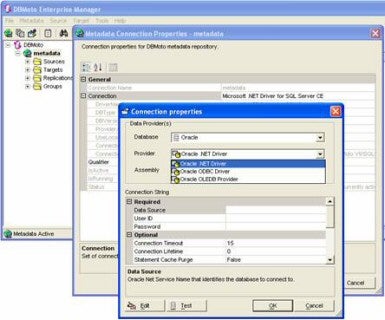
While it is almost suggested that DBMoto should
use .NET exclusively, I had read somewhere that an ODBC or OLE DB connection
could be used for defining the connection to where the metadata would be
stored. Wanting just to use the wizards in this product, I neglected to read the
user guide that actually told you to right click on the metadata tag in the
tree structures. Then after realizing that a box with three dots (
)
enabled me to define connection attributes I was off and running.
Create connections

Creating connections to either source or target
database is a matter of clicking through simple wizards. Setting up a source or
target connection involves:
1. Select database type and
data provider
2. Enter the data source
name and user credentials
3. Expand a tree structure
of database tables to click which tables will be involved on the source or
target sides
View table information

Not all replication setups are straightforward.
Users might want to investigate the data in source or target databases to
verify the data they are replicating. DBMoto provides an easy way to look at
table structures and view the data within the tables. For instance, you could
navigate down the source tree structure, find a table of interest, right click
on that table, and then open up another window to execute a query against that
table. This is one of those nice to have features so that a user doesnt have
to jump out to yet another product to view data. In addition, as replication
processes get underway, this will provide an interface to validate the data
movement.
Setting up replication
DBMoto provides for different types of
replication between the same or different database servers and platforms. It is
just as easy to replicate from Oracle to Oracle, as it is to replicate from
Oracle to MySQL. Replication with DBMoto can take on four distinct forms:
-
Refresh
This
is where target table is replaced with source table data.
-
Continuous Refresh Is the same as a Refresh but the target table is
refreshed on a schedule.
-
One-way mirroring
Is a continuous update of the target table as changes to the source table are
recorded in the database logs. This sort of replication typically will involve
a refresh and then scheduling periodic checks for change data capture.
-
Synchronization This is also called two-way mirroring where both
source and target are involved in the replication process. Data is allowed to
change on either the source or target and then data is replicated both ways as
needed.

Depending
on the type of replication chosen, obviously the source and target tables must
exist. Because of the way DBMoto allows for mapping from simple one-to-one or
complex one-to-many, many-to-one, or many-to-many replication scenarios, both
source and target tables do not have to be composed of exactly the same
structure. However, if the user needs a little help creating table structures,
DBMoto supplies a table creation wizard that pulls metadata from the database
and enables the user to execute the CREATE TABLE DDL commands.

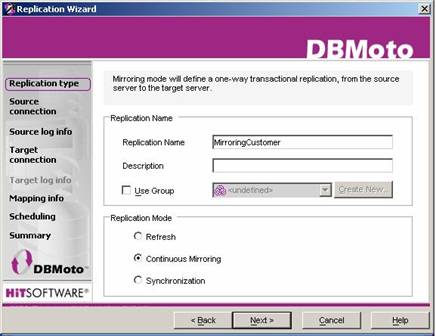
Setting
up replications, when the target table already exists, is as simple as right
clicking on the source table and choosing to create a new replication. From
there you just select the replication mode, select source connection and table,
select the target connection and table, verifying or altering the mappings, and
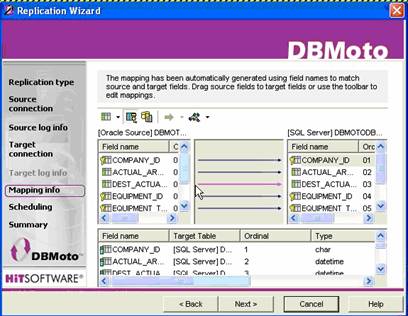
then schedule the replication process. The mappings, column matching between
source and target, are done automatically but allow the user to drag and drop
target columns on the sourcesimplifying the process.

Because
replication can progress beyond the simple one-to-one / source-to-target
scenarios, DBMoto has a nice interface for grouping replications through their
multiple replication wizardenabling a user to set source, target, and
scheduling details just once for a set of replications and reduce the required
maintenance. This can also optimize the number of database connections and
reduce overhead to access database logs as the database log would only be read
once for all replications as opposed to multiple times if the replications were
not grouped together. DBMoto also provides a way to customize replication
behavior by scripting with Visual Basic .NET.
Conclusion
Simple and effective is the best way I can
describe DBMoto. DBMoto is easy to set up, easy to configure,, and makes it easy
to replicate between the major platforms. The strongest point about DBMoto is
that it doesnt require a user to understand replication technology for all the
major database environments. Replicating between Oracle, DB2, Informix, SQL
Server, etc. is basically all the samejust point click and shoot. With a wide
array of replicating options, scripting, and a nicely written user guide,
DBMoto can easily be configured for a variety of environments. You can obtain a
full working 30-day copy, with full support here: DBMoto
Evaluation Download.
»
See All Articles by Columnist James Koopmann