Before
starting to audit your Oracle database, use some of these guidelines to help
you plan your auditing initiative.
Over the
last two months, weve been taking a look at the Oracle 2-Day Security Guide. Up
to this point, weve taken a look at the following topics:
Enabling
default security settings
Securing
the Data Dictionary
Those
Pesky Predefined Accounts
The
Power of PROFILES
Object
privileges and synonym usage
Explicit
GRANTs and ROLES in Oracle Database 11g
Securing
Oracle Database Client Connections
Securing
Client Connections: OS Authentication
Secure
Sockets Layer and Oracle 11g Security
Getting
started with standard auditing in Oracle Database 11g
Setting
default auditing as recommended by Oracle
Creating
a standard audit trail in Oracle Database 11g
If youve
noticed, throughout the Oracle 2-Day Security Guide, Oracle has focused on
first setting or taking the defaults for just about all of the security setup
setting; not venturing too far from normal operations and configurations of
databases. It is thus proper, as we begin to close the 2-Day Security Guide
book to end with a section that takes a look at a few guidelines for auditing.
The 2-Day Security Guide categorizes its guidelines for auditing in the
following way:
-
Using default
auditing of SQL statements and privileges
-
Managing
audited Information
-
Auditing
typical database activity
-
Auditing
suspicious database activity
The guidelines set forth for using default auditing of SQL
statements and privileges basically just points us to the fact that when we
create a new database you can enable auditing of a select set of SQL statements
and privileges. Of course Oracle recommends you enable default auditing for
this so that you can enforce strong internal controls and if needed you can
meet any regulatory requirements as defined in the Sarbanes-Oxley Act. We went
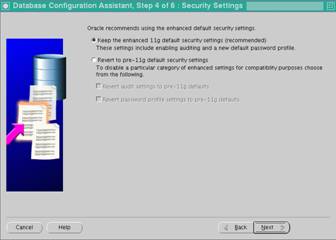
through using the database creation assistant (DBCA) in the Setting default
auditing as recommended by Oracle topic, where from the Security Settings window we
selected Keep the enhanced 11g default security settings (recommended)
and clicked Next. Within the 2-Day Security Guide, you could also take
a further look by checking out the "Using Default Auditing for Security-Relevant SQL
Statements and Privileges" section for more information about default
auditing.

As for
the guidelines for managing audited information, the 2-Day Security Guide, mentions
that auditing does not severely affect database performance you should limit
the number of audited events as much as possible because this will minimize
the performance impact on the execution of audited statements and the size of
the audit trail. Now while the guide does say this is for ease of analysis,
which I will agree, it brings up two very important questions that beg for
answers. The first being: how can they say auditing does not severely affect
database performance but then dogmatically state that limiting audited events
will minimize the performance impact? Clearly if you audit too much or too many
events, a database will suffer some impact. Probably the more logical explanation
of the statements would be that you, as a security/database administrator,
should know what youre auditing or else it will become out of control. This
sort of leads into the second beckoning question of: how much auditing is too
much and how much is too little? Additionally, is there a fine line that would
limit you from auditing everything you need and the performance impact you will
experience? For these types of questions, the 2-Day Security Guide asks that
you follow these two guidelines when developing your auditing strategy:
1.
Know why youre
auditing Clearly auditing for the sake of auditing, especially in a
production system, is not a good reason to audit. If you want to learn about
auditing then you should play on a separate sandbox. This knowing also
translates into knowing what to audit. You may say you want to detect ill-use
of database information but make sure you know what that looks like. You may
say that a SELECT statement that returns a lot of data is suspicious but depending
on your application and the person performing the SELECT, it just might be
valid.
2.
When you do
audit, make sure you understand it Putting a blanket set of auditing rules
for a database is probably not going to make anyone happy. Imagine capturing
every single SELECT statement that your database performs. Here you have to
understand your database, understand the objects, understand the data, and
understand your users, to put in place a minimum number of audit rules to
capture just what you need for vulnerability detection. This will limit the
amount of auditing data you as a security / database administrator will have to
comb throughmaking your life much easier.
When
auditing typical database activity, and we should probably emphasis typical here,
the 2-Day Security Guide directs us to three guidelines for auditing when the
purpose is for gathering historical information about database activities.
These include:
1.
Only audit
those actions that are pertinent to database activity You should audit only
specific database activities, to limit the amount of audit information gathered
and cluttering up meaningful information with useless information.
2.
Archive old
audit records and purge the audit trail Over time, and sometimes not very
long, the audit trail records collected will fill up and bog down the active
audit area. It is a good idea to save off pertinent collected data (to an
archive area) and then purge the audit trail. To archive audit records you can
just use the INSERT..INTO..SELECT..FROM SYS.AUD$ statement of from the
SYS.FGA_LOG$ if using fine-grained auditing. To purge you can just use a
standard DELETE statement on these same objects. Just remember, before
archiving, you can always SELECT only those audit rows that are of interest to
reduce the archive area as well.
3.
Auditing
should be considered when meeting certain regulations Auditing, just as
regular database activity, is access to sensitive data. Make sure you're
auditing practices adhere to the same regulatory policies.
Once you
figure out what to audit, the Security Guide offers two guidelines that state:
1.
Begin auditing
general information and then switch to specific information Often times when
auditing is performed, knowing exactly what youre looking for, not much
information is availablecausing one to question if auditing is set up properly
or giving the false impression that nothing is happening on the database. For
these reasons, it is often best to broaden the scope and set up options that
audit more generally at first but using the standard audit trail. After you
analyze this initial auditing information then you can always turn to auditing
specific actions with options like fine-grained auditing.
2.
Keep your
audit trail safe Remember that the audit trail contains sensitive information
and it also contains a record of what has happened to prove or disprove your
case against suspicious activity. Because of this, you should keep your audited
information safe and away from those that might want to add to or delete from
it.
Setting
up auditing is not as easy as just flipping on a switch. There are planning,
running, and analyzing processes that must be considered. Improper planning can
easily make you feel overwhelmed and unable to properly detect miss-use of a
database. The 2-Day Security Guide helps overcome some of these downfalls by
giving us some basic guidelines to get started.
»
See All Articles by Columnist James Koopmann