


One of
the new features in Microsoft SQL Server 2008 is the ability to track changes
on a table. You can enable change tracking on a table using the Change Data
Capture feature.
Part one
of this series illustrates how to enable Change Data Capture on a database, and
on a table, and how to keep track of Data Definition Language changes on a
table.
Note:
This article is written based on the SQL Server 2008 – Nov CTP.
Step 1
Let’s
create a database named MyDataBase as shown below. [Refer Fig 1.0]
USE [master]
GO
/*** Object:  Database [MyDataBase]   Script Date: 01/07/2008 18:46:15 ***/
IF  EXISTS (SELECT name FROM sys.databases WHERE name = N’MyDataBase’)
DROP DATABASE [MyDataBase]
GO
USE [master]
GO
/*** Object:  Database [MyDataBase]   Script Date: 01/07/2008 18:46:33 ***/
CREATE DATABASE [MyDataBase]
GO
Click for larger image
Fig 1.0
Step 2
Now let’s
create a table named MyTable on the MyDataBase database, as shown Below. [Refer
Fig 1.1]
USE [MyDataBase]
GO
/*** Object:  Table [dbo].[MyTable]   Script Date: 01/07/2008 18:52:14 ***/
IF  EXISTS (SELECT * FROM sys.objects WHERE object_id = OBJECT_ID(N’[dbo].[MyTable]’)
	AND type in (N’U’))
DROP TABLE [dbo].[MyTable]
GO
USE [MyDataBase]
GO
/*** Object:  Table [dbo].[MyTable]   Script Date: 01/07/2008 18:52:26 ***/
SET ANSI_NULLS ON
GO
SET QUOTED_IDENTIFIER ON
GO
SET ANSI_PADDING ON
GO
CREATE TABLE [dbo].[MyTable](
	[ID] [int] NOT NULL,
	[Name] [varchar](100) NULL,
 CONSTRAINT [MyTable_PK] PRIMARY KEY CLUSTERED
(
	[ID] ASC
)WITH (PAD_INDEX  = OFF, STATISTICS_NORECOMPUTE  = OFF,
	IGNORE_DUP_KEY = OFF, ALLOW_ROW_LOCKS  = ON,
	ALLOW_PAGE_LOCKS  = ON) ON [PRIMARY]
) ON [PRIMARY]
GO
SET ANSI_PADDING OFF
GO
Click for larger image
Fig 1.1
Step 3
In order
to track changes on the table, we need to enable the Change Data Capture feature
on the database. We can enable the Change Data Capture feature using the
following Transact SQL command, as shown below. [Refer Fig 1.2]
Until
this point, the only schema that exists on the database is dbo. Once we enable Change
Data Capture, a new schema with a bunch of objects will be created.
USE [MyDataBase]
GO
EXEC sys.sp_cdc_enable_db_change_data_capture
GO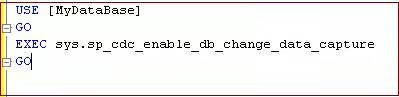
Fig 1.2
The
following CDC tables are created under the CDC schema, as shown below. [Refer
Fig 1.3]
cdc.captured_columns
cdc.change_tables
cdc.ddl_history
cdc.index_columns
cdc.lsn_time_mapping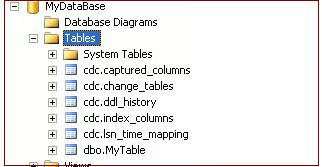
Fig 1.3
When you
query these tables, you will see only zero number of rows. [Refer Fig 1.4]
select * from cdc.captured_columns
select * from cdc.change_tables
select * from cdc.ddl_history
select * from cdc.index_columns
select * from cdc.lsn_time_mapping
Result
home\sql2008(HOME\MAK): (0 row(s) affected)
home\sql2008(HOME\MAK): (0 row(s) affected)
home\sql2008(HOME\MAK): (0 row(s) affected)
home\sql2008(HOME\MAK): (0 row(s) affected)
home\sql2008(HOME\MAK): (0 row(s) affected)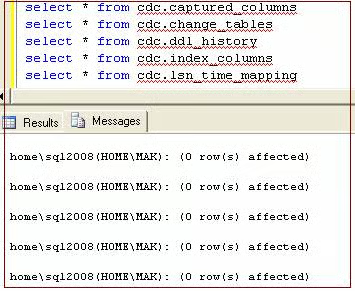
Fig 1.4
Step 3
In order
to track changes on the table, we need to enable the Change Data Capture feature
on the table as well. Let’s enable the Change Data Capture feature using the
following Transact SQL command, as shown below. [Fig 1.5]
USE [MyDataBase]
GO
EXEC sys.sp_cdc_enable_table_change_data_capture
@source_schema = ‘dbo’,
@source_name = ‘MyTable’,
@role_name = ‘cdc_MyTable’
GO
Result
home\sql2008(HOME\MAK):
Job ‘cdc.MyDataBase_capture’ started successfully.
home\sql2008(HOME\MAK):
Job ‘cdc.MyDataBase_cleanup’ started successfully.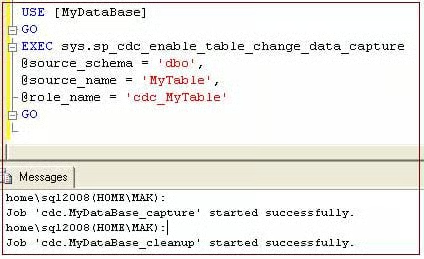
Fig 1.5
By
reading the result, we can easily understand that SQL Server Agent is a must to
do the capture and cleanup. We can see these jobs are actually created as SQL
Server Scheduled jobs. [Refer Fig 1.6, 1.7]
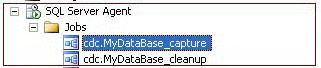
Fig 1.6
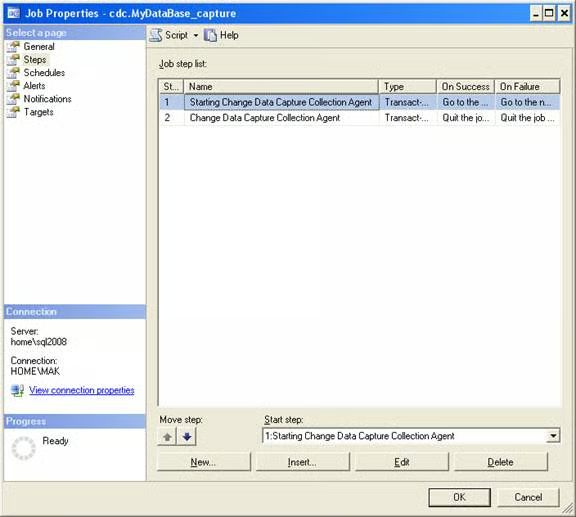
Fig 1.7
Now let’s
execute the following Transact SQL to see if any data has been inserted on any
of the CDC tables.
select * from cdc.captured_columns
select * from cdc.change_tables
select * from cdc.index_columns
Result
object_id, column_name, column_id, column_type, column_ordinal, is_computed
389576426, ID, 1, int, 1, 0
389576426, Name, 2, varchar, 2, 0
home\sql2008(HOME\MAK): (2 row(s) affected)
object_id,  version,  source_object_id, capture_instance, start_lsn, end_lsn, supports_net_changes, has_drop_pending,
	role_name, index_name, filegroup_name, create_date
389576426, 0, 53575229, dbo_MyTable, NULL, NULL, 0, NULL, cdc_MyTable, MyTable_PK, NULL, 2008-01-07 19:05:49.733
home\sql2008(HOME\MAK): (1 row(s) affected)
object_id, column_name, index_ordinal, column_id
389576426, ID, 1, 1
home\sql2008(HOME\MAK): (1 row(s) affected)
You can see
that the CDC schema stores metadata information about which tables and columns
are being tracked by Change Data Capture. It also stores information about what
Index the table that has been tracked has.
Step 4
We can check
to see if Change Data Capture is enabled on a database by using the following
transact SQL statement.
SELECT is_cdc_enabled FROM sys.databases WHERE name = ‘MyDataBase’Result
is_cdc_enabled
————–
1
home\sql2008(HOME\MAK): (1 row(s) affected)
Step 5
We can check
to see if Change Data Capture is enabled on a table, by using the following
transact SQL statement.
SELECT is_tracked_by_cdc FROM sys.tables WHERE name = ‘MyTable’Result
is_tracked_by_cdc
—————–
1
home\sql2008(HOME\MAK): (1 row(s) affected)
Step 6
Now let’s
make some changes to table structure and see if Change Data Capture captures
the changes. Execute the following query as shown below. [Refer Fig 1.8]
USE [MyDataBase]
GO
Alter Table MyTable add Address varchar(500)
GO
Alter Table MyTable add Salary money
GO
Alter Table MyTable add Bonus money
GO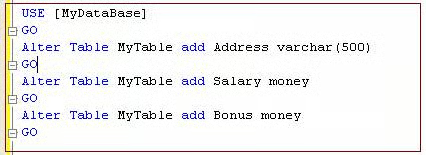
Fig 1.8
Query the
cdc table ddl_history as shown below. [Refer Fig 1.9]
select * from cdc.ddl_historyResult
source_object_id, object_id, required_column_update, ddl_command, ddl_lsn, ddl_time
53575229, 389576426, 0, Alter Table MyTable add Address varchar(500)
, 0x0000001C000001350001, 2008-01-07 19:23:00.000
53575229, 389576426, 0, Alter Table MyTable add Salary money
, 0x0000001C000001370018, 2008-01-07 19:23:00.000
53575229, 389576426, 0, Alter Table MyTable add Bonus money
, 0x0000001C0000013D0018, 2008-01-07 19:23:00.000
home\sql2008(HOME\MAK): (3 row(s) affected)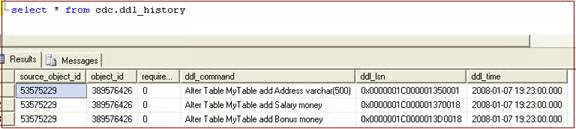
Fig 1.9
Note:
This article is written based on the SQL Server 2008 – Nov CTP.
Conclusion
This article
illustrated how to enable the new SQL Server Feature “Change Data Capture” on a
database. In addition, it illustrated how to enable Change Data Capture on a
table and how to keep track of Data Definition Language changes on a table. It
also explained the CDC schema and changes happening in the objects of the CDC
schema.
»
See All Articles by ColumnistMAK