


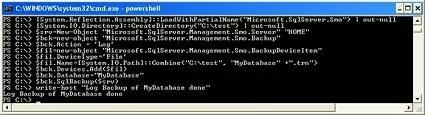
This
script will take the Transaction log backup of the MyDatabase database onto the
folder c:\test as shown below. [Refer Fig 1.3]
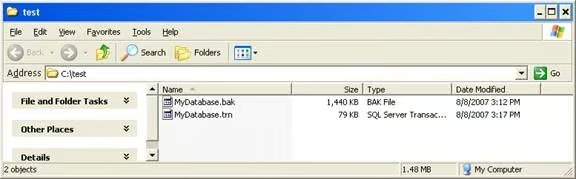
Fig 1.3
Method
3
Let
us assume we have a database ‘MyDatabase’, on the server ‘HOME’. Now let us
assume that we want to take a Differential backup of the databases onto the
folder c:\test. Execute the following cmdlets, one by one, as shown below. [Refer
Fig 1.4]
[System.Reflection.Assembly]::LoadWithPartialName(“Microsoft.SqlServer.Smo”) | out-null
[System.IO.Directory]::CreateDirectory(“C:\test”) | out-null
$srv=New-Object “Microsoft.SqlServer.Management.Smo.Server” “HOME”
$bck=new-object “Microsoft.SqlServer.Management.Smo.Backup”
$bck.Incremental = 1
$fil=new-object “Microsoft.SqlServer.Management.Smo.BackupDeviceItem”
$fil.DeviceType=’File’
$fil.Name=[System.IO.Path]::Combine(“C:\test”, “MyDatabase” +”.diff”)
$bck.Devices.Add($fil)
$bck.Database=”MyDatabase”
$bck.SqlBackup($srv)
write-host “Differential Backup of MyDatabase done”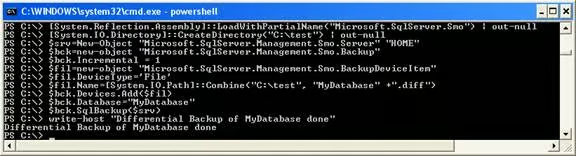
Fig 1.4
This
script will take the Differential backup of the MyDatabase database on to the
folder c:\test as shown below. [Refer Fig 1.5]
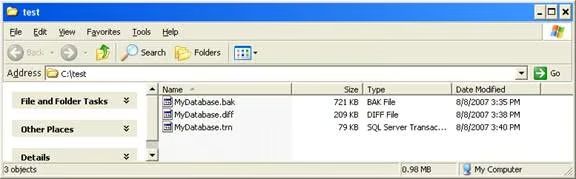
Fig 1.5
Method
4
Now
let’s join Method 1, Method 2 and Method 3 together as a PowerShell script that
will accept Server name, Database name, Backup type and Folder location as
parameters, so that it will be easy to automate. Create the following Backup.ps1
script in C:\PS folder, as shown below. [Fig 1.6, 1.7]
param (
  [string] $ServerName,
  [string] $DatabaseName,
  [string] $Backuptype ,
  [string] $BackupPath
)
[System.Reflection.Assembly]::LoadWithPartialName(“Microsoft.SqlServer.Smo”) | out-null
[System.IO.Directory]::CreateDirectory($BackupPath) | out-null
$srv=New-Object “Microsoft.SqlServer.Management.Smo.Server” “$servername”
$bck=new-object “Microsoft.SqlServer.Management.Smo.Backup”
if ($Backuptype -eq “FULL”)
{
$bck.Action = ‘Database’
$extenstion=”.BAK”
$text1=”Full Backup ”
}
if ($Backuptype -eq “TRAN”)
{
$bck.Action = ‘Log’
$extenstion=”.LOG”
$text1=”Transactional Log Backup ”
}
if ($Backuptype -eq “DIFF”)
{
$bck.Incremental = 1
$extenstion=”.DIFF”
$text1=”Differential Backup ”
}
$fil=new-object “Microsoft.SqlServer.Management.Smo.BackupDeviceItem”
$fil.DeviceType=’File’
$fil.Name=[System.IO.Path]::Combine($BackupPath, $DatabaseName+$extenstion)
$bck.Devices.Add($fil)
$bck.Database=$DatabaseName
$bck.SqlBackup($srv)
write-host $text1 of $Databasename done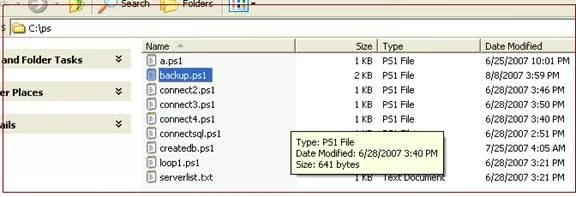
Fig 1.6
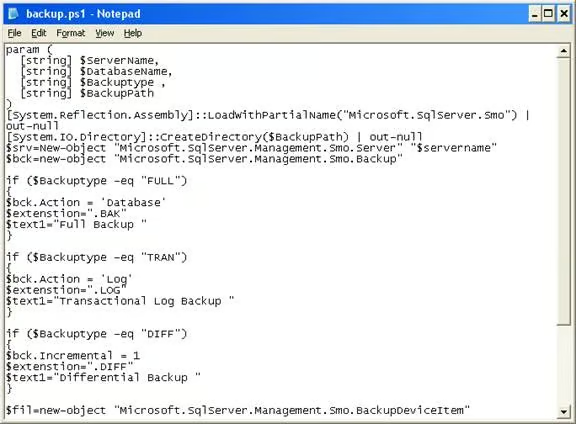
Fig 1.7
Now
let us execute the above PowerShell script with the following parameters, as
shown below. [Refer Fig 1.8]
./backup.ps1 HOME MyDatabase FULL C:\test
./backup.ps1 HOME MyDatabase DIFF C:\test
./backup.ps1 HOME MyDatabase TRAN C:\test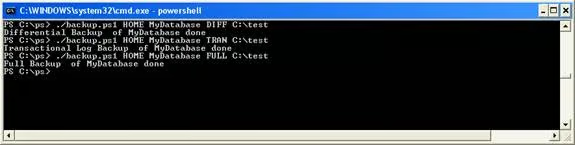
Fig 1.8
The
execution of above script results in taking a Full, Transaction Log and
Differential backup of the Mydatabase database. [Refer Fig 1.8 and 1.9]
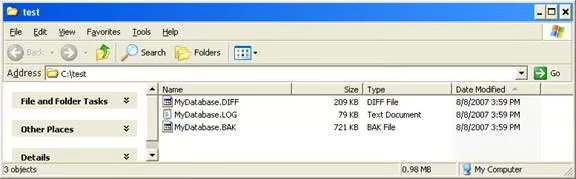
Fig 1.9
Method
5
Let
us assume that we need to add the Date Stamp to the file name when doing a backup
using the above script. In order to achieve that, update the script with the
following code. [Fig 2.0]
param (
  [string] $ServerName,
  [string] $DatabaseName,
  [string] $Backuptype ,
  [string] $BackupPath
)
[System.Reflection.Assembly]::LoadWithPartialName(“Microsoft.SqlServer.Smo”) | out-null
[System.IO.Directory]::CreateDirectory($BackupPath) | out-null
$srv=New-Object “Microsoft.SqlServer.Management.Smo.Server” “$servername”
$bck=new-object “Microsoft.SqlServer.Management.Smo.Backup”
if ($Backuptype -eq “FULL”)
{
$bck.Action = ‘Database’
$extenstion=”.BAK”
$text1=”Full Backup ”
}
if ($Backuptype -eq “TRAN”)
{
$bck.Action = ‘Log’
$extenstion=”.LOG”
$text1=”Transactional Log Backup ”
}
if ($Backuptype -eq “DIFF”)
{
$bck.Incremental = 1
$extenstion=”.DIFF”
$text1=”Differential Backup ”
}
$fil=new-object “Microsoft.SqlServer.Management.Smo.BackupDeviceItem”
$fil.DeviceType=’File’
$fil.Name=[System.IO.Path]::Combine($BackupPath, $DatabaseName+ “_”+ [DateTime]::Today.ToString(“yyyy_MM_dd”)+$extenstion)
$bck.Devices.Add($fil)
$bck.Database=$DatabaseName
$bck.SqlBackup($srv)
write-host $text1 of $Databasename done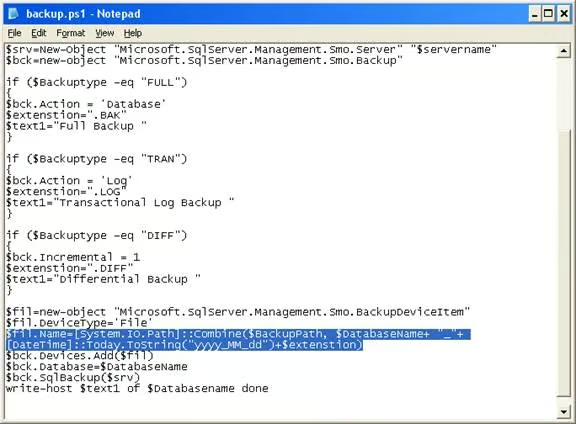
Fig 2.0
Now
let us execute the above PowerShell script with the following parameters, as
shown below. [Refer Fig 2.1]
./backup.ps1 HOME\SQLExpress Admin FULL C:\test
./backup.ps1 HOME\SQLExpress Admin DIFF C:\test
./backup.ps1 HOME\SQLExpress Admin TRAN C:\testNote: HOME\SQLExpress
is the named instance of sql server on the host HOME;
Admin
is the database name.
The
execution of the above script results in taking a Full, Transaction Log and
Differential backup of the database Admin. [Refer Fig 2.1 and 2.2]
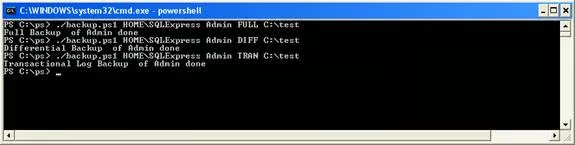
Fig 2.1
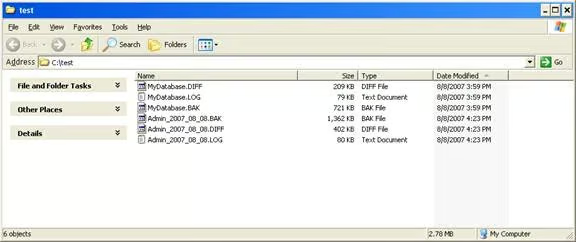
Fig 2.2
Conclusion
Part 6 of
this series has illustrated how to use PowerShell and PowerShell script to do
Full Backup, Transaction Log backup and Differential backups of the databases
with a date stamped file name.
»
See All Articles by ColumnistMAK