


Part of Database
Administrator’s job is to monitor blocking in SQL Server. By taking advantage
of the Microsoft
Knowledge Base article 271509, we can
monitor the blocking and capture the SQL statements that are involved in the blocking
to a file. This can be accomplished by updating the procedure from KB Article
271509 in such a way that it writes the output directly to a file.
Step 1
Create the procedure usp_writetofile,
as shown in the figure Fig 1.1
Click for larger image
[Fig. 1.1]
Source Code
set quoted_identifier off
go
use master
go
if exists (select * from dbo.sysobjects where id = object_id(N’[dbo].[Usp_WriteToFile]’) and
   OBJECTPROPERTY(id, N’IsProcedure’) = 1)
drop procedure [dbo].[Usp_WriteToFile]
GO
CREATE PROCEDURE Usp_WriteToFile
(@FileName varchar(1000), @Text1 varchar(1000)) AS
–Objective: To Write a given string on to a given file
–Created by: MAK
–Date: Sep 25, 2004
DECLARE @FS int, @OLEResult int, @FileID int
EXECUTE @OLEResult = sp_OACreate ‘Scripting.FileSystemObject’, @FS OUT
IF @OLEResult <> 0 PRINT ‘Error: Scripting.FileSystemObject’
–Open a file
execute @OLEResult = sp_OAMethod @FS, ‘OpenTextFile’, @FileID OUT,
@FileName, 8, 1
IF @OLEResult <>0 PRINT ‘Error: OpenTextFile’
–Write Text1
execute @OLEResult = sp_OAMethod @FileID, ‘WriteLine’, Null, @Text1
IF @OLEResult <> 0 PRINT ‘Error : WriteLine’
EXECUTE @OLEResult = sp_OADestroy @FileID
EXECUTE @OLEResult = sp_OADestroy @FSDownload code here.
Step 2
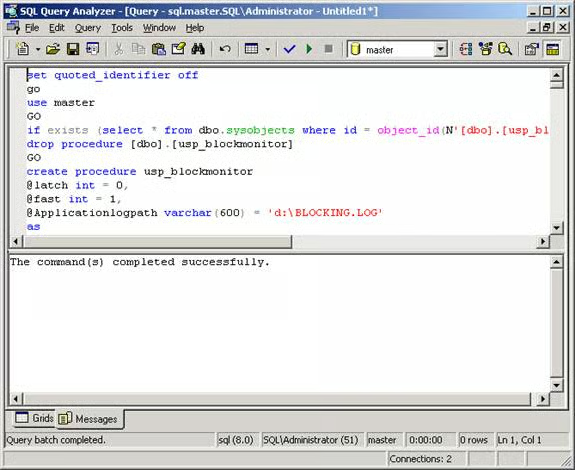
Create the procedure usp_blockmonitor,
by executing the below SQL statement [Fig 1.2]. Download Code from here.
[Fig 1.2]
Step 3
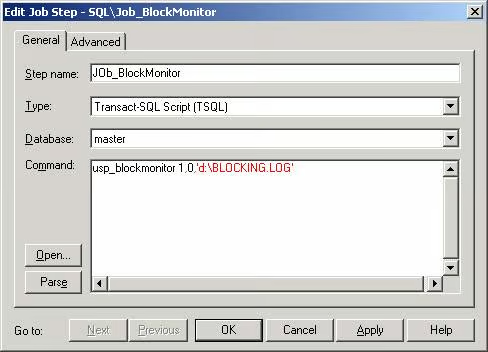
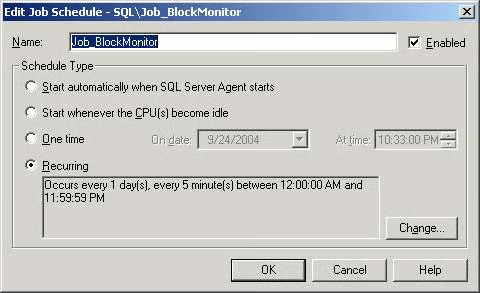
Create a job Job_BlockMonitor
by using Job_BlockMonitor.SQL as shown in Fig 1.3 and Fig 1.4. This job creates
a schedule that causes this job to run every 5 minutes.
[Fig 1.3]
[Fig 1.4]
Source Code to create the
job Job_blockmonitor
— Script generated on 9/24/2004 10:37 PM
— By: MAK
— Server: SQL
BEGIN TRANSACTION
  DECLARE @JobID BINARY(16)
  DECLARE @ReturnCode INT
  SELECT @ReturnCode = 0
IF (SELECT COUNT(*) FROM msdb.dbo.syscategories WHERE name = N’[Uncategorized (Local)]’) < 1
  EXECUTE msdb.dbo.sp_add_category @name = N’[Uncategorized (Local)]’
  — Delete the job with the same name (if it exists)
  SELECT @JobID = job_id
  FROM   msdb.dbo.sysjobs
  WHERE (name = N’Job_BlockMonitor’)
  IF (@JobID IS NOT NULL)
  BEGIN
  — Check if the job is a multi-server job
  IF (EXISTS (SELECT  *
              FROM    msdb.dbo.sysjobservers
              WHERE   (job_id = @JobID) AND (server_id <> 0)))
  BEGIN
    — There is, so abort the script
    RAISERROR (N’Unable to import job ”Job_BlockMonitor” since there is
	  already a multi-server job with this name.’, 16, 1)
    GOTO QuitWithRollback
  END
  ELSE
    — Delete the [local] job
    EXECUTE msdb.dbo.sp_delete_job @job_name = N’Job_BlockMonitor’
    SELECT @JobID = NULL
  END
BEGIN
  — Add the job
  EXECUTE @ReturnCode = msdb.dbo.sp_add_job @job_id = @JobID OUTPUT ,
     @job_name = N’Job_BlockMonitor’, @owner_login_name = N’sa’,
  @description = N’No description available.’, @category_name = N’[Uncategorized (Local)]’,
     @enabled = 1, @notify_level_email = 0,
  @notify_level_page = 0, @notify_level_netsend = 0, @notify_level_eventlog = 2, @delete_level= 0
  IF (@@ERROR <> 0 OR @ReturnCode <> 0) GOTO QuitWithRollback
  — Add the job steps
  EXECUTE @ReturnCode = msdb.dbo.sp_add_jobstep @job_id = @JobID, @step_id = 1,
     @step_name = N’JOb_BlockMonitor’, @command =
  N’usp_blockmonitor 1,0,”d:\BLOCKING.LOG”
‘, @database_name = N’master’, @server = N”, @database_user_name = N”,
   @subsystem = N’TSQL’, @cmdexec_success_code = 0, @flags = 0,
@retry_attempts = 0, @retry_interval = 1, @output_file_name = N”,
   @on_success_step_id = 0, @on_success_action = 1, @on_fail_step_id = 0,
@on_fail_action = 2
  IF (@@ERROR <> 0 OR @ReturnCode <> 0) GOTO QuitWithRollback
  EXECUTE @ReturnCode = msdb.dbo.sp_update_job @job_id = @JobID, @start_step_id = 1
  IF (@@ERROR <> 0 OR @ReturnCode <> 0) GOTO QuitWithRollback
  — Add the job schedules
  EXECUTE @ReturnCode = msdb.dbo.sp_add_jobschedule @job_id = @JobID, @name = N’Job_BlockMonitor’,
     @enabled = 1, @freq_type = 4,
  @active_start_date = 20040923, @active_start_time = 0, @freq_interval = 1,
     @freq_subday_type = 4,
	 @freq_subday_interval = 5,
  @freq_relative_interval = 0, @freq_recurrence_factor = 0, @active_end_date = 99991231,
     @active_end_time = 235959
  IF (@@ERROR <> 0 OR @ReturnCode <> 0) GOTO QuitWithRollback
  — Add the Target Servers
  EXECUTE @ReturnCode = msdb.dbo.sp_add_jobserver @job_id = @JobID, @server_name = N'(local)’
  IF (@@ERROR <> 0 OR @ReturnCode <> 0) GOTO QuitWithRollback
END
COMMIT TRANSACTION
GOTO   EndSave
QuitWithRollback:
  IF (@@TRANCOUNT > 0) ROLLBACK TRANSACTION
EndSave:
Download Code here.