


In a large IT department, it
can be difficult to locate where new SQL Server installations were made and how
many of those SQL Servers were patched, etc. This article explains how to scan
the entire network for a range of IP addresses to find which boxes have SQL
Server instances installed. The OSQL utility with "-L" option will
not always give the right number of servers on the network. In addition, it will
not show the right listing if the SQL Server services were stopped.
Pre-requisites
- WMI services should be running on all of the machines on the
network - Login used to execute the VBScript should have access to all the
machines
Step 1
Create the C:\IPRange folder as
shown in Fig 1.1 and then create c:\IPrange\Source.Txt as shown in the Fig 1.2.
Note: Please change the IP addresses according to your network configuration.
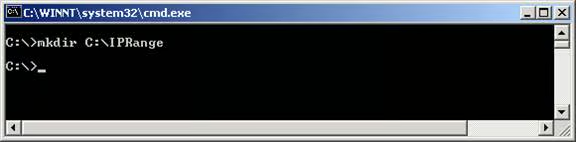
Fig 1.1
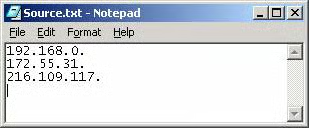
Fig 1.2
Step 2
Create C:\IPRange\ScanRange.vbs,
then copy and paste the code below into the file and save it.
‘Objective: To Find SQL Server on the network using IP
‘Created by: MAK
‘Date: Sep 25, 2004
on error resume next
Function Pingable(strHost)
Dim objExec, objRE
set objshell = wscript.createobject(“wscript.shell”)
blnPingable = “False” ‘assume failure
Set objExec = objShell.Exec(“cmd /C ping -a -n 2 ” & strHost)
string1 = objExec.StdOut.ReadAll
if instr(1,string1,”TTL=”,1) >0 then
Pingable = True
else
pingable =false
end if
if pingable =True then
Chaine = “Pinging ”
Chaine2 = “[”
ValueSearch = InStr(1,string1,Chaine,1)
ValueSearch2 = InStr(valuesearch,string1,Chaine2,1)
If ValueSearch>=1 and ValueSearch2>1 Then
y=  mid(string1,ValueSearch,(ValueSearch2-ValueSearch))
else
pingable=”false”
End If
pingable = replace(y,”Pinging “,””)
pingable = replace(pingable,” “,””)
	if pingable =false or pingable=”” then
	pingable =”False”
	end if
end if
Set objExec = Nothing
Set objRE = Nothing
End Function
Set iFSO = CreateObject(“Scripting.FilesyStemObject”)
Set oFSO = CreateObject(“Scripting.FilesyStemObject”)
InputFile =”c:\IpRange\Source.txt”
Outputfile=”c:\IpRange\IpRangeLog.txt”
Set ofile = ofso.createTextFile(OutputFile, True)
Set ifile = iFSO.OpenTextFile(inputfile)
Do until ifile.AtEndOfLine
ip	= ifile.ReadLine
ofile.writeline “*************************************************”
ofile.writeline “Scan SQl server for the ip range : ” & ip & ” Started”
ofile.writeline now()
x=ip
For i = 1 to 254
x= x + cstr(i)
‘msgbox test1
‘ofile.writeline test
servername = pingable(x)
if servername<>”False” then
ofile.writeline “________________________________________________”
ofile.writeline “Machine= ” & servername & “: IP Address= ” & x
	Set objWMIService =nothing
‘	msgbox “winmgmts:\\” & servername & “\root\cimv2”
	Set objWMIService = GetObject(“winmgmts:\\” & servername & “\root\cimv2″)
	Set colItems = nothing
	query=””
	query = “Select * from Win32_Service”
	Set colItems = objWMIService.ExecQuery(query,,48)
	if err.number<>0 then
		ofile.writeline “Error: ” & err.number
		ofile.writeline “Error: ” & err.description
	else
		For Each objItem in colItems
			If left(objItem.name,5)=”MSSQL” then
			ofile.writeline “Servicename: ” & objItem.name
			end if
		next
ofile.writeline “________________________________________________”
	end if
‘msgbox cstr(ip)+cstr(i)
else
ofile.writeline “machine:” & x & ” Not Pingable”
end if
x=ip
next
ofile.writeline “Scan SQl server for the ip range : ” & ip &” Completed”
ofile.writeline now()
ofile.writeline “*************************************************”
loopDownload Code from here.
Step 3
Execute the
C:\IPRange\scanrange.vbs using the cscript command as shown below. (refer Fig
1.3)
cscript scanrange.vbs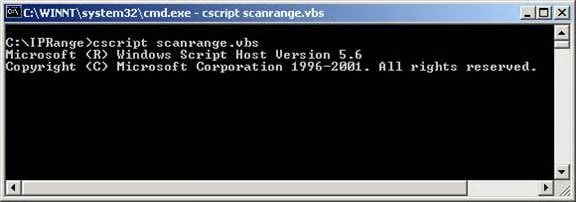
Fig 1.3
Step 4
Once the script is executed, it
creates C:\IPRange\IpRangeLog.txt, which contains all of the information as
shown in Fig 1.4.
*************************************************
Scan SQL server for the ip range : 192.168.0. Started
9/25/2004 7:00:09 PM
machine:192.168.0.1 Not Pingable
machine:192.168.0.2 Not Pingable
machine:192.168.0.3 Not Pingable
machine:192.168.0.4 Not Pingable
machine:192.168.0.5 Not Pingable
machine:192.168.0.6 Not Pingable
machine:192.168.0.7 Not Pingable
machine:192.168.0.8 Not Pingable
machine:192.168.0.9 Not Pingable
machine:192.168.0.10 Not Pingable
machine:192.168.0.11 Not Pingable
machine:192.168.0.12 Not Pingable
machine:192.168.0.13 Not Pingable
machine:192.168.0.14 Not Pingable
machine:192.168.0.15 Not Pingable
machine:192.168.0.16 Not Pingable
machine:192.168.0.17 Not Pingable
machine:192.168.0.18 Not Pingable
machine:192.168.0.19 Not Pingable
machine:192.168.0.20 Not Pingable
machine:192.168.0.21 Not Pingable
machine:192.168.0.22 Not Pingable
machine:192.168.0.23 Not Pingable
machine:192.168.0.24 Not Pingable
machine:192.168.0.25 Not Pingable
.
.
.
.
.
.
.
machine:192.168.0.99 Not Pingable
________________________________________________
Machine= sql: IP Address= 192.168.0.100
Servicename: MSSQLSERVER
Servicename: MSSQLServerADHelper
________________________________________________
________________________________________________
Machine= MAK: IP Address= 192.168.0.101
Servicename: MSSQLSERVER
Servicename: MSSQLServerADHelper
________________________________________________
________________________________________________
Machine= EBONY: IP Address= 192.168.0.102
Servicename: MSSQLSERVER
Servicename: MSSQLServerADHelper
________________________________________________
machine:192.168.0.103 Not Pingable
.
.
.
machine:192.168.1.131 Not Pingable
________________________________________________
Machine= CLAIRE: IP Address= 192.168.0.132
Servicename: MSSQLSERVER
Servicename: MSSQLServerADHelper
Servicename: MSSQLServerOLAPService
________________________________________________
.
.
.
machine:192.168.0.251 Not Pingable
machine:192.168.0.252 Not Pingable
machine:192.168.0.253 Not Pingable
machine:192.168.0.254 Not Pingable
Scan SQL server for the ip range : 192.168.0. Completed
9/25/2004 7:07:10 PM
*************************************************
*************************************************
Scan SQL server for the ip range : 192.168.0. Started
9/25/2004 7:07:11 PM
.
.
.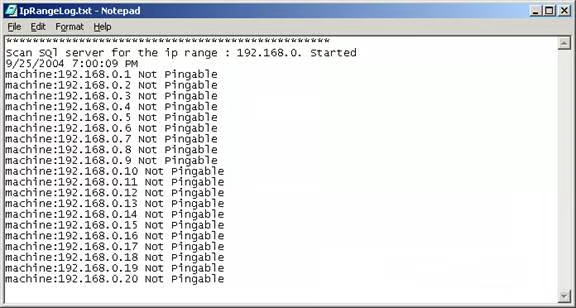
Fig 1.4
Conclusion
As mentioned, this article explains
how to scan the entire network for a range of IP addresses to find which
machines have SQL Server instances installed.