


One of the many command line utilities that came with SQL Server 2005 is the TableDiff utility. Although this utility is primarily designed for comparing replicated tables, we can take advantage of its functionality to compare tables. The objective of this article is to demonstrate the TableDiff utility.
Let us assume that we have the following databases and table.
Step 1
set quoted_identifier off
go
USE [master]
GO
/****** Object:  Database [MyDB1]    Script Date: 03/22/2006 08:08:48 ******/
IF  EXISTS (SELECT name FROM sys.databases WHERE name = N’MyDB1′)
DROP DATABASE [MyDB1]
go
create database MyDB1
go
use MyDB1
go
create table ABC (id int primary key, name varchar(100),salary money)
go
insert into ABC select 1,”Catherine Donnel”,200000
insert into ABC select 2,”Stacey Kost”,150000
insert into ABC select 3,”Jason Leanos”,36000
insert into ABC select 4,”Catherine O’Donnel”,20000
go
USE [master]
GO
/****** Object:  Database [MyDB2]    Script Date: 03/22/2006 08:09:12 ******/
IF  EXISTS (SELECT name FROM sys.databases WHERE name = N’MyDB2′)
DROP DATABASE [MyDB2]
go
Create database MyDB2
go
use MyDB2
go
create table ABC (id int primary key, name varchar(100),salary money)
go
insert into ABC select 1,”Catherine O’Donnel”,220000
insert into ABC select 2,”Stacey Kostue”,230000
insert into ABC select 4,”Catherine O’Donnel”,20000
insert into ABC select 9,”Irina Zolotrova”,40000
go
Step 2
Go to the command prompt [Click Start – Run – Cmd.exe – press enter] and type the following commands. [refer Fig 1.0]
Note: Change the path depending on your installation configuration. The TableDiff utility is installed under the
Program Files\Microsoft SQL Server\90\COM folder
C:\> cd “C:\Program Files\Microsoft SQL Server\90\COM”
C:\Program Files\Microsoft SQL Server\90\COM>tablediff -sourceserver “SQL2005” –
sourcedatabase “MyDB1” -sourcetable “ABC” -destinationserver “SQL2005” -destinat
iondatabase “MyDB2” -destinationtable “ABC”
Result
User-specified agent parameter values:
-c
-sourceserver SQL2005
-sourcedatabase MyDB1
-sourcetable ABC
-destinationserver SQL2005
-destinationdatabase MyDB2
-destinationtable ABC
Table [MyDB1].[dbo].[ABC] on SQL2005 and Table [MyDB2].[dbo].[ABC]
 on SQL2005 have 4 differences.
Err     id      Col
Mismatch        1       name salary
Mismatch        2       name salary
Src. Only       3
Dest. Only      9
The requested operation took 0.3905616 seconds.Step 3
Another cool function of the TableDiff utility is the generation of SQL Scripts for the differences that it found. Let us re-run the TableDiff utility by adding another –f parameter.
C:\Program Files\Microsoft SQL Server\90\COM>tablediff -sourceserver “SQL2005” –
sourcedatabase “MyDB1” -sourcetable “ABC” -destinationserver “SQL2005” -destinat
iondatabase “MyDB2” -destinationtable “ABC”  -f “c:\Diff”
Result
-sourceserver SQL2005
-sourcedatabase MyDB1
-sourcetable ABC
-destinationserver SQL2005
-destinationdatabase MyDB2
-destinationtable ABC
-f c:\Diff
Table [MyDB1].[dbo].[ABC] on SQL2005 and Table [MyDB2].[dbo].[ABC] on SQL2005 ha
ve 4 differences.
Fix SQL written to c:\Diff.sql.
Err     id      Col
Mismatch        1       name salary
Mismatch        2       name salary
Src. Only       3
Dest. Only      9
The requested operation took 0.3905616 seconds.
This time the TableDiff Utility also created C:\Diff.SQL file as shown below. [refer Fig 1.1]
— Host: SQL2005
— Database: [MyDB2]
— Table: [dbo].[ABC]
UPDATE [dbo].[ABC] SET [name]=’Catherine Donnel’,[salary]=200000.0000 WHERE [id] = 1
UPDATE [dbo].[ABC] SET [name]=’Stacey Kost’,[salary]=150000.0000 WHERE [id] = 2
INSERT INTO [dbo].[ABC] ([id],[name],[salary]) VALUES (3,’Jason Leanos’,36000.0000)
DELETE FROM [dbo].[ABC] WHERE [id] = 9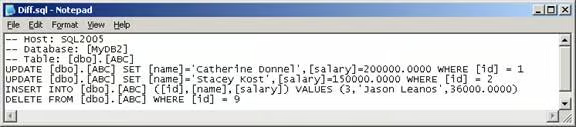
Fig 1.1
Other options can be used in the TableDiff Utility. They can be found by executing the following command:
C:\Program Files\Microsoft SQL Server\90\COM>tablediff /?| — Source Options — | |
|---|---|
| -sourceserver | Source Host |
| -sourcedatabase | Source Database |
| -sourceschema | Source Schema Name |
| -sourcetable | Source Table or View |
| -sourceuser | Source Login |
| -sourcepassword | Source Password |
| -sourcelocked | Lock the source table/view durring tablediff |
| — Destination Options — Note: For multiple Destinations use a comma delimited list | |
|---|---|
| -destinationserver | Destination Host |
| -destinationdatabase | Destination Database |
| -destinationschema | Destination Schema Name |
| -destinationtable | Destination Table or View |
| -destinationuser | Destination Login |
| -destinationpassword | Destination Password |
| -destinationlocked | Lock the destination table/view durring tablediff |
| — Misc Options – | |
|---|---|
| -c | Column Level Diff |
| -f | Generate Fix SQL (You may also specify a file name and path) |
| -q | Quick Row Count |
| -et | Specify a table to put the errors into |
| -dt | Drop the error table if it exists |
| -o | Output file |
| -b | Number of bytes to read for blob data types (Default 1000) |
| -strict | Strict compare of source and destination schema |
Conclusion
This article has demonstrated the major function of the TableDiff utility.