


Automatic file growth in SQL Server data and log files
made the SQL Server Database Administrator’s life easier, since the transaction
log is not filled; it expands automatically based on the percentage settings
[refer Fig 1.0]. However, this feature introduced the crisis of the hard disk
running out of space, since the transaction log expands automatically.
In this article, I am going to discuss how to avoid this crisis
by taking a transaction log backup on time, i.e. before the log file is expanded.
So let us go through the process of taking a transaction log backup of a
database when the log file usage reaches more than 75% (threshold).
Click for larger image
[Fig 1.0]
Step 1
Create
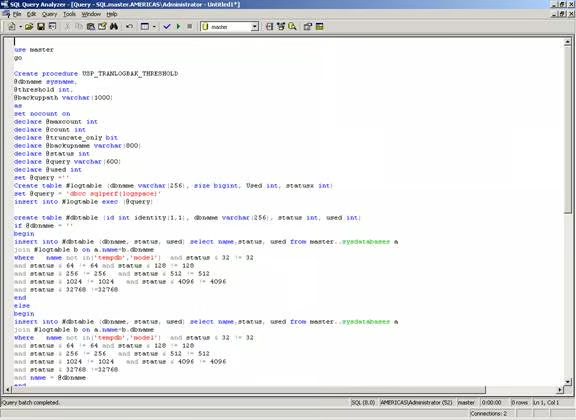
the procedure "USP_TRANLOGBAK_THRESHOLD" using the script below [Refer
Fig 1.1]:
use master
go
Create procedure USP_TRANLOGBAK_THRESHOLD
@dbname sysname,
@threshold int,
@backuppath varchar(1000)
as
set nocount on
declare @maxcount int
declare @count int
declare @truncate_only bit
declare @backupname varchar(800)
declare @status int
declare @query varchar(600)
declare @used int
set @query =”
Create table #logtable (dbname varchar(256), size bigint, Used int, statusx int)
set @query = ‘dbcc sqlperf(logspace)’
insert into #logtable exec (@query)
create table #dbtable (id int identity(1,1), dbname varchar(256), status int, used int)
if @dbname = ”
begin
insert into #dbtable (dbname, status, used) select name,status, used from master..sysdatabases a
join #logtable b on a.name=b.dbname
where   name not in(‘tempdb’,’model’)  and status & 32 != 32
and status & 64 != 64 and status & 128 != 128
and status & 256 != 256   and status & 512 != 512
and status & 1024 != 1024   and status & 4096 != 4096
and status & 32768 !=32768
end
else
begin
insert into #dbtable (dbname, status, used) select name,status, used from master..sysdatabases a
join #logtable b on a.name=b.dbname
where   name not in(‘tempdb’,’model’)  and status & 32 != 32
and status & 64 != 64 and status & 128 != 128
and status & 256 != 256   and status & 512 != 512
and status & 1024 != 1024   and status & 4096 != 4096
and status & 32768 !=32768
and name = @dbname
end
set @count =1
set @maxcount =  scope_identity()
While @count <= @maxcount
begin
select @dbname =dbname, @status =status, @used=used  from #dbtable where id = @count
set @backupname =@dbname +’_’+convert(varchar(25),getdate(),112)+’_’+replace(convert(varchar(25),
  getdate(),108),’:’,’_’)+’.TRN’
if @status & 8 = 8
begin
select @truncate_only = 1
end
else
begin
select @truncate_only = 0
end
if @truncate_only = 1 and @used >@threshold
	begin
	set @query = ‘set quoted_identifier off BEGIN BACKUP LOG [’ +@dbname +’]
	  WITH TRUNCATE_ONLY END’
	print @query
	exec (@query)
	end
if @truncate_only = 0 and @used >@threshold
	begin
	set @query = ‘set quoted_identifier off BEGIN BACKUP LOG [’ + @dbname + ‘] to disk =
	  “‘+ @backuppath +@backupname+'”  END’
	print @query
	exec (@query)
	end
set @count =@count+1
end
drop table #logtable
drop table #dbtable
–Usage :
–USP_TRANLOGBAK_THRESHOLD ”,45,’d:\’
–USP_TRANLOGBAK_THRESHOLD ‘MyDB’,80,’d:\backup\’
Download USP_TRANLOGBAK_THRESHOLD.sql.
[Fig 1.1]
Step 2
Create a
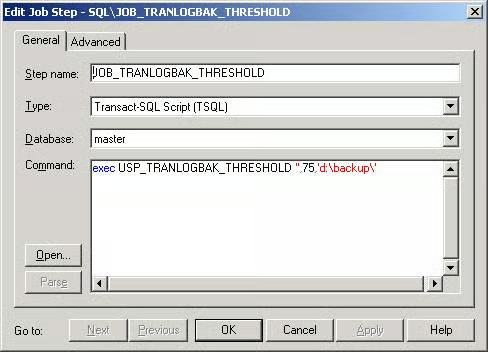
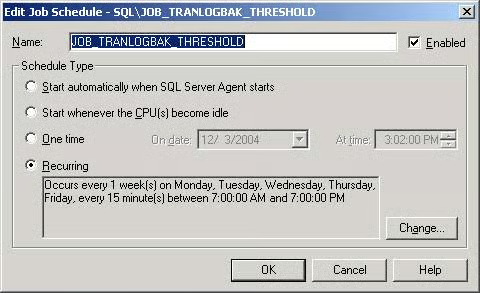
job to execute the above procedure using the script below. [Refer Fig 1.2]
This job
will be executed every 15 minutes from 7 am to 7 pm.
BEGIN TRANSACTION
  DECLARE @JobID BINARY(16)
  DECLARE @ReturnCode INT
  SELECT @ReturnCode = 0
IF (SELECT COUNT(*) FROM msdb.dbo.syscategories WHERE name = N’[Uncategorized (Local)]’) < 1
  EXECUTE msdb.dbo.sp_add_category @name = N’[Uncategorized (Local)]’
  — Delete the job with the same name (if it exists)
  SELECT @JobID = job_id
  FROM   msdb.dbo.sysjobs
  WHERE (name = N’JOB_TRANLOGBAK_THRESHOLD’)
  IF (@JobID IS NOT NULL)
  BEGIN
  — Check if the job is a multi-server job
  IF (EXISTS (SELECT  *
              FROM    msdb.dbo.sysjobservers
              WHERE   (job_id = @JobID) AND (server_id <> 0)))
  BEGIN
    — There is, so abort the script
    RAISERROR (N’Unable to import job ”JOB_TRANLOGBAK_THRESHOLD”
	  since there is already a multi-server job with this name.’, 16, 1)
    GOTO QuitWithRollback
  END
  ELSE
    — Delete the [local] job
    EXECUTE msdb.dbo.sp_delete_job @job_name = N’JOB_TRANLOGBAK_THRESHOLD’
    SELECT @JobID = NULL
  END
BEGIN
  — Add the job
  EXECUTE @ReturnCode = msdb.dbo.sp_add_job @job_id = @JobID OUTPUT ,
    @job_name = N’JOB_TRANLOGBAK_THRESHOLD’, @owner_login_name = N’sa’,
	@description = N’No description available.’, @category_name = N’[Uncategorized (Local)]’,
	@enabled = 1, @notify_level_email = 0, @notify_level_page = 0, @notify_level_netsend = 0,
	@notify_level_eventlog = 2, @delete_level= 0
  IF (@@ERROR <> 0 OR @ReturnCode <> 0) GOTO QuitWithRollback
  — Add the job steps
  EXECUTE @ReturnCode = msdb.dbo.sp_add_jobstep @job_id = @JobID, @step_id = 1,
    @step_name = N’JOB_TRANLOGBAK_THRESHOLD’,
	@command = N’exec USP_TRANLOGBAK_THRESHOLD ””,75,”d:\backup\”’,
	  @database_name = N’master’,
	@server = N”, @database_user_name = N”, @subsystem = N’TSQL’, @cmdexec_success_code = 0,
	@flags = 0, @retry_attempts = 0, @retry_interval = 1, @output_file_name = N”,
	@on_success_step_id = 0, @on_success_action = 1, @on_fail_step_id = 0, @on_fail_action = 2
  IF (@@ERROR <> 0 OR @ReturnCode <> 0) GOTO QuitWithRollback
  EXECUTE @ReturnCode = msdb.dbo.sp_update_job @job_id = @JobID, @start_step_id = 1
  IF (@@ERROR <> 0 OR @ReturnCode <> 0) GOTO QuitWithRollback
  — Add the job schedules
  EXECUTE @ReturnCode = msdb.dbo.sp_add_jobschedule @job_id = @JobID,
    @name = N’JOB_TRANLOGBAK_THRESHOLD’, @enabled = 1, @freq_type = 8, @active_start_date = 20041203,
	@active_start_time = 70000, @freq_interval = 62, @freq_subday_type = 4,
	@freq_subday_interval = 15, 	@freq_relative_interval = 0, @freq_recurrence_factor = 1,
	@active_end_date = 99991231, 	@active_end_time = 190000
  IF (@@ERROR <> 0 OR @ReturnCode <> 0) GOTO QuitWithRollback
  — Add the Target Servers
  EXECUTE @ReturnCode = msdb.dbo.sp_add_jobserver @job_id = @JobID, @server_name = N'(local)’
  IF (@@ERROR <> 0 OR @ReturnCode <> 0) GOTO QuitWithRollback
END
COMMIT TRANSACTION
GOTO   EndSave
QuitWithRollback:
  IF (@@TRANCOUNT > 0) ROLLBACK TRANSACTION
EndSave:Download JOB_TRANLOGBAK_THRESHOLD.sql.
[Fig 1.2]
[Fig 1.3]
Step 3
Execute the above create job, "JOB_TRANLOGBAK_THRESHOLD."
When the job runs, it finds
the log space usage on every database on that server, generates the "BACKUP
LOG" statement for a database that exceeds the threshold of 75% and
executes that "BACKUP LOG" statement as shown below.
Note that it does "BACKUP LOG with TRUNCATE_ONLY"
on databases that are in simple mode.
set quoted_identifier off BEGIN BACKUP LOG [master] WITH TRUNCATE_ONLY END
set quoted_identifier off BEGIN BACKUP LOG [msdb] WITH TRUNCATE_ONLY END
set quoted_identifier off BEGIN BACKUP LOG [pubs] WITH TRUNCATE_ONLY END
set quoted_identifier off BEGIN BACKUP LOG [Northwind] to disk =
  “d:\backup\Northwind_20041203_15_20_36.TRN”  END
set quoted_identifier off BEGIN BACKUP LOG [MyDB] to disk =
  “d:\backup\MyDB_20041203_15_20_37.TRN”  END
set quoted_identifier off BEGIN BACKUP LOG [Employee] to disk =
  “d:\backup\Employee_20041203_15_20_38.TRN”  END
set quoted_identifier off BEGIN BACKUP LOG [x] to disk = “d:\backup\x_20041203_15_20_38.TRN”  END
set quoted_identifier off BEGIN BACKUP LOG [ABC] to disk =
  “d:\backup\ABC_20041203_15_20_39.TRN”  END
set quoted_identifier off BEGIN BACKUP LOG [FCS] to disk =
  “d:\backup\FCS_20041203_15_20_40.TRN”  END
set quoted_identifier off BEGIN BACKUP LOG [AgentTrader] to disk =
  “d:\backup\AgentTrader_20041203_15_20_40.TRN”  END
Step 4
If you would
like to have a different threshold for different database, then you can modify
the job by passing parameters. [refer Fig 1.4]
exec USP_TRANLOGBAK_THRESHOLD ‘Master’,75,’d:\backup\’
exec USP_TRANLOGBAK_THRESHOLD ‘MyDB’,95,’d:\backup\’
exec USP_TRANLOGBAK_THRESHOLD ‘Solo’,85,’d:\backup\’
exec USP_TRANLOGBAK_THRESHOLD ‘Agent’,80,’d:\backup\’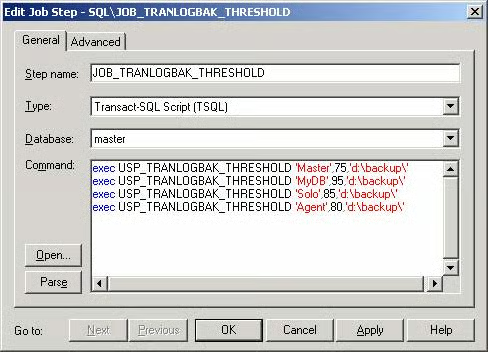
[Fig 1.4]
Parameters explained
Exec USP_TRANLOGBAK_THRESHOLD 'Master',75,'d:\backup\'| USP_TRANLOGBAK_THRESHOLD | – | Procedure name |
|---|---|---|
| ‘Master’ | – | Database name. If parameter is ” then it takes all the databases into consideration. |
| 75 | – | Threshold Size |
| ‘d:\backup’ | – | Backup folder location |
Conclusion
This
article has described how to do transaction log backups before the log file is
expanded, based on the threshold that you set, for example, 85% or 75%, etc.