


Introduction
In my last article “Converting Comma Separated Value to Rows and Vice Versa in SQL Server”, I talked about how you can convert comma separated (or separated with some other character) values in a single column into rows and vice versa. In this article, I demonstrate how you can convert rows values into columns values (PIVOT) and columns values into rows values (UNPIVOT) in SQL Server.
Converting Rows to Columns – PIVOT
SQL Server has a PIVOT relational operator to turn the unique values of a specified column from multiple rows into multiple column values in the output (cross-tab), effectively rotating a table. It also allows performing aggregations, wherever required, for column values that are expected in the final output. The basic syntax for a PIVOT relational operator looks like this:
SELECT <<ColumnNames>>
FROM <<TableName>>
PIVOT
 (
   AggregateFunction(<<ColumnToBeAggregated>>)
   FOR PivotColumn IN (<<PivotColumnValues>>)
 ) AS <<Alias>>
With the script below, let’s create a table and load some data into it. As you can see in the image below, it has sales information for some countries for a couple of years. Also, if you notice, for each country and for each year there is a separate row.
CREATE TABLE [dbo].[PivotExample](
       [Country]   [nvarchar](50)   NULL,
       [Year]   [smallint] NOT NULL,
       [SalesAmount]   [money] NULL
)
GO

INSERT   [dbo].[PivotExample]   ([Country],   [Year], [SalesAmount])   VALUES (N'Australia', 2005, 1309047.1978)
INSERT   [dbo].[PivotExample]   ([Country],   [Year], [SalesAmount])   VALUES (N'Germany', 2006, 521230.8475)
INSERT   [dbo].[PivotExample]   ([Country],   [Year], [SalesAmount])   VALUES (N'United States',   2007, 2838512.3550)
INSERT   [dbo].[PivotExample]   ([Country],   [Year], [SalesAmount])   VALUES (N'France', 2008, 922179.0400)
INSERT   [dbo].[PivotExample]   ([Country],   [Year], [SalesAmount])   VALUES (N'Australia', 2007, 3033784.2131)
INSERT   [dbo].[PivotExample]   ([Country],   [Year], [SalesAmount])   VALUES (N'France', 2005, 180571.6920)
INSERT   [dbo].[PivotExample]   ([Country],   [Year], [SalesAmount])   VALUES (N'United Kingdom',   2006, 591586.8540)
INSERT   [dbo].[PivotExample]   ([Country],   [Year], [SalesAmount])   VALUES (N'Canada', 2006, 621602.3823)
INSERT   [dbo].[PivotExample]   ([Country],   [Year], [SalesAmount])   VALUES (N'United Kingdom',   2005, 291590.5194)
INSERT   [dbo].[PivotExample]   ([Country],   [Year], [SalesAmount])   VALUES (N'United States',   2005, 1100549.4498)
INSERT   [dbo].[PivotExample]   ([Country],   [Year], [SalesAmount])   VALUES (N'Canada', 2007, 535784.4624)
INSERT   [dbo].[PivotExample]   ([Country],   [Year], [SalesAmount])   VALUES (N'France', 2007, 1026324.9692)
INSERT   [dbo].[PivotExample]   ([Country],   [Year], [SalesAmount])   VALUES (N'Germany', 2007, 1058405.7305)
INSERT   [dbo].[PivotExample]   ([Country],   [Year], [SalesAmount])   VALUES (N'Australia', 2006, 2154284.8835)
INSERT   [dbo].[PivotExample]   ([Country],   [Year], [SalesAmount])   VALUES (N'United Kingdom',   2008, 1210286.2700)
INSERT   [dbo].[PivotExample]   ([Country],   [Year], [SalesAmount])   VALUES (N'United States',   2008, 3324031.1600)
INSERT   [dbo].[PivotExample]   ([Country],   [Year], [SalesAmount])   VALUES (N'Germany', 2008, 1076890.7700)
INSERT   [dbo].[PivotExample]   ([Country],   [Year], [SalesAmount])   VALUES (N'United Kingdom',   2007, 1298248.5675)
INSERT   [dbo].[PivotExample]   ([Country],   [Year], [SalesAmount])   VALUES (N'Australia', 2008, 2563884.2900)
INSERT   [dbo].[PivotExample]   ([Country],   [Year], [SalesAmount])   VALUES (N'Canada', 2005, 146829.8074)
INSERT   [dbo].[PivotExample]   ([Country],   [Year], [SalesAmount])   VALUES (N'Germany', 2005, 237784.9902)
INSERT   [dbo].[PivotExample]   ([Country],   [Year], [SalesAmount])   VALUES (N'Canada', 2008, 673628.2100)
INSERT   [dbo].[PivotExample]   ([Country],   [Year], [SalesAmount])   VALUES (N'United States',   2006, 2126696.5460)
INSERT   [dbo].[PivotExample]   ([Country],   [Year], [SalesAmount])   VALUES (N'France', 2006, 514942.0131)
GO

SELECT * FROM [dbo].[PivotExample] ORDER   BY Country
GO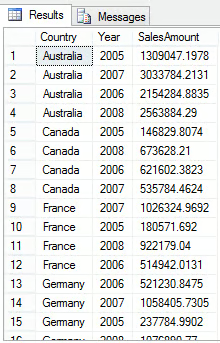
Now by using the PIVOT operator, we will convert row values into column values with the script given below and the results as shown in the image below.
Though we have used the SUM aggregation function, in this case there is no summation, as there is only one row for each unique combination for country and year. Please note the use of brackets for pivot column values; these are required.
SELECT   [Country], [2005],   [2006], [2007],   [2008]
FROM   [dbo].[PivotExample]
PIVOT
(
       SUM(SalesAmount)
       FOR [Year] IN ([2005], [2006], [2007], [2008])
) AS P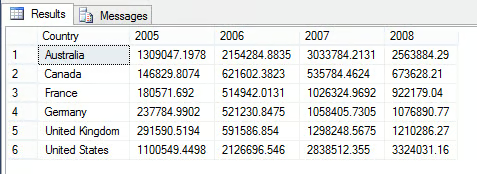
Bringing Dynamism to the PIVOT
If you notice in the above script, we have provided values (2005, 2006, 2007 and 2008) for pivot columns as these values are available in the original datasets. But what if some additional values are expected to come in the future, for example 2009 and 2010, etc. for the pivot column?
In that case, you can still use the pivot column values, which are expected to come (or which are still not available in the original dataset) in the future though you will see NULL for its values. The script below shows this scenario and the image below shows NULLs for the years 2009 and 2010 as there is no data for these years.
SELECT   [Country], [2005],   [2006], [2007],   [2008], [2009],   [2010]
FROM   [dbo].[PivotExample]
PIVOT
(
       SUM(SalesAmount)
       FOR [Year] IN ([2005], [2006], [2007], [2008], [2009], [2010])
) AS P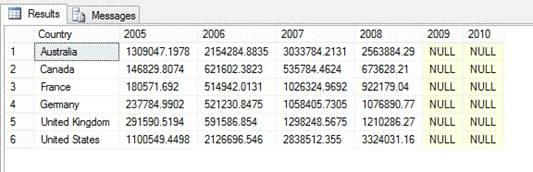
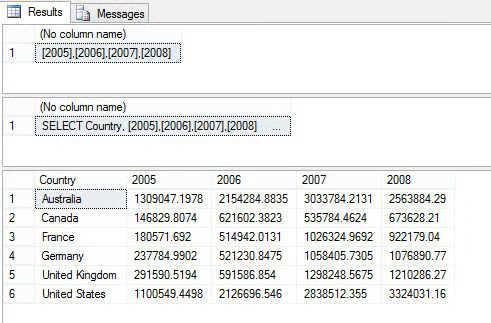
The above discussed approach works fine if you already know all of the possible values for the pivot column, but what if you don’t?
In that case, you can write a dynamic query to first grab all the unique values for the pivot column at runtime and then a write dynamic query to execute it with the pivot query as shown below:
--Declare necessary variables
DECLARE   @SQLQuery AS NVARCHAR(MAX)
DECLARE   @PivotColumns AS NVARCHAR(MAX)

--Get unique values of pivot column
SELECT   @PivotColumns= COALESCE(@PivotColumns + ',','') + QUOTENAME(Year)
FROM (SELECT DISTINCT Year FROM [dbo].[PivotExample]) AS PivotExample

SELECT   @PivotColumns

--Create the dynamic query with all the values for
--pivot column at runtime
SET   @SQLQuery =
    N'SELECT Country, ' +   @PivotColumns + '
    FROM [dbo].[PivotExample]
    PIVOT( SUM(SalesAmount)
          FOR Year IN (' + @PivotColumns + ')) AS P'

SELECT   @SQLQuery
--Execute dynamic query
EXEC sp_executesql @SQLQuery
Converting Columns to Rows – UNPIVOT
UNPIVOT is another relational operator in SQL Server that performs almost the reverse operation of PIVOT, by rotating column values into rows values. Let me demonstrate this with an example; lets create a table with pivoted data from the previous query with the script below. The image below shows data of the newly created table with pivoted data.
SELECT   [Country], [2005],   [2006], [2007],   [2008]
INTO   [dbo].[UnpivotExample]
FROM   [dbo].[PivotExample]
PIVOT
(
       SUM(SalesAmount)
       FOR [Year] IN ([2005], [2006], [2007], [2008])
) AS P
GO
SELECT * FROM [dbo].[UnpivotExample] ORDER   BY Country
GO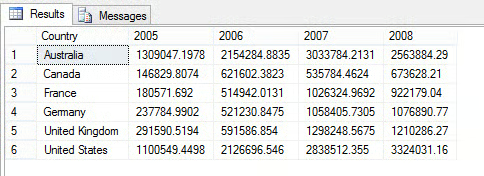
To rotate column values into row values, we will now use the UNPIVOT operator as shown below. The image below shows rotated data:
SELECT   Country, Year, SalesAmount
FROM [dbo].[UnpivotExample]
UNPIVOT
(
       SalesAmount
       FOR [Year] IN ([2005], [2006], [2007], [2008])
) AS P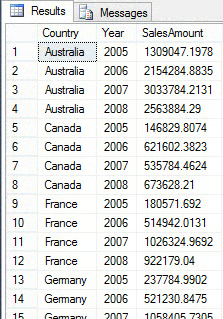
If you refer back, I said UNPIVOT is almost the reverse of the PIVOT operator; this means it might or might not be exactly the same. The reason is, Pivot performs aggregation while rotating row values into column values and might merge possible multiple row values into single column value in the output. For example, consider for a given country and year there are two values, say 5000 and 6000. Now when you pivot it, the output will have 11000 as the column value if you have SUM as the aggregation function. Later if you want to unpivot it back, you will get 11000 not the bi-furcated values (5000 and 6000 as original). Having said that, we can say if the pivoted values are aggregated values, it will not be possible to get the original data back.
Conclusion
In this article, I demonstrated how you can convert row values into column values (PIVOT) and column values into row values (UNPIVOT) in SQL Server. I also talked about writing a dynamic query to write a dynamic pivot query in which possible pivot column values are determined at runtime.
Resources
Converting Comma Separated Value to Rows and Vice Versa in SQL Server