
This is part 11 of a series. If you have not read part 10,
you can find it here.
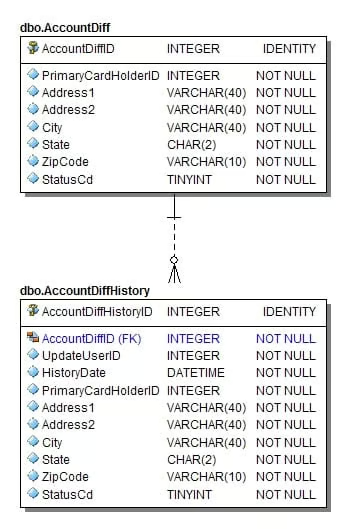
- The end user (ID 1000) creates the Account record through the web
application. - A CSR (ID 99) locks the account using the back-office
application. - A CSR (ID 99) re-enables the account using the back-office
application. - A different user on the account (ID 1001) updates the address
information. - The first user (ID 1000) makes the other user (ID 1001) the PrimaryCardholder
for the account. - A CSR (ID 99) disables the account.
- An administrative program (ID 1) marks the account deleted.
All of this information is captured in the history record.
We know exactly who made what changes when.
The main drawback comes from the fact that it stores every
column on every update. First, this requires more space. Second, it makes it
harder to search the history records for changes.
The other side of that second “issue” is that, for any point
in the record’s history, it is very simple to see the values of all columns.
Depending on your application’s requirements, this may be more or less
valuable.
Here is a limited set of columns from the history records
for the scenario above, ordered by HistoryID:
	UpdateUserID PrimaryCardholderID StatusCd
	———— ——————- ——–
	1000         1000                1
	99           1000                3
	99           1000                1
	1001         1000                1
	1000         1001                1
	99           1001                2
	1            1001                4
Compare this to the results from AccountMin to see how they
differ.
When I have created history records in databases I designed,
this is the scheme I have used.
“Min” History Records
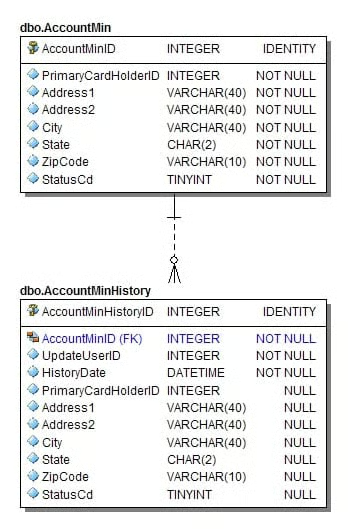
This type of record is different from the “Diff” records in
that the updateable columns are all nullable. Only the columns that are updated
get written to the history record.
Schema
	CREATE TABLE dbo.AccountMinHistory (
	    AccountMinHistoryID  int          NOT NULL   IDENTITY,
	    AccountMinID         int          NOT NULL,
	    UpdateUserID         int          NOT NULL,
	    HistoryDate          datetime     NOT NULL
	        CONSTRAINT AccountMinHistory_HistoryDate_DF
	        DEFAULT GETUTCDATE(),
	    PrimaryCardHolderID  int          NULL,
	    Address1             varchar(40)  NULL,
	    Address2             varchar(40)  NULL,
	    City                 varchar(40)  NULL,
	    [State]              char(2)      NULL,
	    ZipCode              varchar(10)  NULL,
	    StatusCd             tinyint      NULL
	        CONSTRAINT AccountMinHistory_StatusCd_DF
	        DEFAULT 1,

	    CONSTRAINT AccountMinHistory_PK PRIMARY KEY CLUSTERED
	        (AccountMinHistoryID),
	    CONSTRAINT AccountMinHistory_AccountMinID_FK FOREIGN KEY
	        (AccountMinID) REFERENCES dbo.AccountMin (AccountMinID)
	);
Merits and Issues
This is also a very simple type of history record. This type
makes it easy to see the changes and ignore the columns that have not changed.
The attached AccountMin.sql
script runs the same scenario as above. Even though this scheme stores much
less data, all of the changes are still captured. Again, we know exactly who
made what changes when.
The benefit here, over the Diff scheme, is that it requires
less space. The drawback here is basically the opposite of the first scheme. It
is easy to see what changes happened during a particular update, but it is more
difficult to recreate a complete record corresponding to each change. As
before, depending on your application’s requirements, this may be more or less
valuable.
Here is a limited set of columns from the history records
for the scenario above, ordered by HistoryID:
	UpdateUserID PrimaryCardholderID StatusCd
	———— ——————- ——–
	1000         1000                1
	99           NULL                3
	99           NULL                1
	1001         NULL                NULL
	1000         1001                NULL
	99           NULL                2
	1            NULL                4
The NULLs make it easy to see that, for instance, the second
record has an update to StatusCd but not PrimaryCardholderID.
“Link” History Records
This type of record is one that I have seen multiple times
and, frankly, I think it’s pretty awful.
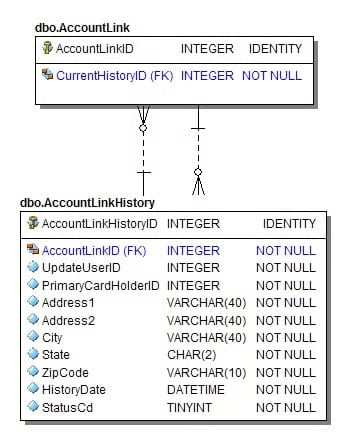
The basic idea here is that you store a set of updateable
columns, not in the base table at all, but in the history table only. This makes
it more “pure” from a data redundancy standpoint, but the coding is much more
complex. I have included my attempt at making it work in the attached AccountLink.sql script. If
you are a big fan of this history scheme, please use the forum
to explain the beauty that I’m not seeing.
Schema
I have to include the AccountLink schema here because it is
so different from the others.
	CREATE TABLE dbo.AccountLink (
	    AccountLinkID     int  NOT NULL  IDENTITY,
	    CurrentHistoryID  int  NOT NULL,

	    CONSTRAINT AccountLink_PK PRIMARY KEY CLUSTERED
	        (AccountLinkID)
	);

	CREATE TABLE dbo.AccountLinkHistory (
	    AccountLinkHistoryID  int          NOT NULL    IDENTITY,
	    AccountLinkID         int          NOT NULL,
	    UpdateUserID          int          NOT NULL,
	    HistoryDate           datetime     NOT NULL
	        CONSTRAINT AccountLinkHistory_HistoryDate_DF
	        DEFAULT GETUTCDATE(),
	    PrimaryCardHolderID   int          NOT NULL,
	    Address1              varchar(40)  NOT NULL,
	    Address2              varchar(40)  NOT NULL,
	    City                  varchar(40)  NOT NULL,
	    [State]               char(2)      NOT NULL,
	    ZipCode               varchar(10)  NOT NULL,
	    StatusCd              tinyint      NOT NULL
	        CONSTRAINT AccountLinkHistory_StatusCd_DF
	        DEFAULT 1,

	    CONSTRAINT AccountLinkHistory_PK PRIMARY KEY CLUSTERED
	        (AccountLinkHistoryID)
	);
Merits and Issues
The main benefit here is that there is no duplicated data.
Well, sort of. Since you don’t store any data in the base table, every history
record must store every value. You might be able to implement a
combination of “Link” and “Min” (where you store only the changed values), but
the coding would be nasty, and the performance would be abysmal.
The issues with Link come when you start coding the schema
and the procedures. Creating the double links (foreign keys) requires a lot of
special coding. Any time you select an account and need to return anything
besides the ID (which you are probably using to select it), you have to join to
the history record. With either of the other two schemes, most selects can be
accomplished with just the base table. With the Link scheme, every
select requires a join.
Recommendations
If you’ve gotten this far, you know that I don’t like the
Link scheme. Between the other two, I think the choice comes down to
application requirements. If you are tracking these changes solely for auditing
purposes or ad-hoc research, use the Min scheme. If your application will
actually need to show the full record as of a certain point in time or a
certain change, then use the Diff scheme.
What do you do? Please provide
feedback through the forum. Do you use a different scheme than one of
these? If so, please explain how it works and what business problems it
addresses.
Regardless of which scheme you use, be sure it can answer
the three critical questions:
- Who made the change?
- When did they make the change?
- And what are the old and new values?
Download files
for part 11 of this series.